Networks
Wireless Connections

Contents
Wireless connectivity means connecting a device to a network without a cable. Data is carried through the air as radio waves, so a device can join as long as it is within the signal range and has the network credentials — there is no lead running from the device to a socket or switch.
Advantages of going wireless
- Mobility: users can move around and stay connected anywhere within the signal range. A librarian with a tablet can check stock in any aisle, and a student can carry a laptop between classrooms without unplugging anything. A cable ties a device to one spot.
- Easier to add users: a new device joins by being given the network name and password, so it is ready in seconds, provided it is within range. You do not have to run a new cable to a spare port each time someone joins. For example, a youth club that buys six extra tablets can add them all to its network on the same afternoon.
- No cabling: there is no cable to buy, fit or repair, which keeps installation simpler and cheaper, especially in an old building where walls cannot easily be chased out. It also removes cables trailing across floors, so there are no leads for people to trip over.
These benefits explain why phones, tablets and laptops are almost always wireless, while equipment that never moves can often be left on a cable.
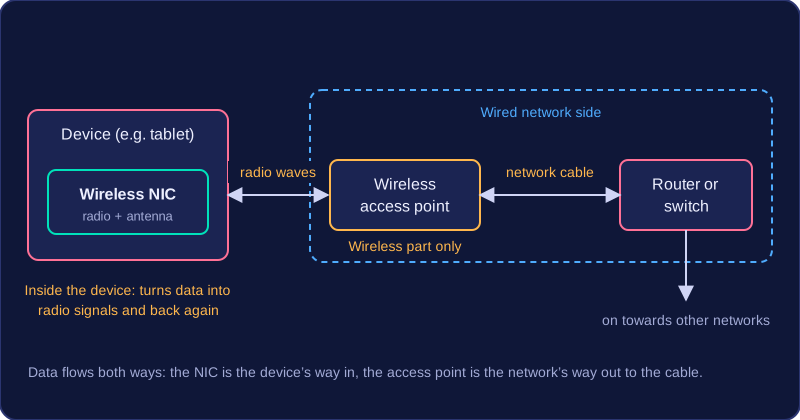
To join a wireless network, a device needs two pieces of hardware working together: a wireless network interface card inside the device, and a wireless access point at the edge of the wired network.
Wireless network interface card (NIC)
A wireless network interface card (NIC) is the hardware that lets a device send and receive data over a wireless network. It contains a small radio transmitter, a receiver and an antenna, and it turns the data the device wants to send into a radio signal, then turns incoming radio signals back into data. A tablet, games console or printer with a wireless NIC can join a Wi-Fi network; the same device without one has no way in until an adapter is added. A desktop computer with no built-in wireless NIC can be given one as a USB Wi-Fi adapter, which does the same job from outside the case.
Wireless access point (AP)
A wireless access point (AP) lets wireless devices join a wired network. It has its own radio and antenna, so it can pick up the signals from nearby NICs, convert them into signals that travel along a network cable, and send replies back out as radio waves. An AP is usually connected to a router or switch by a cable. The router or switch moves the data around the wired network and on towards other networks, while the AP handles only the wireless part.
| Hardware | Where it is | Main job |
|---|---|---|
| Wireless NIC | Inside the device that wants to connect | Turns the device's data into radio signals and back again |
| Wireless access point | At the edge of the wired network | Links wireless devices to the wired network and back |
One box, several jobs
A single unit can contain more than one of these functions but each part still does its own job, in the way a Swiss Army knife holds several tools in one handle. Some access points, for example, also contain a small switch so that a few wired devices can plug straight into them. A wireless NIC and an access point are still not the same thing: the NIC is the device's own way in, and the access point is the network's way out to the cable.
Wi-Fi and Bluetooth are wireless transmission protocols: agreed sets of rules that let devices send data through the air as radio waves instead of down a cable. Wi-Fi joins a device to a network, while Bluetooth links two devices that sit close together, such as a phone and a pair of earbuds. Wi-Fi and Bluetooth signals can both be blocked by walls and disrupted by other electrical devices, which reduces their range.
A Wi-Fi standard is one agreed version of Wi-Fi. Each standard states how the hardware communicates, and newer standards allow a higher maximum speed. A standard also sets which frequency band or bands the equipment can use, because the band is part of the rules the hardware follows. Buying a newer router or phone therefore only helps if both ends support the same standard.
The two common bands
Wireless networks mostly use the 2.4 GHz band or the 5 GHz band. The number is the frequency of the radio wave, and it changes how the signal behaves.
| Band | Range | Data rate | Walls and solid objects | How crowded |
|---|---|---|---|---|
| 2.4 GHz | Longer | Lower | Passes through more easily | Busier |
| 5 GHz | Shorter | Higher | Absorbed more | Quieter |
Low-frequency waves have a longer wavelength, so they travel further and lose less energy pushing through brick and plasterboard. That is why 2.4 GHz still works at the far end of a building. The drawback is that the 2.4 GHz band is shared with cordless phones, microwave ovens, Bluetooth and every nearby network, so it is crowded and suffers more interference. The 5 GHz band has more space and can send data faster, but its shorter waves are soaked up by walls, so it covers less ground.
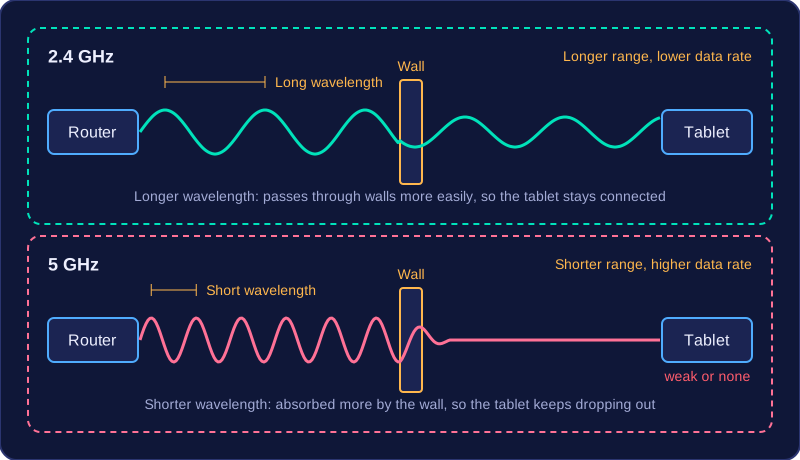
Picture a small guesthouse with the router in the reception office. A tablet taken up to a top-floor bedroom, with two walls and a ceiling in between, holds a steady connection on 2.4 GHz; on 5 GHz the same tablet keeps dropping out. Carry that tablet back down to reception, though, and the 5 GHz download is noticeably faster, because nothing solid is in the way.
Wireless interference is anything that makes a wireless signal less clear. Wireless signals travel as radio waves, so they can be disturbed by other electrical devices, by nearby wireless networks, and by physical objects in the way.
Sources of interference
Common sources include:
- Other electrical devices — a microwave oven, a cordless phone or a faulty power supply can give off radio waves that mix with your signal.
- Nearby wireless networks — in a block of flats, several home Wi-Fi networks and Bluetooth devices may interfere with each other's signals.
- Walls and solid objects — brick, concrete and metal absorb or reflect the signal, so less of it reaches the device.
What interference does
When interference is present, signal quality drops: the signal is less clear and more likely to be corrupted. This can lower the speed at which data is transferred, because devices spend more time checking and resending data. It can also increase latency, the delay between sending and receiving data, and reduce the range — the distance over which the connection still works reliably.
Distance, obstacles and blind spots
Signal strength generally falls as you move further from the access point. A thick wall or a metal cabinet makes this worse, even if the connection does not drop completely. A blind spot is an area where the signal is too weak for a reliable connection. For example, a tablet in a café may stream video smoothly near the access point, but behind a thick brick wall in the back room, the video may pause, files download more slowly and the connection may fail altogether.
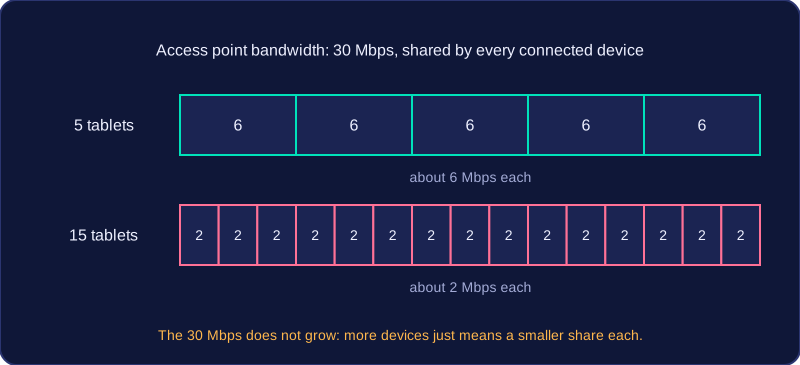
On a wireless network, devices share the same radio channel instead of having a cable of their own. The bandwidth of a wireless access point — the maximum amount of data it can carry each second — is shared out among every device connected to it.
More devices, less each
Because the radio channel is one shared medium, every extra laptop, tablet or phone joins the queue for the same capacity. Add more devices and the share each one gets shrinks, so downloads, video and file transfers slow down. The bandwidth of the access point has not changed; it is just divided more ways.
For example, an art classroom access point can carry 30 Mbps. With 5 tablets connected, each could get about 6 Mbps. With 15 tablets, each gets about 2 Mbps, so the same video clip loads more slowly. The split is rarely exact, because not every device is busy at the same moment.
Congestion and latency
Congestion happens when many devices try to transmit at the same time. A wireless device cannot send and listen at the same moment on the same channel, so data has to wait its turn. That extra waiting raises latency, which is why a video call can stutter in a crowded hall even when the signal looks strong.
Adding devices therefore never adds bandwidth — it shares out the bandwidth already there, and busy periods make the delays worse.
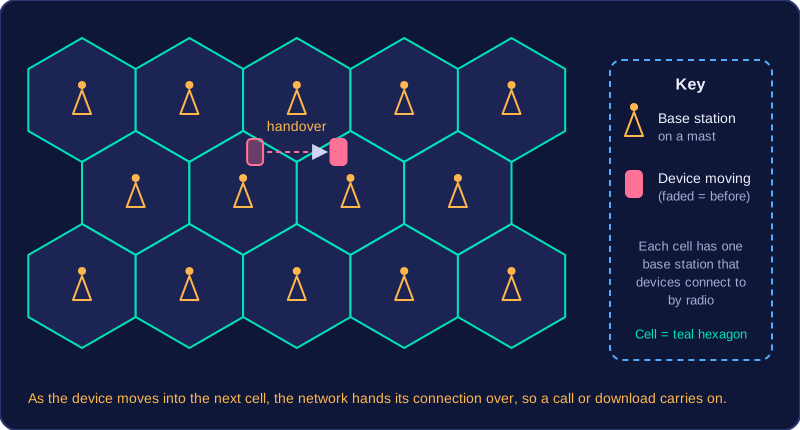
A mobile network (also called a cellular network) provides wireless connectivity over a wide area rather than inside a single building. The land is divided into cells, and each cell has a base station, often on a mast, that devices connect to by radio. As you travel, the network hands your connection from one cell to the next — a handover — so a call or a download carries on while you move.
Because masts are spread across the country, a mobile network reaches places one home router could never cover: a bus travelling between towns, a delivery driver's handheld scanner, a stall at an outdoor market taking card payments. That wide reach is the point of a mobile network: one connection that follows the user around.
Generations
Mobile networks are improved in generations, such as 2G, 3G, 4G and 5G. Each generation is a set of standards describing how devices and masts talk to each other, and later generations generally offer higher speeds and lower latency, so data moves faster and the delay before it arrives is shorter. For example, a courier's newer handheld uploads a photo of a customer's signature in a second or two, while an older handheld on an older generation may take far longer over the same image.
| Characteristic | Earlier generation | Later generation |
|---|---|---|
| Speed | Lower | Higher |
| Latency | Higher | Lower |
| Typical uses | Calls and text messages | Maps, video calls, live tracking |
Coverage varies
Masts are not spread evenly. In a remote village, a deep valley or the basement of a large building you may get a weak signal or none at all, and the device might drop to an older generation or lose its data connection altogether. With a weak signal, a transfer takes longer and the delay before data arrives grows, so a smaller distance is the range you can actually rely on.