Wireless Connections
Wireless Network Hardware

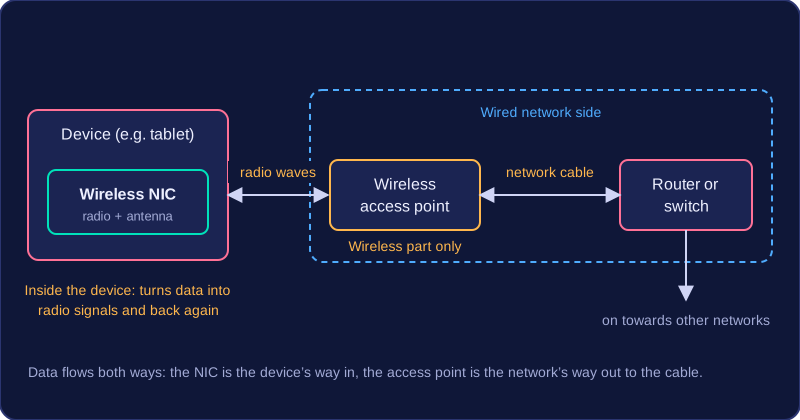
To join a wireless network, a device needs two pieces of hardware working together: a wireless network interface card inside the device, and a wireless access point at the edge of the wired network.
Wireless network interface card (NIC)
A wireless network interface card (NIC) is the hardware that lets a device send and receive data over a wireless network. It contains a small radio transmitter, a receiver and an antenna, and it turns the data the device wants to send into a radio signal, then turns incoming radio signals back into data. A tablet, games console or printer with a wireless NIC can join a Wi-Fi network; the same device without one has no way in until an adapter is added. A desktop computer with no built-in wireless NIC can be given one as a USB Wi-Fi adapter, which does the same job from outside the case.
Wireless access point (AP)
A wireless access point (AP) lets wireless devices join a wired network. It has its own radio and antenna, so it can pick up the signals from nearby NICs, convert them into signals that travel along a network cable, and send replies back out as radio waves. An AP is usually connected to a router or switch by a cable. The router or switch moves the data around the wired network and on towards other networks, while the AP handles only the wireless part.
| Hardware | Where it is | Main job |
|---|---|---|
| Wireless NIC | Inside the device that wants to connect | Turns the device's data into radio signals and back again |
| Wireless access point | At the edge of the wired network | Links wireless devices to the wired network and back |
One box, several jobs
A single unit can contain more than one of these functions but each part still does its own job, in the way a Swiss Army knife holds several tools in one handle. Some access points, for example, also contain a small switch so that a few wired devices can plug straight into them. A wireless NIC and an access point are still not the same thing: the NIC is the device's own way in, and the access point is the network's way out to the cable.
Practise this
Edexcel GCSE Computer Science · Wireless Connections