Networks
Wired Connections

Contents
A wired connection links devices using a physical transmission medium — a cable — instead of wireless signals. Data travels along the cable itself, so the devices are physically joined together and nothing is sent through the air.
Three common cables
- Twisted pair copper cable — pairs of copper wires twisted together, carrying data as electrical signals. It is thin and flexible, so it is used for most everyday network links.
- Coaxial cable — a single copper core surrounded by a metal shield, also carrying data as electrical signals. It is thicker and stiffer than twisted pair, so it does not bend around tight corners as easily.
- Fibre optic cable — a thin strand of glass that carries data as pulses of light rather than as electricity.
Each cable type ends in its own connector, so a cable cannot be pushed into a port built for a different type.
Ports and plugs
For a wired connection to work, every device needs a physical port that matches the cable, and the cable must be long enough to reach the rest of the network. A computer usually has an RJ45 port, a rectangular socket that takes a twisted pair cable with an RJ45 plug; a fibre optic port has a different shape and takes a different plug. A device with no port at all, such as a slim tablet, cannot join the network by cable unless you add an adapter.
For example, in a small veterinary surgery, the reception computer, the vet's desktop and a shared printer each have an RJ45 port. One twisted pair cable runs from each port to a switch in the back office, so all three devices are part of the same wired network. A nurse's laptop with no network port would need an adapter before a cable could connect it.
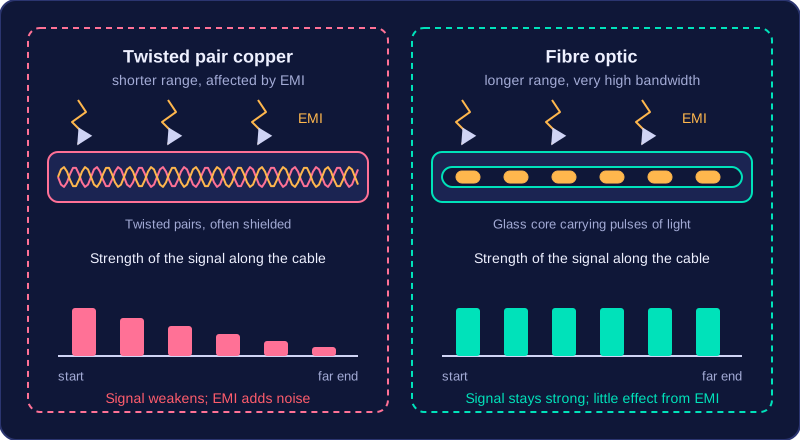
Wired networks carry data through cables. Two of the most common are twisted pair copper cable, which carries data as electrical pulses, and fibre optic cable, which carries data as pulses of light along thin strands of glass.
Fibre optic cable: longer range, higher bandwidth
Light travels through glass with far less signal loss than an electrical signal suffers in copper, so fibre optic cable carries data over much longer distances before the signal becomes too weak to read. A single fibre also offers very high bandwidth, so a large amount of data travels every second, which helps when many users stream video at once.
Because fibre uses light rather than an electric current, it is largely unaffected by electromagnetic interference (EMI), the unwanted electrical noise given off by motors, power cables and fluorescent lights.
Copper cable: shorter range, more interference
Twisted pair copper cable has a shorter effective range, because its electrical signal weakens quickly as the cable gets longer. It is also affected by EMI, which adds noise to the signal and can corrupt data, so the link becomes less reliable and data must be sent again. Shielding — metal foil or braid wrapped around the pairs — blocks much of this interference, and twisting the pairs helps because noise picked up on both wires tends to cancel out.
| Cable | Bandwidth | Effective range | Effect of EMI |
|---|---|---|---|
| Fibre optic | Very high | Long | Very little |
| Twisted pair copper | Lower | Short | Significant, reduced by shielding |
What decides wired performance
Performance depends on the cable type, the cable length and the quality of the physical connection. Fibre beats copper over the same distance, a short cable beats a long one, and a neatly fitted, undamaged plug with clean contacts beats a loose or worn one — even excellent cable performs badly if the connector is poorly attached.
For example, a theme park's entrance card reader connects to the ticket office computer 300 m away, with its cable running beside the ride motors' power cables. Copper over that distance would lose too much signal and pick up interference from the motors, so the park uses fibre. For the 3 m link from the office computer to its printer, copper is perfectly adequate.
Range is the maximum distance over which a signal can travel and still be received reliably. It is measured in units of distance, such as metres. At the receiving end, the device must be able to tell a 1 from a 0 clearly; once the signal is too faint or distorted, that is no longer possible.
Why cable length limits range
In a wired connection, range depends on the length of the cable and on the signal weakening as it travels along it. A signal leaves the sender at full strength, but some of its energy is lost in the cable with every metre, so the longer the cable, the weaker the signal that arrives at the far end.
If the signal fades too much, the receiver may misread bits and the data is corrupted, or nothing usable arrives at all. That is why every cable has a practical maximum length rather than carrying data any distance.
Range in practice
A garden centre keeps its router in the office and runs a cable to a card machine at the far end of the plant area, about 180 m away. Test payments made near the office work, but payments from the far end sometimes fail: the signal has become too weak to be read reliably. The manager moves the router to a cupboard halfway along, so each cable run is well inside its usable range and payments go through. Fitting a cable that loses less signal over distance, such as fibre optic, is another way to extend the range.
Range is only about distance. It does not tell you how much data the link can carry or how long a message takes to arrive; bandwidth and latency describe those separate characteristics.
A wired connection carries data as electrical or light signals through a physical cable, and that direct path is what makes it outperform a wireless link in most situations. Speed, bandwidth, latency, reliability and security all benefit when the signal never has to travel through the air.
Faster, wider and quicker to respond
A wired link usually gives a higher speed, meaning more bits arrive every second, and just as importantly that speed stays consistent. A wireless signal weakens with distance and competes with everything else broadcasting nearby, so its throughput rises and falls; a signal tucked inside a cable does not suffer that. A cable also offers higher bandwidth, so it has the capacity to carry more data at once, which you notice when several large files move together.
Latency is the delay between data being sent and data being received. Wired links usually keep it low because the signal stays inside the cable, away from interference and from other devices competing for airtime, so data is rarely corrupted and rarely has to be sent again. A video call over a cable replies almost instantly, while the same call over a weak Wi-Fi signal can stutter and lag.
Steadier and harder to intercept
Wired links are more reliable: walls, weather and other people's wireless traffic do not disturb a signal travelling inside a cable, so it behaves the same way every time. They are more secure too, because anyone wanting to intercept the data needs physical access to the cable or the equipment it plugs into, rather than simply being within range of a broadcast.
Choosing wired
Put those points together and wired suits any fixed device that needs speed, capacity, quick responses or protection. A desktop computer in an editing studio, for example, stays on one desk and pushes huge video files to a shared drive all day, so a cable gives it the steady high bandwidth and low latency the job demands.
A wired connection sends data through a physical cable, so most of its drawbacks come from that cable having to exist. Because a cable has a fixed length, the range of the connection is limited: a device has to sit within reach of a port.
Cables tie devices to one place
A device on a wired network cannot be moved freely from place to place. A desktop in a small recording studio can only be used where its cable reaches the wall socket, so you cannot carry it across the room to work next to the drummer. Nothing is broken — the cable simply will not stretch.
Wired connections also need physical installation: someone has to fit the cables and the ports they plug into. That fixes where devices can go and makes adding or moving equipment less flexible, because a new cable run or port may be needed first. Running a second cable to a new desk in a room with solid brick walls could mean lifting floorboards or chasing out plaster, so the network grows slowly and at a cost.
Damage and mobility
A damaged cable breaks communication for whatever it carries. A chair rolled over a trailing cable cuts one device off; a cable feeding a cabinet of equipment can take out part of the network at once, until someone finds and replaces it.
Wireless connections avoid these problems. They may be preferable when users need mobility, such as staff carrying a tablet around a warehouse, or when cabling is impractical. The trade-off is generally lower speed, higher latency and a greater security risk, because the signal travels through the air and can be picked up without anyone touching a cable. Wired is not automatically better in every way — it suits fixed devices that need speed and security, but it is the wrong choice for anything that has to keep moving.