Algorithms
Flowcharts

Contents
An algorithm is a series of steps that solves a problem or carries out a task. Each step must be clear and precise, and the steps must be in a sensible order, so that anyone following them gets the same result. You can represent an algorithm as a flowchart, as pseudocode or as program code; the steps and their order stay the same.
Input, processing and output
Most algorithms take input, do something with it called processing, and produce output. For example, an algorithm for a school trip may take the number of students going as input, multiply that number by the cost per student, and output the total cost. In a flowchart, input and output steps use the input/output symbol, while calculations and other processing steps use the process symbol. The order of the symbols shows the order in which the steps happen.
Three basic structures
Every algorithm, however long, can be built from three basic structures: sequence, selection and iteration (also called repetition).
| Structure | What it does | Example in the trip algorithm |
|---|---|---|
| Sequence | Carries out steps one after another in order. | Ask for the number of students, calculate the cost, then display the cost. |
| Selection | Chooses between different paths depending on a condition. | If more than 30 students go, book a larger coach; otherwise book a smaller coach. |
| Iteration | Repeats a section of the algorithm. | Ask for each student's name, one at a time, until every student has been recorded. |
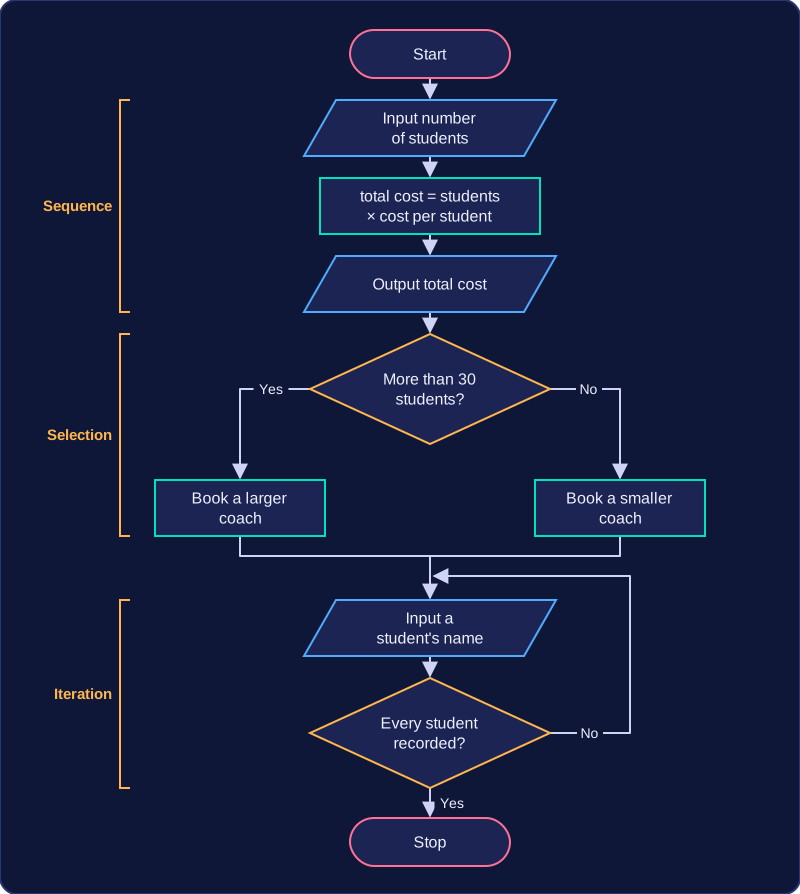
Selection is about choosing a path, while iteration is about repeating steps. These three structures are enough to describe any algorithm, whether it is written for a person to follow or for a computer to run.
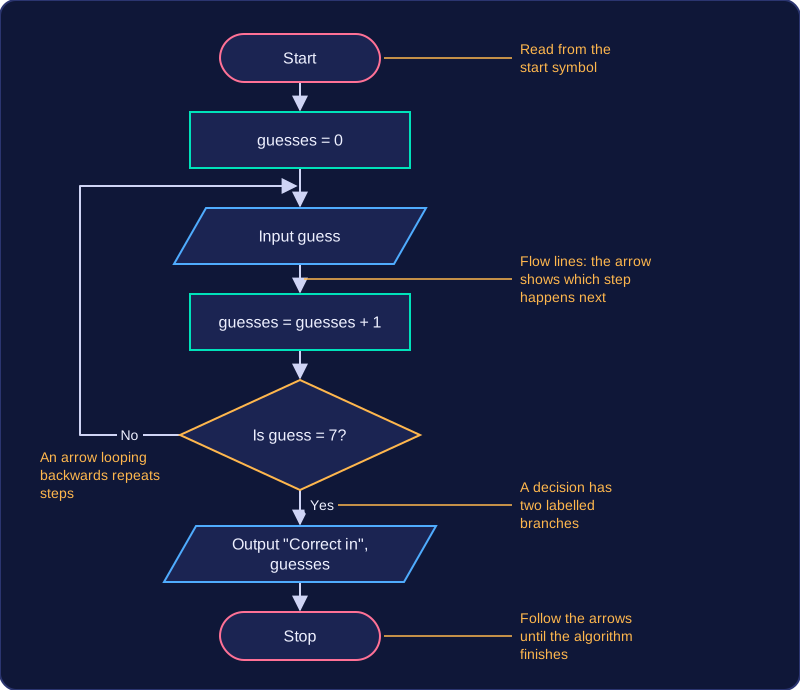
A flowchart is a graphical representation of an algorithm: standard symbols joined by flow lines that show the order in which the steps are carried out.
Each symbol stands for one kind of step and the arrows show which step happens next, so you read a flowchart from its start symbol and follow the arrows until the algorithm finishes.
Why plan with a flowchart?
Before you write program code, you need to be sure the steps are in the right order. A flowchart lets you design and check the logic on paper, where a forgotten step or a loop that never ends is easy to spot and cheap to fix. Because it is visual, the sequence of steps, the two branches at each decision and the arrows that loop backwards are easy to follow. Someone else can then check your plan without knowing a programming language, which makes a flowchart a good way to communicate an algorithm to a classmate, a teacher or a client before any code exists.
Where flowcharts struggle
For a long algorithm a flowchart grows quickly: lots of symbols, arrows crossing over each other, and a drawing that no longer fits on one page. Changing one step can mean redrawing a large part of the chart, and a crowded chart is slow to read. Pseudocode has nothing to redraw, so it can describe a complex algorithm in far fewer lines and is quicker to edit when the design changes.
One symbol, one meaning
The symbols are standard, so each one has a fixed meaning and they cannot be swapped around. A decision must be drawn as a decision rather than squeezed into a process box, because a reader relies on the shape to tell at a glance whether a step is an input, a process or a decision. Using the wrong shape therefore changes what the flowchart says the algorithm does.
| Feature | Flowchart | Pseudocode |
|---|---|---|
| Order of steps | shown by arrows you follow | shown by lines read top to bottom |
| Decisions and loops | stand out visually | shown with keywords and indentation |
| Small algorithm | clear and quick to read | clear and quick to read |
| Large, complex algorithm | becomes crowded and hard to edit | stays compact and easier to edit |
Every step of a flowchart is drawn with a standard symbol, so anyone reading it can recognise what happens at a glance. Four symbols cover the steps you will meet most often, and each shape shows a different kind of step.
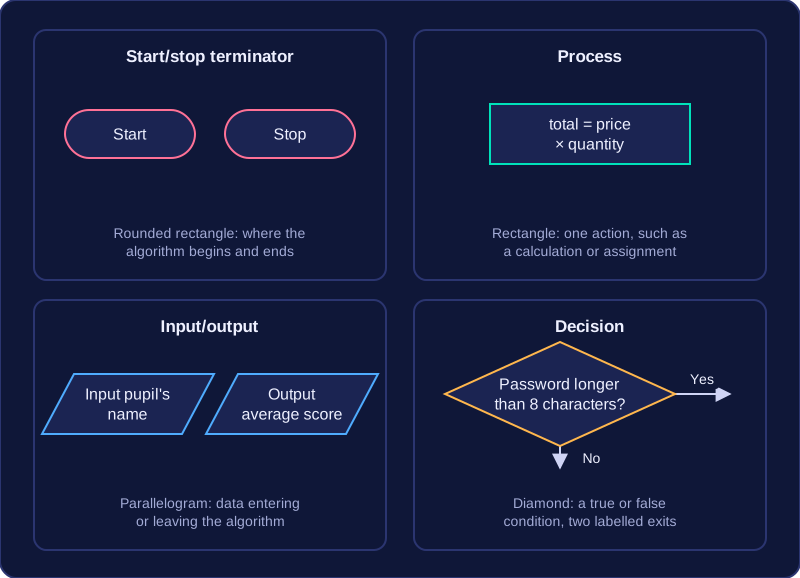
The start/stop terminator is a rounded rectangle. It marks where an algorithm begins and where it ends, usually holding the words Start and Stop, so anyone following it knows exactly where to start and where to finish.
A process symbol is a rectangle. It represents one action, such as updating a variable, performing a calculation or assigning a value. For example, a single rectangle might multiply a price by a quantity and store the answer as the total cost, keeping the whole instruction in one step.
An input/output symbol is a parallelogram. It represents data entering the algorithm, such as a value the user types in, or data leaving it, such as a result displayed on screen. For example, one parallelogram might ask for a pupil's name and another might display their average score.
A decision symbol is a diamond. It holds a condition with a true or false answer, such as whether a password is longer than eight characters. The two paths leaving the diamond are labelled, commonly Yes and No, and exactly one path is followed depending on the answer.
Flow lines are the directed arrows that join the symbols of a flowchart. They show the direction the algorithm moves in, so they tell you which symbol is carried out next. Without them a flowchart is just a collection of shapes; the arrows are what turn it into an ordered set of steps.
What the arrows must do
- Show the direction. A line drawn without an arrowhead does not show direction, so every connection needs an arrowhead on it.
- Join every symbol. Every symbol except the start should have an arrow arriving at it, and every symbol except the stop should have an arrow leaving it.
- Leave nothing hanging. A symbol with no arrow arriving at it can never be reached; one with no arrow leaving it never continues, so the algorithm is unfinished.
- Label the outcomes at a decision. The two arrows leaving a decision diamond should be labelled with their outcomes, such as Yes and No, so you can tell which route is which.
Start, stop and paths
A flowchart begins at one start terminator and finishes at one stop terminator. One of each: two starts give two places to begin, and a flowchart with no stop never finishes. Then trace every route. Take both arrows out of each decision and follow each one to the end; a branch that stops halfway leaves part of the algorithm undone, even if the rest looks correct.
Checking the connections
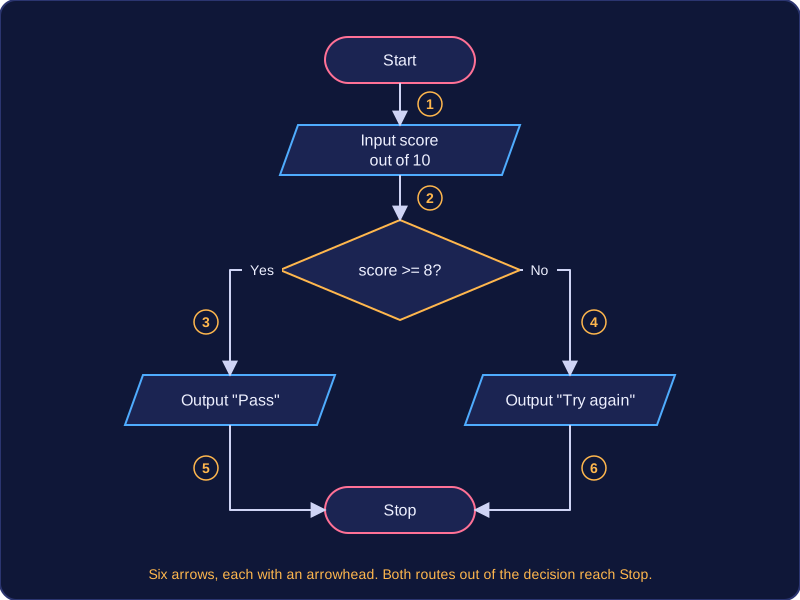
Suppose you draw a flowchart for a spelling test that inputs a score out of 10, prints "Pass" when the score is 8 or more and prints "Try again" otherwise. There are six symbols: start, input, decision, two outputs and stop. Count the arrows: start to input, input to decision, the two branches out of the decision, and one from each output into the stop, six in total. Follow each path from start through input, decision and one output to stop; both routes reach the stop, so the connections are complete.
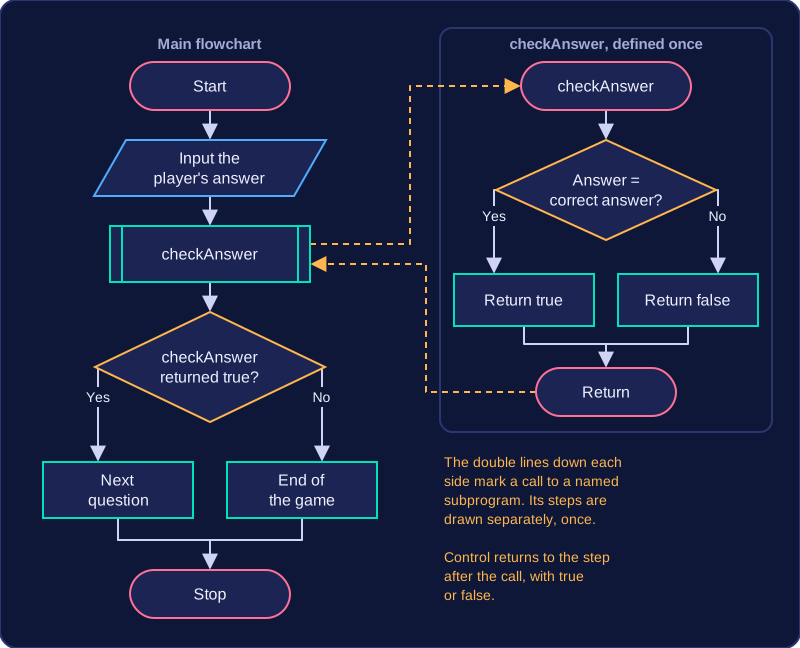
A subprogram symbol is a rectangle with extra vertical lines down its sides. It marks a call to a named procedure or function, rather than showing that subprogram's steps inside the main flowchart.
What happens at the call
When the flow reaches the symbol, the algorithm leaves the main path and runs the subprogram with that name. The subprogram's own steps are defined once, separately. When they finish, control returns to the point after the call, and the main flowchart carries on from there. A procedure just performs actions. A function may also return a value to the step that called it, and that value can then be used in a calculation or an output.
Why split an algorithm up
Subprograms break a large algorithm into smaller named parts. Each part can be designed, checked and corrected on its own, and the main flowchart stays shorter and easier to follow. The same subprogram can be called more than once, so you do not redraw or rewrite the same steps each time.
For example, a flowchart for a school quiz machine might reach a subprogram symbol labelled checkAnswer once the player's answer has been entered. The subprogram compares that answer with the correct one and returns true or false, and the next decision symbol in the main flowchart uses that value to choose between the next question and the end of the game. Not every call brings a value back: a symbol labelled playChime simply makes a sound and then hands control straight to the step after the call. A subprogram symbol is not an ordinary process rectangle: an ordinary process rectangle has no extra vertical lines and stands for a step carried out at that point.
Following a flowchart means working from the start terminator to the stop terminator, doing each step as you reach it. The arrows decide where you go next, so you never skip a symbol or take the boxes out of order.
Working through the symbols
Begin at start. Each time you arrive at a symbol, do what it asks:
- A process symbol gives you a calculation or assignment to carry out.
- An input/output symbol either takes a value in or displays a result.
- A decision symbol holds a condition. Work out whether it is true, then leave along the branch carrying that label, such as Yes or No — the label, not habit, tells you which way to go.
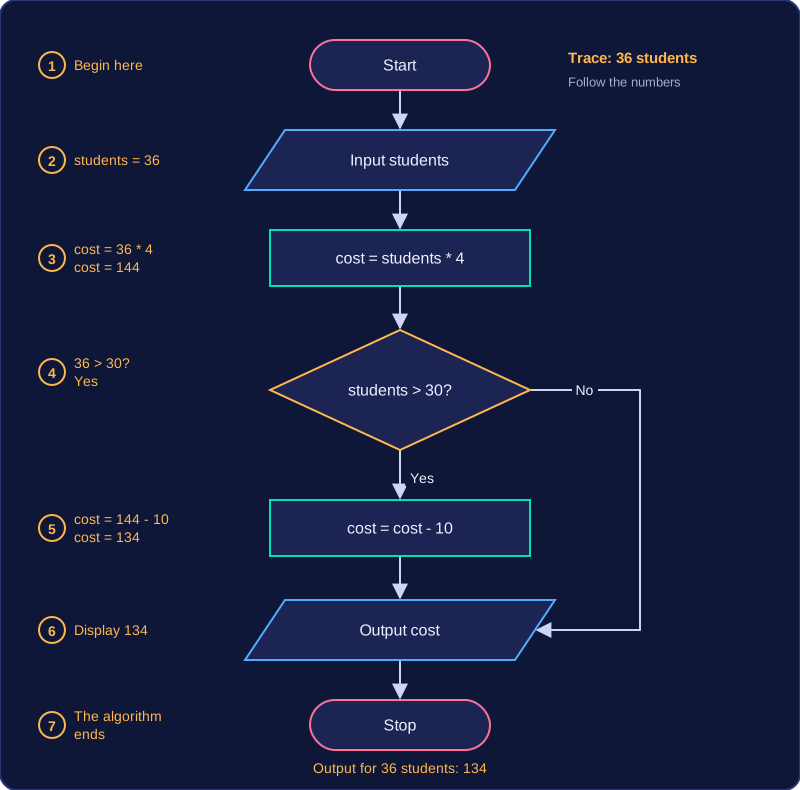
Imagine a flowchart for a school trip: start, input the number of students, process cost = students * 4 at £4 each, then decision “students > 30?”. Yes leads to process cost = cost - 10, both branches join at output cost, and then stop. For 36 students you would trace it like this.
| Step | Symbol | What you do |
|---|---|---|
| 1 | Start | Begin here |
| 2 | Input | students = 36 |
| 3 | Process | cost = 36 * 4, so cost = 144 |
| 4 | Decision | Is 36 > 30? Yes, so leave along the Yes arrow |
| 5 | Process | cost = 144 - 10, so cost = 134 |
| 6 | Output | Display 134 |
| 7 | Stop | The algorithm ends |
The order of the symbols is the sequence
Sequence means steps are completed one after another, in order. In a flowchart it is shown by process, input and output symbols placed one after another and joined by arrows, so the order you visit the symbols is the order the algorithm carries out its steps. Swapping two steps that depend on each other changes what the algorithm does, even though every instruction is still there.
Keeping every path logical
A flowchart must be logically correct: each outcome of a decision must lead to a sensible next step, and every route must reach the stop terminator so the algorithm ends. A symbol with no arrow leaving it, a decision with only one labelled branch, or a route that never reaches the stop leaves the algorithm broken, because you could not say what it would do for every possible input.
Selection means an algorithm chooses between different paths depending on whether a condition is true or false. In a flowchart, selection is drawn with a decision symbol: a diamond containing a question, with two outgoing flow lines.
Two labelled branches
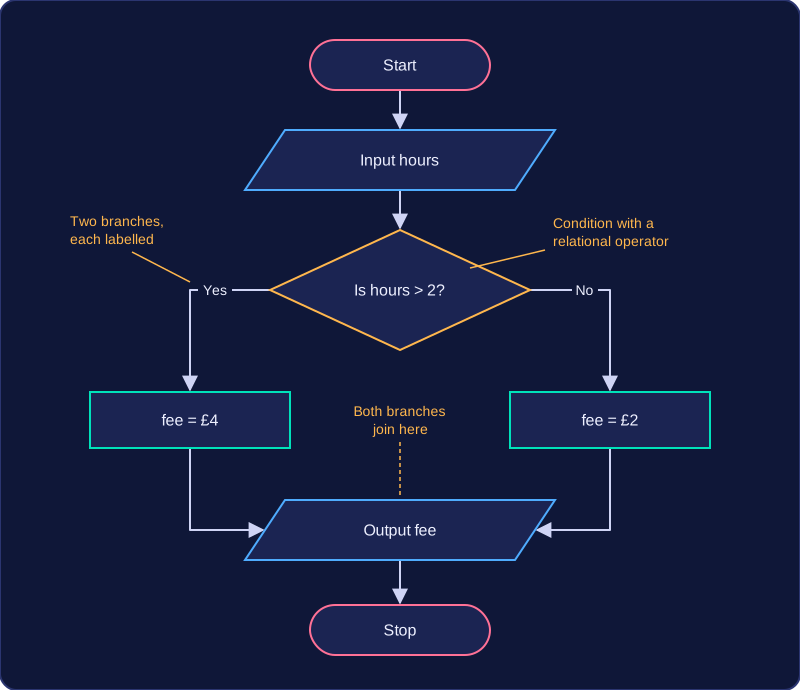
A decision must have exactly two possible outcomes. Label each branch clearly, usually Yes and No (or True and False). This is because the question in the diamond can only be answered in one of two ways. If a branch is left unlabelled, anyone following the flowchart cannot tell which path to take. A condition written inside a process rectangle does not create a choice; only the diamond shows the two paths.
For example, a leisure centre car park charges by the number of hours parked. The decision diamond contains Is hours > 2?. The Yes branch leads to a process box setting the fee to £4; the No branch leads to a process box setting the fee to £2. Both branches then join and lead to an output symbol that displays the fee.
Conditions use relational operators
The question inside a decision should compare values using a relational operator: <, >, <=, >=, == or !=. For instance, Is score >= 50? is a clear condition because it can be tested as true or false. A vague question such as Is the score good? is not suitable: there is no single value to compare against, so different people could answer it differently. Use == when checking whether two values are equal, because a single = means assign a value.
Iteration, also called repetition or looping, means running a section of an algorithm more than once. In a flowchart you show it with a flow line that goes back to an earlier symbol: the algorithm travels down the page, then an arrow takes it back up to repeat the steps in between.
The decision that ends the loop
A backward arrow on its own would repeat for ever, so every loop also needs a decision diamond with both outcomes labelled. One outcome keeps the algorithm going round the loop and the other lets it out: often Yes repeats the section and No leaves the loop. The decision holds the condition being checked, such as attempts < 4, and the repeated steps are the loop body. The condition is tested directly, so no separate flag variable is needed, but it must depend on something the loop body changes, or the loop never ends.
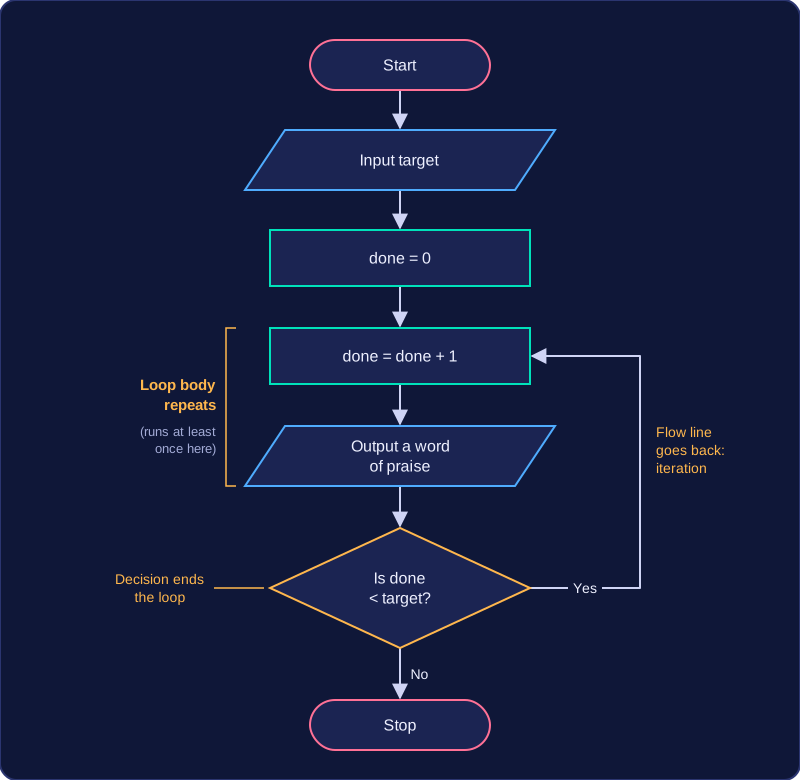
Where the decision sits changes the loop. Below the body, it is the backward arrow itself, so the body always runs at least once. Above the body, the Yes branch leads forwards into the body and the arrow from the end of the body goes back up to the decision, so the body is skipped if the condition is false first time.
Worked example
A fitness app asks how many star jumps you want to do, then counts them off. The start terminator leads to an input that reads the target, then a process sets done = 0. The loop body adds one to done and outputs a word of praise, and the decision then checks done < target. Yes is the arrow back up to the counter, so the body repeats; No carries on to the stop terminator. The backward arrow makes this iteration rather than sequence, and the decision stops it running for ever.
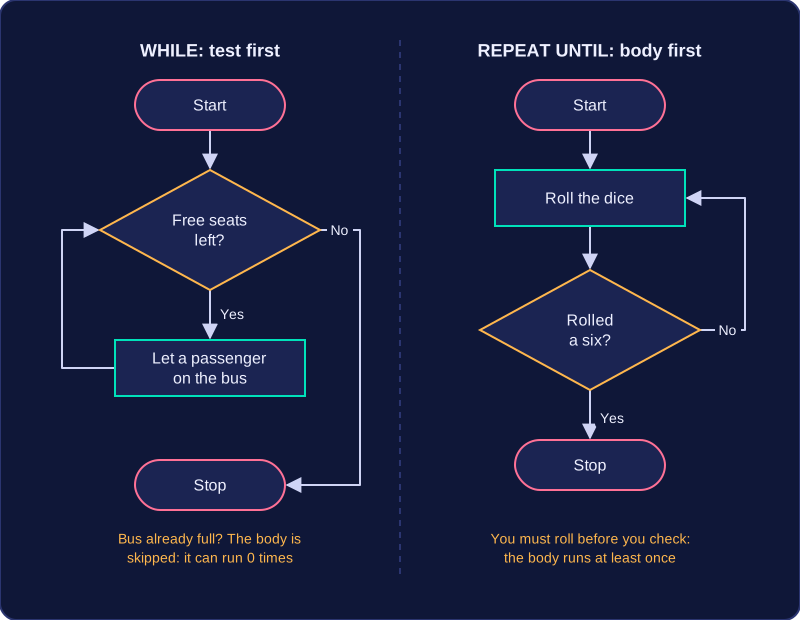
A condition-controlled loop repeats a set of statements while or until a condition is met. It is used when the number of repetitions is not fixed in advance: the loop keeps going until the data makes the test give the result that ends it. The condition is checked before each pass through the loop body.
WHILE: test first
A WHILE loop tests its condition at the start of every iteration. If the condition is false the first time, the loop body is skipped completely and never runs. For example, you might let passengers onto a bus while there are still free seats: if the bus is already full, nobody gets on. In a flowchart, the decision sits before the repeated steps, so the same path can miss them out entirely.
REPEAT UNTIL: body first
A REPEAT UNTIL loop runs its body first and tests the condition afterwards. The body therefore always runs at least once. It repeats until the condition becomes true, then stops. For example, you might roll a dice until you get a six: you must roll at least once before you can check the result. In a flowchart, the decision comes after the body, and the loop goes back when the stopping condition is not yet met.
| Loop | Condition tested | Minimum runs | Stops when |
|---|---|---|---|
| WHILE | Before the body | 0 times | Condition is false |
| REPEAT UNTIL | After the body | 1 time | Condition is true |
The program below repeats only while the password is not correct. The test is at the top, so if the first password is right, the repeated lines are skipped.
password = input("Enter the password: ")
while password != "maple":
    print("Try again")
    password = input("Enter the password: ")
print("Welcome")
Output when the user types pine, maple:
Enter the password: pine
Try again
Enter the password: maple
Welcome