Algorithms
Pseudocode

Contents
- Pseudocode
- Selection: IF and ELSE
- Variables and Constants
- Input, Output and Type Conversion
- FOR Loops
- Condition-Controlled Loops: WHILE and REPEAT UNTIL
- Indentation and Block Structure
- One- and Two-Dimensional Arrays
- Records and Strings
- Following and Tracing Pseudocode
- Converting Between Flowcharts and Pseudocode
Pseudocode is a way of writing down an algorithm in plain, English-like statements instead of the strict syntax of a programming language, so there are no fussy rules about brackets, colons or semicolons.
Its main job is to let you concentrate on the logic of an algorithm — the order of the steps and the decisions it makes — rather than the exact syntax of one language. You can plan in pseudocode, check that the logic works, then translate it into a language such as Python. It need not be precise down to the last symbol, but it must be unambiguous: anyone following it should carry out exactly the same steps and get the same result.
An algorithm can be represented as a flowchart, as pseudocode or as program code. A flowchart is a diagram, while the other two are written down; pseudocode sits between them, structured like code but readable like English.
What pseudocode can express
- Sequence — statements carried out one after another, in the order written.
- Selection — a decision, written with a keyword such as IF.
- Repetition — statements repeated by a loop.
- Iteration — working through every item in a data structure, such as each character in a string.
Keywords do the job of the symbols you meet in code: IF and ELSE for selection; FOR, WHILE and REPEAT UNTIL for loops; INPUT and OUTPUT; comparisons such as <>; arithmetic such as *; INT, REAL and STR for type conversion; and <- or = to store a value. Writers use different words for the same idea, so a style unlike the one you have seen is not wrong as long as the logic stays clear.
A worked example
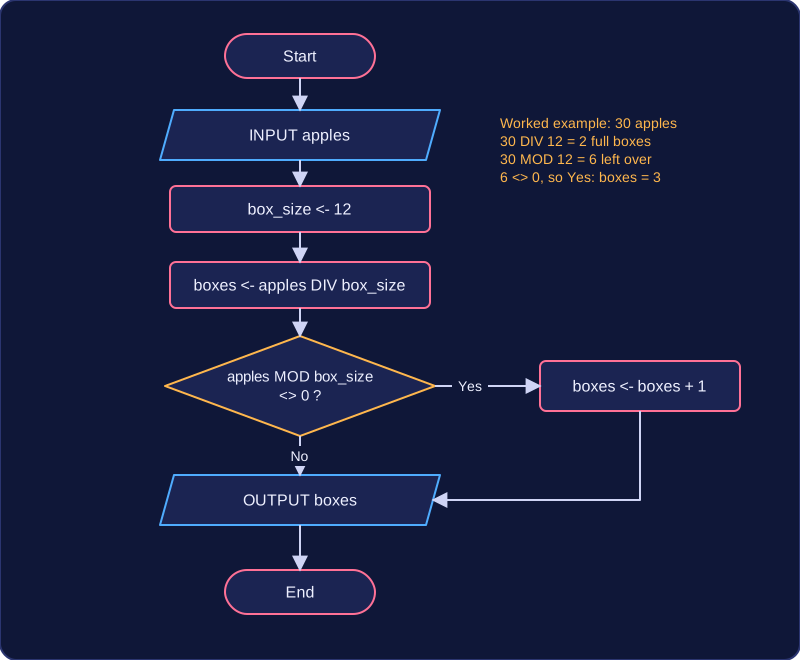
This program works out how many boxes are needed, with 12 apples in each box:
apples = int(input("How many apples? "))
box_size = 12
boxes = apples // box_size
if apples % box_size != 0:
    boxes = boxes + 1
print("Boxes needed: " + str(boxes))
Output when the user types 30:
How many apples? 30
Boxes needed: 3
The same algorithm in pseudocode is a short list of English-like steps: input how many apples there are, set the box size to 12, work out the full boxes, add one more box if apples are left over, then output the answer. The logic is identical, but pseudocode keeps your attention on the steps and the leftover check rather than on int() and str().
Selection means the next statement or block to be executed depends on whether a condition is true or false. Without selection, statements simply run in the order they are written; with selection, a program can choose between different paths.
IF and ELSE
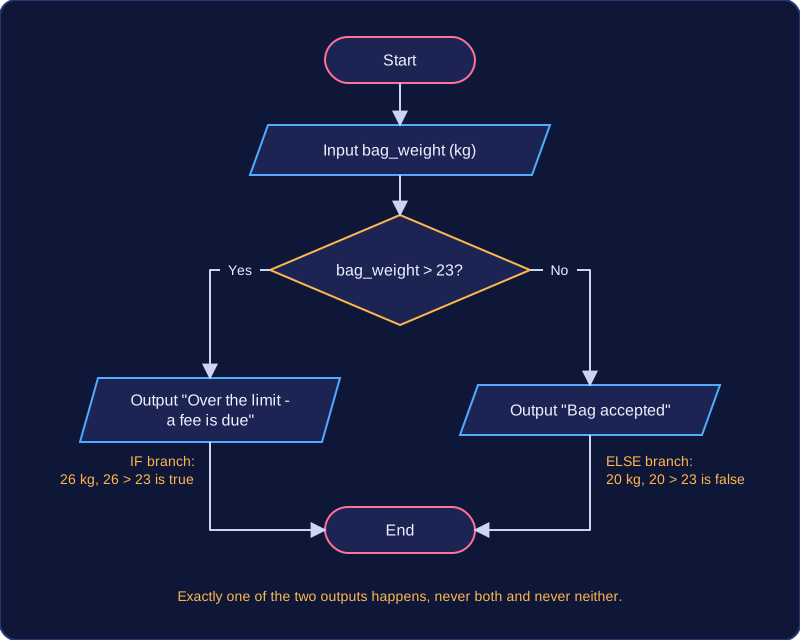
An IF statement is a selection statement. It holds a condition, and the statements inside the IF block run only when that condition is true. An ELSE branch handles the case where the condition is false, so the IF part and the ELSE part together always choose exactly one path.
bag_weight = float(input("Weight of your bag in kg: "))
if bag_weight > 23:
    print("Over the limit - a fee is due")
else:
    print("Bag accepted")
Output when the user types 20:
Weight of your bag in kg: 20
Bag accepted
Trace it with a bag of 20 kg: 20 > 23 is false, so the IF block is skipped and only the ELSE branch runs. With a bag of 26 kg the condition is true, so the IF branch runs and the ELSE is skipped. Exactly one of the two messages is printed, never both and never neither, which is why the two branches are alternatives rather than a list of steps.
Conditions
A condition compares two values using comparison operators:
| Operator | Meaning | Example condition |
|---|---|---|
== | equal to | door_code == 4821 |
< | less than | age < 13 |
> | greater than | total > 50 |
<= | less than or equal to | laps <= 10 |
>= | greater than or equal to | height >= 120 |
!= | not equal to | answer != 7 |
In Python, use these operators exactly as shown; a single = is assignment, not comparison. The indented statements under if and else belong to that branch, and the selection ends at the first statement lined up with the if.
steps = int(input("Steps walked today: "))
if steps >= 10000:
    print("Daily goal reached")
else:
    print("Goal not reached yet")
print("Well done for moving today")
Output when the user types 12000:
Steps walked today: 12000
Daily goal reached
Well done for moving todayAn assignment gives a value to a variable. The variable on the left of the assignment receives the result of the expression on the right, which is worked out first. For example, points = 6 * 7 stores 42 in points.
The = sign in an assignment does not mean "is equal to" — it means "store this value". A variable can be reassigned while a program runs, so its value can change. In a game, lives = 3 might run at the start; later, after a hard level, lives = 1 runs, and lives now holds 1. Only the most recent value is kept.
Constants
A constant is given a value that does not change while the program runs. You use a constant for something fixed, such as the length of one lap of a running track or the number of points a badge is worth. By convention, a constant in Python is written in capital letters with underscores, for example MAX_POINTS, so anyone reading the program can see the value should not be altered. Python does not enforce this, but the capital letters are a clear signal.
Using a constant makes a program easier to read and change, because the value is set in one place. For example, if POINTS_PER_BADGE = 10 is defined once, every calculation can use it. If the value ever needed updating, you would change that one line rather than hunting through the program for every 10.
# constant: set once, used in every calculation
POINTS_PER_BADGE = 10
week_one = 74
week_two = 38
badges_one = week_one // POINTS_PER_BADGE
badges_two = week_two // POINTS_PER_BADGE
print("Week 1 badges: " + str(badges_one))
print("Week 2 badges: " + str(badges_two))
print("Points per badge: " + str(POINTS_PER_BADGE))
Output:
Week 1 badges: 7
Week 2 badges: 3
Points per badge: 10Input is how a program gets data from the user, usually storing it in a variable. Output is how it shows a message or value back to the user. Pseudocode uses INPUT and OUTPUT statements to show these stages, with the processing steps in between, so the algorithm forms a complete solution to a problem.
Input and output in pseudocode
Some pseudocode styles put the prompt inside the INPUT statement; others use an OUTPUT statement to show the prompt first, then an INPUT statement to accept the response. In Python, input() shows a prompt and returns the typed text, while print() displays a message or value.
pagesText = input("How many pages did you read? ")stores the response inpagesText.print(pagesText)displays that value.
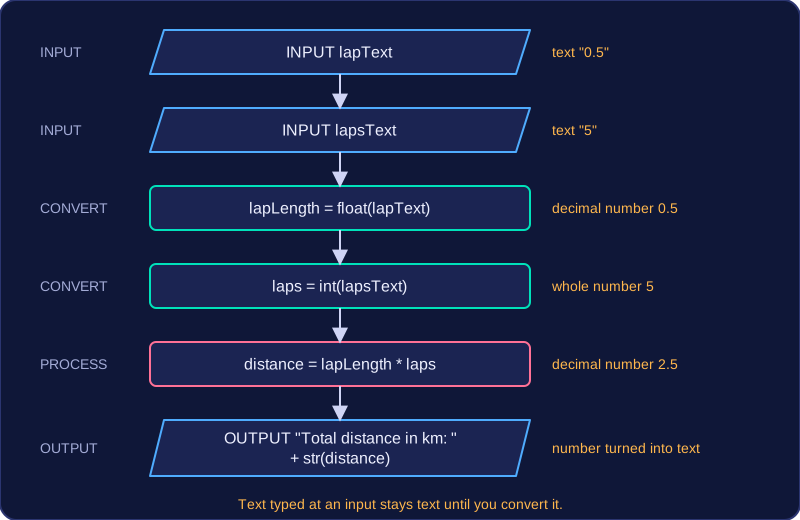
For example, a program for a school running track might ask for the length of one lap and the number of laps, multiply them, then display the distance. The two input() calls gather the data, the multiplication is the processing, and print() reports the result.
lapText = input("Length of one lap in km: ")
lapsText = input("How many laps did you run? ")
lapLength = float(lapText)
laps = int(lapsText)
distance = lapLength * laps
print("Total distance in km: " + str(distance))
Output when the user types 0.5, 5:
Length of one lap in km: 0.5
How many laps did you run? 5
Total distance in km: 2.5
Why type conversion matters
In Python, anything typed at an input is text, even if it looks like a number. If you type 12, the program holds the characters 1 and 2, not the value twelve, so arithmetic on it does not work as expected. Type conversion changes a value from one data type to another.
| Function | Converts to | Use it when |
|---|---|---|
int() | whole number | a count is used in a calculation |
float() | decimal number | a measurement is used in a calculation |
str() | text | a number must be joined to a message |
So laps = int(lapsText) turns typed text into a whole number you can multiply, and print("Total distance in km: " + str(distance)) turns a number into text so it can join a label.
scoreText = input("Enter your quiz score: ")
score = int(scoreText)
bonus = score + 5
print("Your score with the bonus is " + str(bonus))
Output when the user types 17:
Enter your quiz score: 17
Your score with the bonus is 22Repetition, also called iteration, means repeating statements. A FOR loop is count-controlled: it repeats a set number of times. WHILE and REPEAT UNTIL loops are condition-controlled.
When to use a FOR loop
Use a FOR loop when you know in advance how many repetitions are needed, or when you need to process a fixed range of values. A counter variable takes each value in the range in turn, and the statements in the loop body run once for each value. The loop header names the counter and the range it should take, then the repeated statements are written underneath. For example, if you want to print four lap numbers, the counter could take the values 1, 2, 3 and 4.
# Count-controlled FOR loop
for lap in range(1, 5):
    print("Lap " + str(lap))
Output:
Lap 1
Lap 2
Lap 3
Lap 4
Iterating over a data structure
A FOR loop can also iterate over every item in a data structure. Instead of a counter and a range, the loop visits each element of an array or each character in a string, one at a time. The loop variable holds the current item, so the same statements can process every item without you writing them out again.
# Iterating over each character in a string
for letter in "CODE":
    print(letter)
Output:
C
O
D
EA WHILE loop is condition-controlled: it repeats a block of statements while a condition is true. The condition is checked at the start of every iteration. If it is false the first time, the body never runs.
people_waiting = int(input("How many are waiting? "))
while people_waiting > 0:
    print("Serving a customer")
    people_waiting = people_waiting - 1
print("Queue empty")
Output when the user types 0:
How many are waiting? 0
Queue empty
Here, the loop serves customers only while the number waiting is above zero. Enter 0 and the body is skipped completely, so a WHILE loop can run zero times.
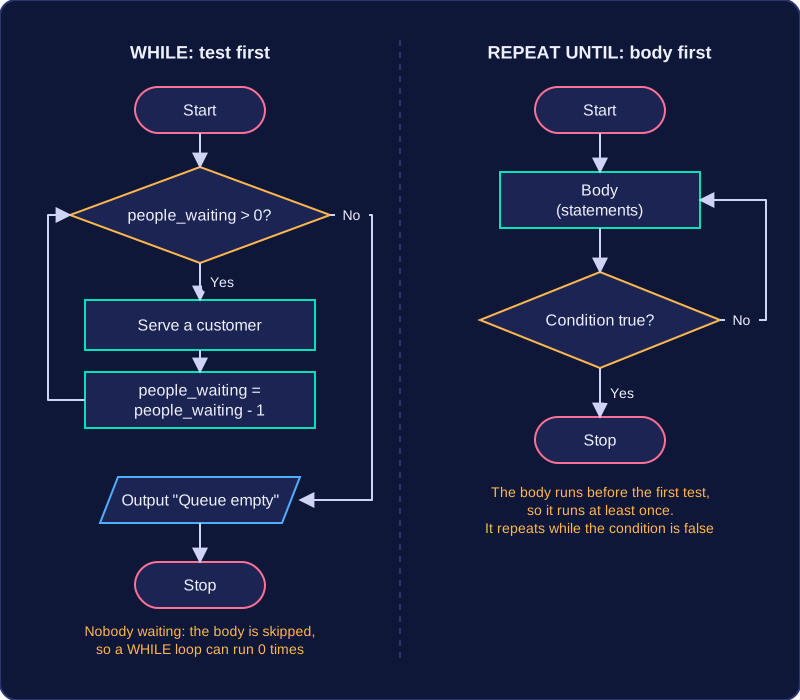
REPEAT UNTIL
A REPEAT UNTIL loop is another condition-controlled loop, but the condition is tested after the body. The body always runs at least once. It continues until the condition becomes true, which means it loops while the condition is false. This suits a task where you must do something once before you can decide whether to stop, such as asking for a value and checking it afterwards.
| Feature | WHILE | REPEAT UNTIL |
|---|---|---|
| Where the condition is tested | At the start | After the body |
| Fewest runs of the body | 0 | 1 |
| Repeats while | The condition is true | The condition is false |
| Stops when | The condition is false | The condition is true |
Indentation is the space at the start of a line that shows which statements sit inside a selection or a loop. A clear block structure groups those statements together, so you can see at a glance what runs only when a condition is true or while a loop repeats.
Selections
In a selection, the IF block is the set of statements that run when the condition is true. Indenting them under the IF shows they belong to it. A statement written back at the same level as the IF is outside the block, so it runs whether the condition was true or false.
answer = input("Is the museum open today? (yes/no): ")
if answer == "yes":
    print("Book your tickets online")
    print("Doors open at 10am")
else:
    print("Try again next week")
print("Thanks for checking")
Output when the user types yes:
Is the museum open today? (yes/no): yes
Book your tickets online
Doors open at 10am
Thanks for checking
The two print() statements are indented under the if, so they only run when the answer is "yes". The else branch has its own indented block. The last print() sits back at the left margin, outside the selection, so it runs whichever answer was typed. Every statement in the same block lines up, because Python uses the indentation to work out which statements belong together.
Loops
Inside a loop, the repeated statements form the loop body. Indenting the body under the loop header shows exactly what repeats, and a statement after the loop, back at the left margin, runs once when the loop has finished. That makes it easier to trace how many times each line runs.
passed = 0
for number in range(1, 6):
    score = int(input("Spelling score for word " + str(number) + ": "))
    if score >= 8:
        passed = passed + 1
print("Words passed: " + str(passed))
Output when the user types 9, 7, 10, 8, 6:
Spelling score for word 1: 9
Spelling score for word 2: 7
Spelling score for word 3: 10
Spelling score for word 4: 8
Spelling score for word 5: 6
Words passed: 3
The lines indented under the for repeat once for each of the five words, and the line that adds to passed is indented again because it only runs when the score is 8 or more. The final print() is not indented, so it runs once, after the loop has ended.
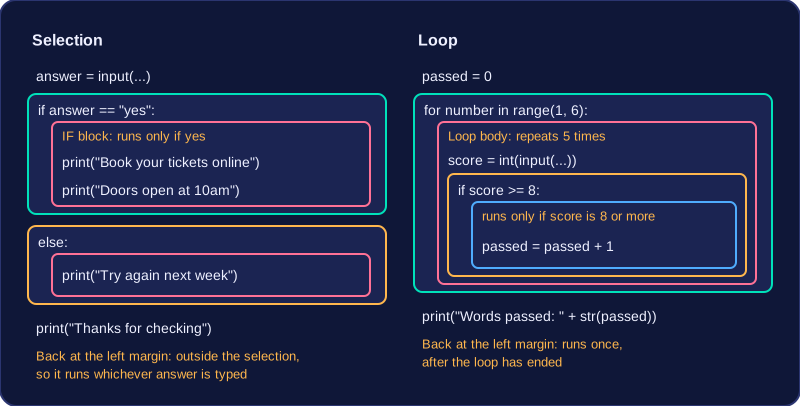
Indentation is not decoration: it is part of how the block structure shows the algorithm's logic. In Python, a block whose lines do not line up stops the program with an IndentationError.
An array stores many related items under one identifier. Each item is reached by its index, which is its position, so one name plus a changing index can reach every item in turn. Indexes start at 0, so the third item in an array sits at index 2.
One-dimensional arrays
A one-dimensional array is a single row of items. Think of a vending machine: one identifier, snacks, where snacks[0] holds crisps, snacks[1] holds a cereal bar and snacks[5] holds mints. To visit every slot you use a FOR loop that counts from 0 up to one less than the number of items. Arrays are useful because one loop can process every item, so the same code works as the array grows.
Two-dimensional arrays
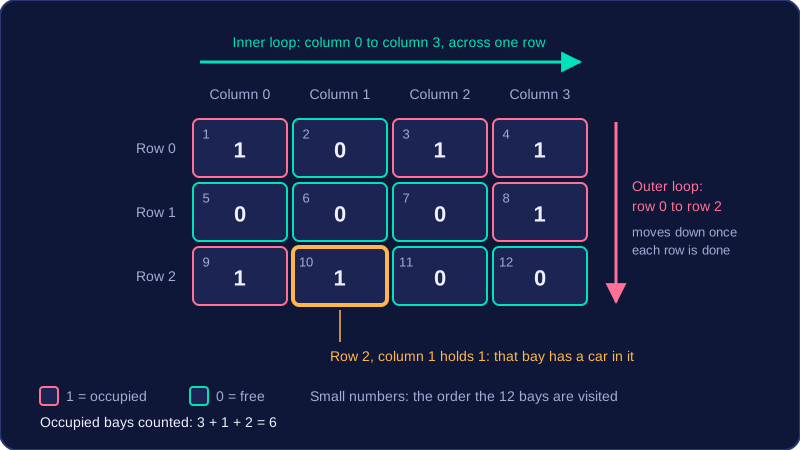
A two-dimensional array stores data in rows and columns, so each item needs two indexes: the row first, then the column. The table shows a car park with three rows of four bays, where 1 means a bay is occupied and 0 means it is free. The value in row 2, column 1 is 1, so that bay has a car in it.
| Column 0 | Column 1 | Column 2 | Column 3 | |
|---|---|---|---|---|
| Row 0 | 1 | 0 | 1 | 1 |
| Row 1 | 0 | 0 | 0 | 1 |
| Row 2 | 1 | 1 | 0 | 0 |
Processing with nested loops
A two-dimensional array can be processed with nested loops: an outer loop steps through the rows and an inner loop steps through the columns. The inner loop finishes its whole row before the outer loop moves down, so each pair of indexes is visited exactly once — all twelve bays in the example. A single loop with one index can step through the rows, but a second loop is needed to step through the columns in each row. The nested pair also counts the occupied bays correctly: add one to a total only when the item you are looking at is 1.
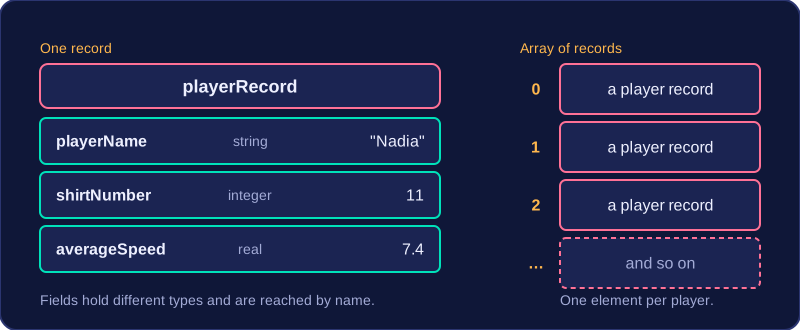
A record groups related data items under one identifier. The items inside it are called fields, and each field can hold a different type, because a record describes one whole thing — a player, a product, a hospital patient — rather than a list of matching values.
| Field | Type | Example value |
|---|---|---|
| playerName | string | "Nadia" |
| shirtNumber | integer | 11 |
| averageSpeed | real | 7.4 |
Keeping these three values inside one record means the whole record can be stored, moved and printed as a single item, and the fields stay together so they cannot be mixed up with another player's data. To hold a whole team you use an array of records: one element per player, and a FOR loop that visits each element and reads its fields. A record is not a two-dimensional array — its fields may be different types and are reached by name, not by a row and column position.
Strings
A string is a one-dimensional sequence of characters, used for any text: a word, a postcode, a password. len() gives the number of characters it holds.
Because a string is a sequence, a FOR loop can process it one character at a time — counting something, checking a code follows a pattern, or building a new string from the pieces. This example counts how many vowels a word contains.
word = input("Enter a word: ")
vowels = 0
for letter in word:
    if letter == "a" or letter == "e" or letter == "i" or letter == "o" or letter == "u":
        vowels = vowels + 1
print("Vowels: " + str(vowels))
Output when the user types pineapple:
Enter a word: pineapple
Vowels: 4
The IF condition compares each character with lowercase vowels only, so a word typed in capitals would score nothing.
Following an algorithm means reading it as the computer would, one statement at a time, and keeping a record of every value that changes. A trace is that record: for each step you note the value of each variable and whether each condition is true or false. The same method works whether the algorithm is printed as pseudocode in an exam paper or written as a program in Python.
Work through the statements in the order they are written. When an assignment runs, the new value replaces the old one. At an if, test the condition once and follow only the branch that applies. In a while loop the condition is tested before each pass, and the body runs only while that condition is true. Constants never change, so use their value in every expression that uses them. If the algorithm works through a data structure, trace the position as well as the value, because the body may run once for each item. Variables, constants and data structures must be used so that the logic of the algorithm is correct. When you write an algorithm, keep the steps and conditions clear so a trace would produce the intended result.
Worked trace
EVEN_POINTS = 10
score = 0
lap = 1
while lap <= 4:
    if lap % 2 == 1:
        score = score + lap * 2
    else:
        score = score + EVEN_POINTS
    lap = lap + 1
print(score)
Output:
28| lap | lap <= 4 | lap % 2 == 1 | score |
|---|---|---|---|
| 1 | True | True | 2 |
| 2 | True | False | 12 |
| 3 | True | True | 18 |
| 4 | True | False | 28 |
| 5 | False | not tested | 28 |
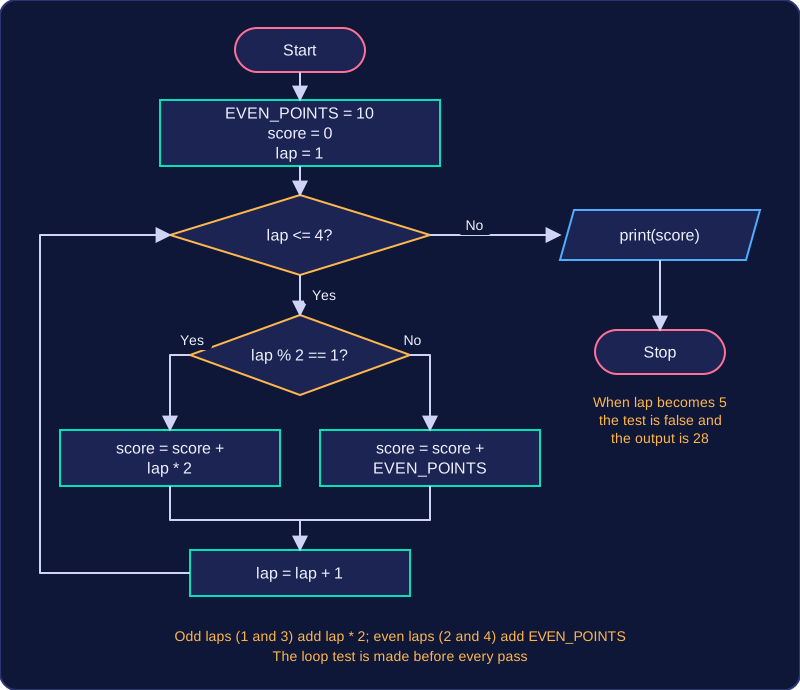
After lap becomes 5 the loop condition is false, so the loop stops and the output is 28. The trace shows what the algorithm does: odd laps add twice the lap number (2, then 6) and every even lap adds the constant 10. If the output were wrong, the trace would show the first statement or condition where the values stop matching what the algorithm should do, helping you find the logic error and confirm the algorithm does what it is meant to do. You can also trace an algorithm to work out its purpose when the output alone is not obvious.
Converting between a flowchart and pseudocode means writing one version of an algorithm from the other. Pseudocode can be written from a flowchart, and a flowchart can be drawn from pseudocode, by matching each line or shape to its partner. The same matching works in either direction, so the logic never changes.
Matching each shape
Follow the arrows from the start symbol to the end, turning each shape into the matching pseudocode as you reach it. To go the other way, turn each pseudocode line back into the matching shape and join the shapes with arrows in the same order.
| Flowchart shape | What it shows | Pseudocode |
|---|---|---|
| Rectangle | A process, such as a calculation | An assignment statement |
| Parallelogram | Data going in or coming out | INPUT or OUTPUT |
| Diamond | A decision with yes and no arrows | IF ... THEN ... ELSE ... |
| Arrow back to an earlier shape | Steps that repeat | A WHILE, REPEAT UNTIL or FOR loop |
The yes arrow from a diamond becomes the statements after THEN, and the no arrow becomes the ELSE branch. If the no path goes straight on with no steps, you can leave out the ELSE.
Loops and order
An arrow that leads back to a shape you have already passed shows repetition. If the diamond is tested before the repeated steps, use a WHILE loop. If it is tested after them, use REPEAT UNTIL, with the condition that ends the loop. A counter that is compared with a fixed number and increased each time can become a FOR loop.
Keep the same order and logic: do not swap steps around or alter what a condition checks. Indent the lines inside an IF or a loop so it is clear which statements belong together.
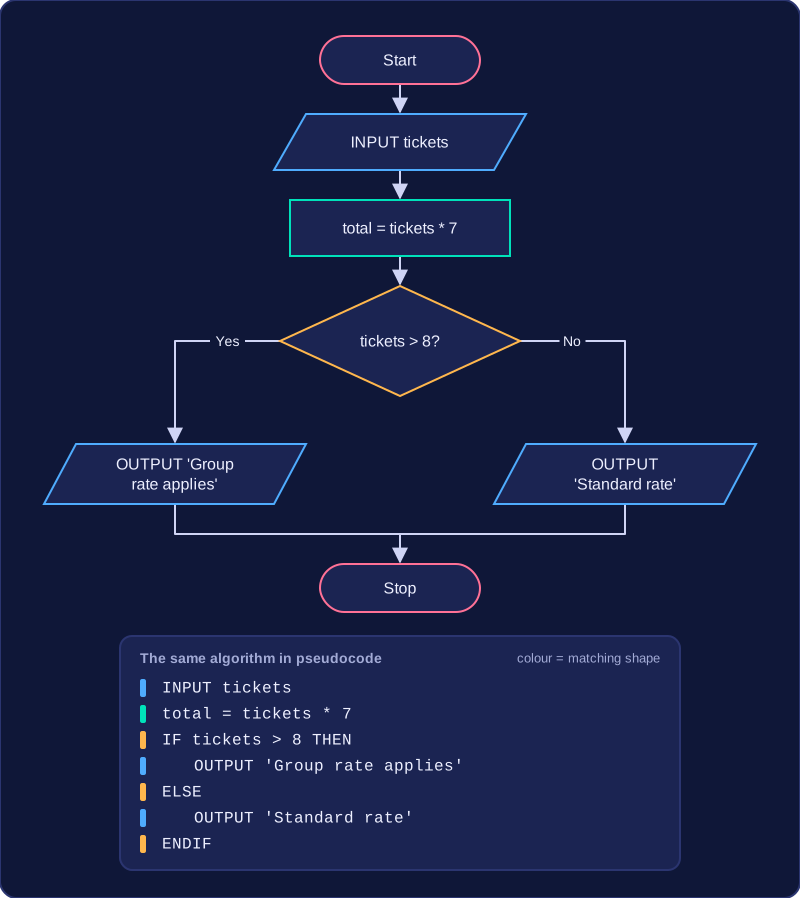
For example, a flowchart for a cinema's group booking inputs the number of tickets, works out the total by multiplying the tickets by 7, then tests whether more than 8 tickets were bought. The yes path outputs 'Group rate applies'; the no path outputs 'Standard rate'. The pseudocode follows that exact order: an INPUT, then an assignment, then an IF with the yes path in the THEN part and the no path in the ELSE part, each branch ending in an OUTPUT.