Pseudocode
Converting Between Flowcharts and Pseudocode

Converting between a flowchart and pseudocode means writing one version of an algorithm from the other. Pseudocode can be written from a flowchart, and a flowchart can be drawn from pseudocode, by matching each line or shape to its partner. The same matching works in either direction, so the logic never changes.
Matching each shape
Follow the arrows from the start symbol to the end, turning each shape into the matching pseudocode as you reach it. To go the other way, turn each pseudocode line back into the matching shape and join the shapes with arrows in the same order.
| Flowchart shape | What it shows | Pseudocode |
|---|---|---|
| Rectangle | A process, such as a calculation | An assignment statement |
| Parallelogram | Data going in or coming out | INPUT or OUTPUT |
| Diamond | A decision with yes and no arrows | IF ... THEN ... ELSE ... |
| Arrow back to an earlier shape | Steps that repeat | A WHILE, REPEAT UNTIL or FOR loop |
The yes arrow from a diamond becomes the statements after THEN, and the no arrow becomes the ELSE branch. If the no path goes straight on with no steps, you can leave out the ELSE.
Loops and order
An arrow that leads back to a shape you have already passed shows repetition. If the diamond is tested before the repeated steps, use a WHILE loop. If it is tested after them, use REPEAT UNTIL, with the condition that ends the loop. A counter that is compared with a fixed number and increased each time can become a FOR loop.
Keep the same order and logic: do not swap steps around or alter what a condition checks. Indent the lines inside an IF or a loop so it is clear which statements belong together.
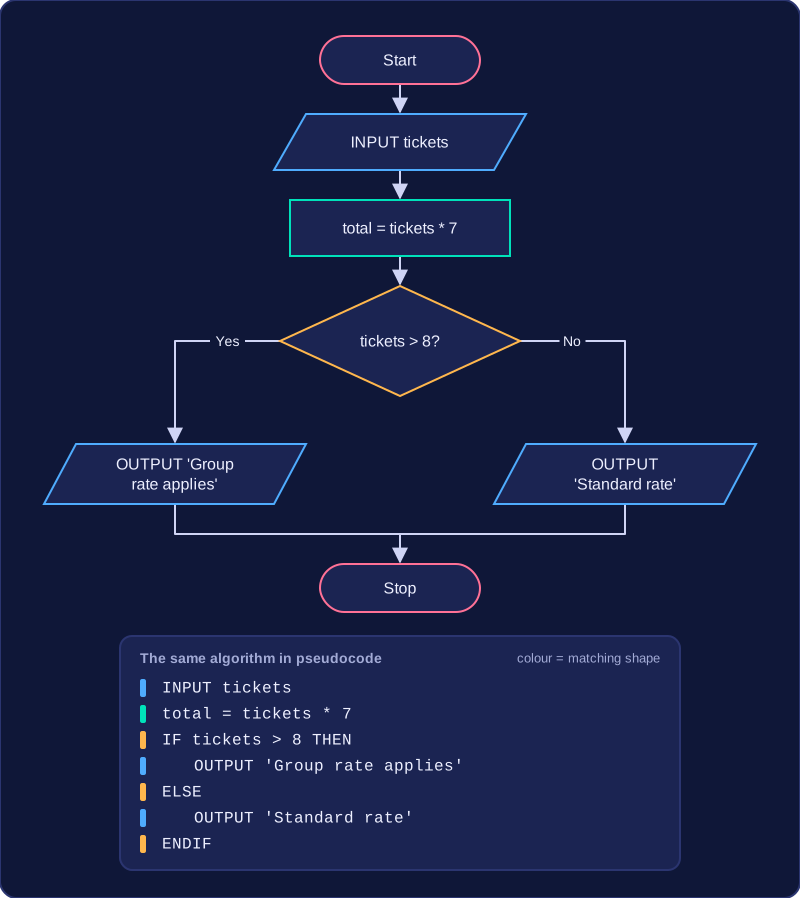
For example, a flowchart for a cinema's group booking inputs the number of tickets, works out the total by multiplying the tickets by 7, then tests whether more than 8 tickets were bought. The yes path outputs 'Group rate applies'; the no path outputs 'Standard rate'. The pseudocode follows that exact order: an INPUT, then an assignment, then an IF with the yes path in the THEN part and the no path in the ELSE part, each branch ending in an OUTPUT.
Practise this
Edexcel GCSE Computer Science · Pseudocode
Edexcel GCSE Computer Science · Flowcharts
Edexcel GCSE Computer Science · Condition Controlled Iteration (While Loops)