Flowcharts
Iteration in Flowcharts

Iteration, also called repetition or looping, means running a section of an algorithm more than once. In a flowchart you show it with a flow line that goes back to an earlier symbol: the algorithm travels down the page, then an arrow takes it back up to repeat the steps in between.
The decision that ends the loop
A backward arrow on its own would repeat for ever, so every loop also needs a decision diamond with both outcomes labelled. One outcome keeps the algorithm going round the loop and the other lets it out: often Yes repeats the section and No leaves the loop. The decision holds the condition being checked, such as attempts < 4, and the repeated steps are the loop body. The condition is tested directly, so no separate flag variable is needed, but it must depend on something the loop body changes, or the loop never ends.
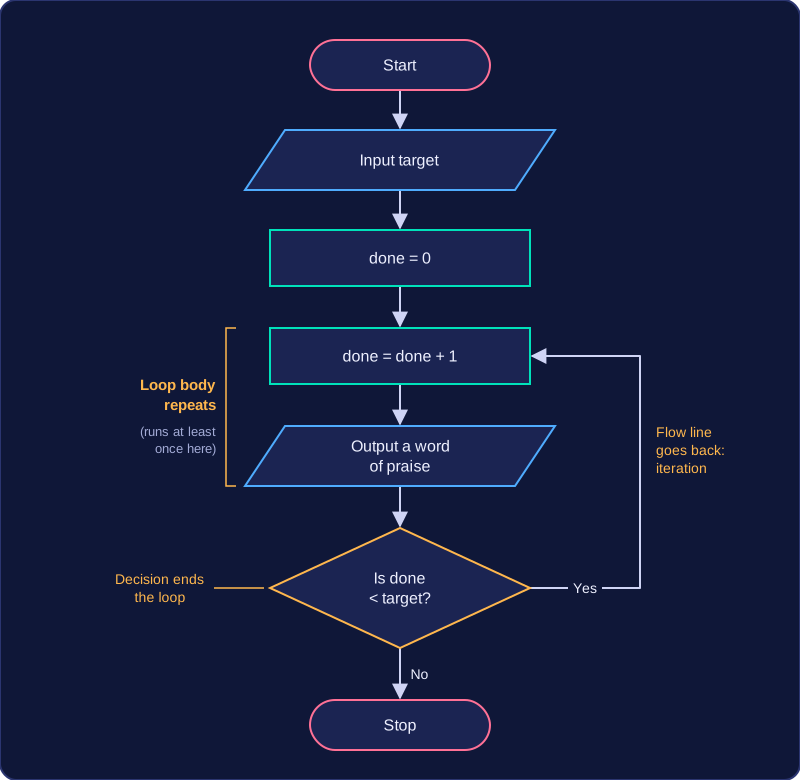
Where the decision sits changes the loop. Below the body, it is the backward arrow itself, so the body always runs at least once. Above the body, the Yes branch leads forwards into the body and the arrow from the end of the body goes back up to the decision, so the body is skipped if the condition is false first time.
Worked example
A fitness app asks how many star jumps you want to do, then counts them off. The start terminator leads to an input that reads the target, then a process sets done = 0. The loop body adds one to done and outputs a word of praise, and the decision then checks done < target. Yes is the arrow back up to the counter, so the body repeats; No carries on to the stop terminator. The backward arrow makes this iteration rather than sequence, and the decision stops it running for ever.
Practise this
Edexcel GCSE Computer Science · Flowcharts
Edexcel GCSE Computer Science · Condition Controlled Iteration (While Loops)