Flowcharts
Condition-Controlled Loops

A condition-controlled loop repeats a set of statements while or until a condition is met. It is used when the number of repetitions is not fixed in advance: the loop keeps going until the data makes the test give the result that ends it. The condition is checked before each pass through the loop body.
WHILE: test first
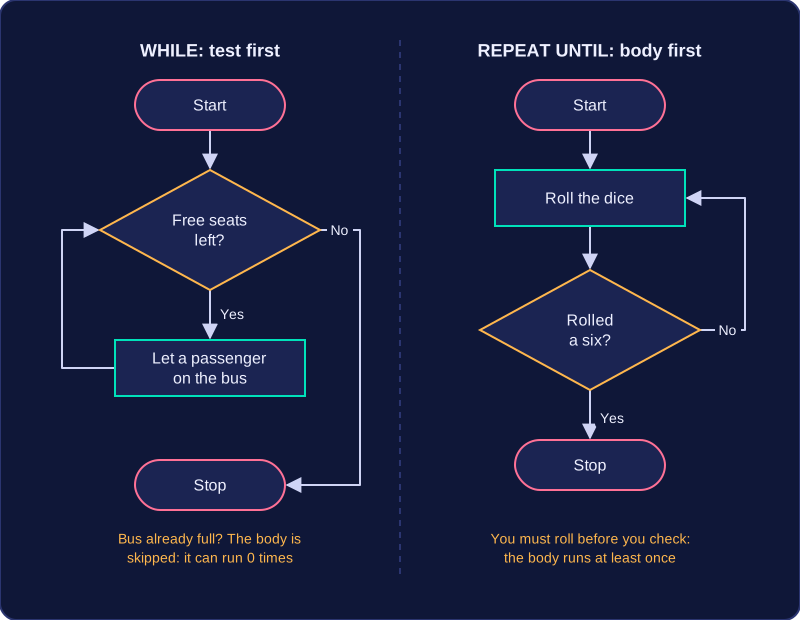
A WHILE loop tests its condition at the start of every iteration. If the condition is false the first time, the loop body is skipped completely and never runs. For example, you might let passengers onto a bus while there are still free seats: if the bus is already full, nobody gets on. In a flowchart, the decision sits before the repeated steps, so the same path can miss them out entirely.
REPEAT UNTIL: body first
A REPEAT UNTIL loop runs its body first and tests the condition afterwards. The body therefore always runs at least once. It repeats until the condition becomes true, then stops. For example, you might roll a dice until you get a six: you must roll at least once before you can check the result. In a flowchart, the decision comes after the body, and the loop goes back when the stopping condition is not yet met.
| Loop | Condition tested | Minimum runs | Stops when |
|---|---|---|---|
| WHILE | Before the body | 0 times | Condition is false |
| REPEAT UNTIL | After the body | 1 time | Condition is true |
The program below repeats only while the password is not correct. The test is at the top, so if the first password is right, the repeated lines are skipped.
password = input("Enter the password: ")
while password != "maple":
    print("Try again")
    password = input("Enter the password: ")
print("Welcome")
Output when the user types pine, maple:
Enter the password: pine
Try again
Enter the password: maple
Welcome
Practise this
Edexcel GCSE Computer Science · Flowcharts