Flowcharts
Selection in Flowcharts

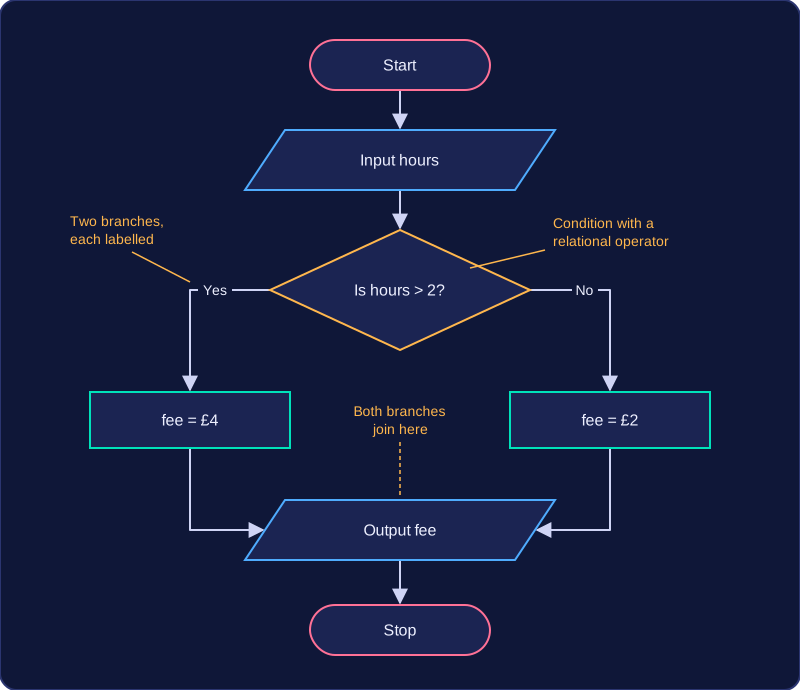
Selection means an algorithm chooses between different paths depending on whether a condition is true or false. In a flowchart, selection is drawn with a decision symbol: a diamond containing a question, with two outgoing flow lines.
Two labelled branches
A decision must have exactly two possible outcomes. Label each branch clearly, usually Yes and No (or True and False). This is because the question in the diamond can only be answered in one of two ways. If a branch is left unlabelled, anyone following the flowchart cannot tell which path to take. A condition written inside a process rectangle does not create a choice; only the diamond shows the two paths.
For example, a leisure centre car park charges by the number of hours parked. The decision diamond contains Is hours > 2?. The Yes branch leads to a process box setting the fee to £4; the No branch leads to a process box setting the fee to £2. Both branches then join and lead to an output symbol that displays the fee.
Conditions use relational operators
The question inside a decision should compare values using a relational operator: <, >, <=, >=, == or !=. For instance, Is score >= 50? is a clear condition because it can be tested as true or false. A vague question such as Is the score good? is not suitable: there is no single value to compare against, so different people could answer it differently. Use == when checking whether two values are equal, because a single = means assign a value.
Practise this
Edexcel GCSE Computer Science · Flowcharts