Flowcharts
Following a Flowchart

Following a flowchart means working from the start terminator to the stop terminator, doing each step as you reach it. The arrows decide where you go next, so you never skip a symbol or take the boxes out of order.
Working through the symbols
Begin at start. Each time you arrive at a symbol, do what it asks:
- A process symbol gives you a calculation or assignment to carry out.
- An input/output symbol either takes a value in or displays a result.
- A decision symbol holds a condition. Work out whether it is true, then leave along the branch carrying that label, such as Yes or No — the label, not habit, tells you which way to go.
Imagine a flowchart for a school trip: start, input the number of students, process cost = students * 4 at £4 each, then decision “students > 30?”. Yes leads to process cost = cost - 10, both branches join at output cost, and then stop. For 36 students you would trace it like this.
| Step | Symbol | What you do |
|---|---|---|
| 1 | Start | Begin here |
| 2 | Input | students = 36 |
| 3 | Process | cost = 36 * 4, so cost = 144 |
| 4 | Decision | Is 36 > 30? Yes, so leave along the Yes arrow |
| 5 | Process | cost = 144 - 10, so cost = 134 |
| 6 | Output | Display 134 |
| 7 | Stop | The algorithm ends |
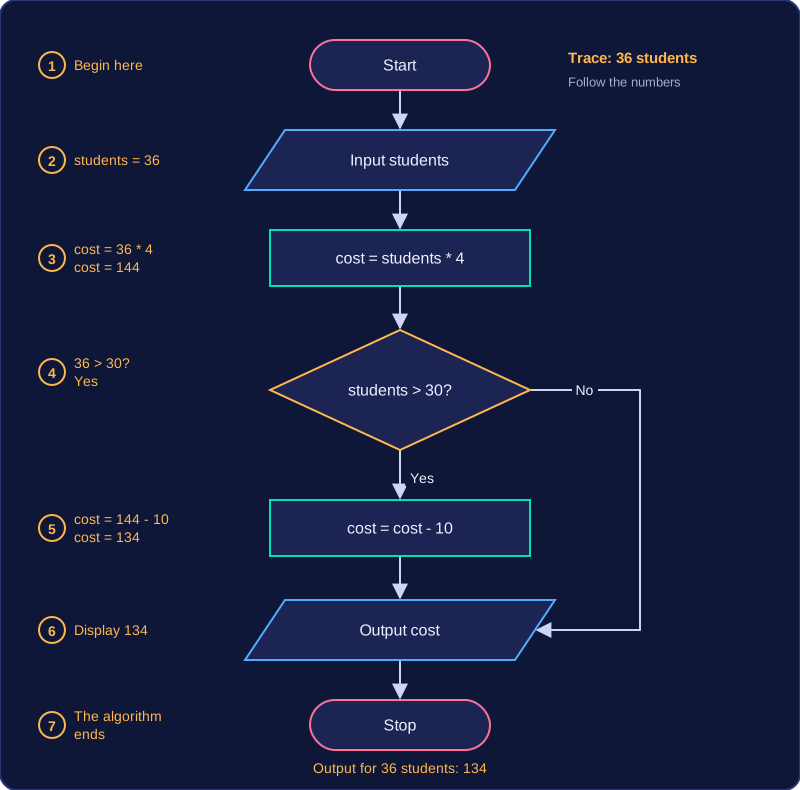
The order of the symbols is the sequence
Sequence means steps are completed one after another, in order. In a flowchart it is shown by process, input and output symbols placed one after another and joined by arrows, so the order you visit the symbols is the order the algorithm carries out its steps. Swapping two steps that depend on each other changes what the algorithm does, even though every instruction is still there.
Keeping every path logical
A flowchart must be logically correct: each outcome of a decision must lead to a sensible next step, and every route must reach the stop terminator so the algorithm ends. A symbol with no arrow leaving it, a decision with only one labelled branch, or a route that never reaches the stop leaves the algorithm broken, because you could not say what it would do for every possible input.
Practise this
Edexcel GCSE Computer Science · Flowcharts