Flowcharts
Subprogram Symbol

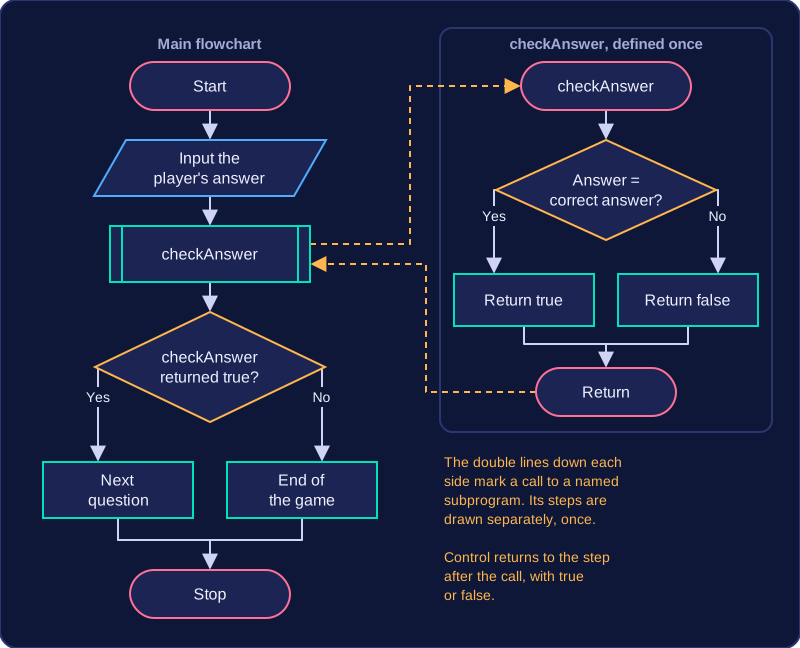
A subprogram symbol is a rectangle with extra vertical lines down its sides. It marks a call to a named procedure or function, rather than showing that subprogram's steps inside the main flowchart.
What happens at the call
When the flow reaches the symbol, the algorithm leaves the main path and runs the subprogram with that name. The subprogram's own steps are defined once, separately. When they finish, control returns to the point after the call, and the main flowchart carries on from there. A procedure just performs actions. A function may also return a value to the step that called it, and that value can then be used in a calculation or an output.
Why split an algorithm up
Subprograms break a large algorithm into smaller named parts. Each part can be designed, checked and corrected on its own, and the main flowchart stays shorter and easier to follow. The same subprogram can be called more than once, so you do not redraw or rewrite the same steps each time.
For example, a flowchart for a school quiz machine might reach a subprogram symbol labelled checkAnswer once the player's answer has been entered. The subprogram compares that answer with the correct one and returns true or false, and the next decision symbol in the main flowchart uses that value to choose between the next question and the end of the game. Not every call brings a value back: a symbol labelled playChime simply makes a sound and then hands control straight to the step after the call. A subprogram symbol is not an ordinary process rectangle: an ordinary process rectangle has no extra vertical lines and stands for a step carried out at that point.
Practise this
Edexcel GCSE Computer Science · Flowcharts