Flowcharts
Flow Lines

Flow lines are the directed arrows that join the symbols of a flowchart. They show the direction the algorithm moves in, so they tell you which symbol is carried out next. Without them a flowchart is just a collection of shapes; the arrows are what turn it into an ordered set of steps.
What the arrows must do
- Show the direction. A line drawn without an arrowhead does not show direction, so every connection needs an arrowhead on it.
- Join every symbol. Every symbol except the start should have an arrow arriving at it, and every symbol except the stop should have an arrow leaving it.
- Leave nothing hanging. A symbol with no arrow arriving at it can never be reached; one with no arrow leaving it never continues, so the algorithm is unfinished.
- Label the outcomes at a decision. The two arrows leaving a decision diamond should be labelled with their outcomes, such as Yes and No, so you can tell which route is which.
Start, stop and paths
A flowchart begins at one start terminator and finishes at one stop terminator. One of each: two starts give two places to begin, and a flowchart with no stop never finishes. Then trace every route. Take both arrows out of each decision and follow each one to the end; a branch that stops halfway leaves part of the algorithm undone, even if the rest looks correct.
Checking the connections
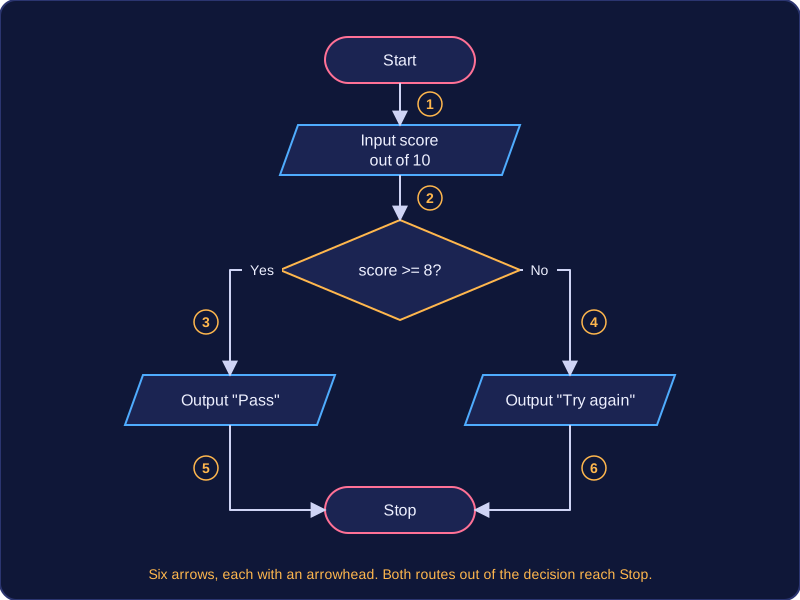
Suppose you draw a flowchart for a spelling test that inputs a score out of 10, prints "Pass" when the score is 8 or more and prints "Try again" otherwise. There are six symbols: start, input, decision, two outputs and stop. Count the arrows: start to input, input to decision, the two branches out of the decision, and one from each output into the stop, six in total. Follow each path from start through input, decision and one output to stop; both routes reach the stop, so the connections are complete.
Practise this
Edexcel GCSE Computer Science · Flowcharts