Input/output
Input Validation
Contents
A presence check confirms that a required value has been entered and that the field has not been left empty. It is used whenever a value must be supplied before the program can continue, such as a delivery reference, a booking code or a quiz team name. If the user just presses Enter, the program should refuse to carry on until something is typed.
In Python, input() returns a string. If the user presses Enter without typing, the string has no characters, so comparing it with "" is True. A condition such as reference == "" detects the empty field. The program can then display an error message and ask again. Using .strip() first removes spaces and other whitespace from both ends, so a field containing only spaces is also treated as empty; without it, a single space is a character and would pass the check.
# A presence check with three attempts
attempts = 0
tracking_ref = ""
while tracking_ref == "" and attempts < 3:
    tracking_ref = input("Enter your delivery reference: ").strip()
    if tracking_ref == "":
        print("A delivery reference is required.")
        attempts = attempts + 1

if tracking_ref == "":
    print("No reference entered. Tracking cancelled.")
else:
    print("Tracking parcel " + tracking_ref)
Output when the user types QR-77310:
Enter your delivery reference: QR-77310
Tracking parcel QR-77310
The loop gives the user three chances to type a delivery reference. Each blank answer is rejected with a message, and the program only starts tracking the parcel once the stored string contains at least one character. A presence check does not judge whether the text is sensible or in the right format; it only checks that something has been typed.
A length check is a validation check that confirms a string contains an allowed number of characters. The rule can set a minimum length, a maximum length, or an exact length that must be matched precisely. It is used whenever the number of characters matters, such as a membership number that must be exactly seven characters, or a comment box that must not exceed 200 characters.
Counting the characters
In Python, len() returns the number of characters in a string, including spaces and punctuation. So len(answer) can be compared with the allowed length using <, <=, > or >=. Choosing the wrong one moves the boundary: len(answer) < 5 rejects a five-character answer, while len(answer) <= 5 accepts it. Use <= or >= when the boundary value is allowed.
For example, a library card code must be exactly six characters. Typing P7K2Q9 gives len() a value of 6, so len(code) != 6 is False and the code is accepted. Typing P7K2Q gives 5, so the condition is True and an error is shown.
A length check in a program
The program below keeps asking until the code is the right length. len(code) counts every character, so a code containing a space would still pass if the count happened to be six — the length is all this check looks at.
code = input("Enter your library card code: ")
while len(code) != 6:
    print("Code must be exactly 6 characters")
    code = input("Enter your library card code: ")
print("Code accepted: " + code)
Output when the user types P7K2Q, P7K2Q9:
Enter your library card code: P7K2Q
Code must be exactly 6 characters
Enter your library card code: P7K2Q9
Code accepted: P7K2Q9
What it does not do
A length check tests only the number of characters. It does not check whether those characters are letters, digits or a sensible value: !!!!!! passes an exact-six check just as easily as P7K2Q9. Other checks, such as a pattern check, are needed to test the type of character.
A range check confirms that a numeric value lies between a lower limit and an upper limit. The boundary values are normally counted as valid, so a rule of 1 to 6 accepts both 1 and 6.
Imagine booking seats at a small cinema where each row has 6 seats, so the software only allows a group of 1 to 6 people. Nobody books 0 seats, and 7 people would not fit in the row. The check tests the number against both limits and rejects anything outside them.
| Seats entered | Inside 1 to 6? | Result |
|---|---|---|
| 0 | No | Rejected |
| 1 | Yes | Accepted |
| 6 | Yes | Accepted |
| 7 | No | Rejected |
The comparison operators decide what happens at the edges. A condition written as seats >= 1 and seats <= 6 keeps both boundaries. Using > 1 and < 6 instead would wrongly reject a booking for 1 or for 6.
The rule must match the real data
A range that is too narrow rejects valid values: allowing only 2 to 5 seats would refuse a person booking alone or a family of six who should be accepted. A range that is too wide lets impossible values through: 0 to 100 seats would accept a booking for 60 people when the row only has 6 seats, and the booking would fail later. The limits should come from the real situation, not from a guess.
Range checks suit anything with sensible limits, such as a percentage from 0 to 100, a month number from 1 to 12, or a quantity of stock items.
The rule goes straight into a condition. The answer is converted to an integer so it can be compared with the limits.
seats = int(input("How many seats do you want? "))

if seats >= 1 and seats <= 6:
    print("Booking accepted")
else:
    print("Please enter a number from 1 to 6")
Output when the user types 7:
How many seats do you want? 7
Please enter a number from 1 to 6A pattern check confirms that input follows an allowed format or contains only permitted types of character. It does not compare the input with one exact string; it tests the kind of characters and the layout the input is allowed to use.
Python's string methods make character-type pattern checks simple. isalpha() returns True only when every character is a letter, isdigit() only when every character is a digit, and isalnum() when every character is a letter or a digit. Each method returns a Boolean, so you can use the call directly in a condition.
| Method | True only when every character is... | Accepts | Rejects |
|---|---|---|---|
isalpha() | a letter | Maple | Maple1, Maple Leaf |
isdigit() | a digit | 4821 | 48 21, 48A |
isalnum() | a letter or a digit | Cedar9 | Cedar 9, Cedar-9 |
For example, a competition entry code may contain only letters and digits. entry_code.isalnum() accepts Blue7 but rejects Blue 7, because the space is neither a letter nor a digit. Spaces and punctuation cause all three methods to return False.
Comparing entry_code == "Blue7" would accept only that one exact code, which is why a pattern check is different: it allows any code that matches the permitted character types.
entry_code = input("Enter your competition code: ")
if entry_code.isalnum():
    print("Code accepted")
else:
    print("Code must use only letters and digits")
Output when the user types Blue7:
Enter your competition code: Blue7
Code acceptedSome fields must satisfy several rules at once, so you apply more than one validation check to the same input. Each check tests one rule, and the value is accepted only when every check passes.
Imagine a library membership code. It must not be left blank (presence check), it must be between 4 and 8 characters (length check), and it must contain only letters and digits (pattern check). Three separate rules, three separate checks, and one wrong character is enough to reject the code.
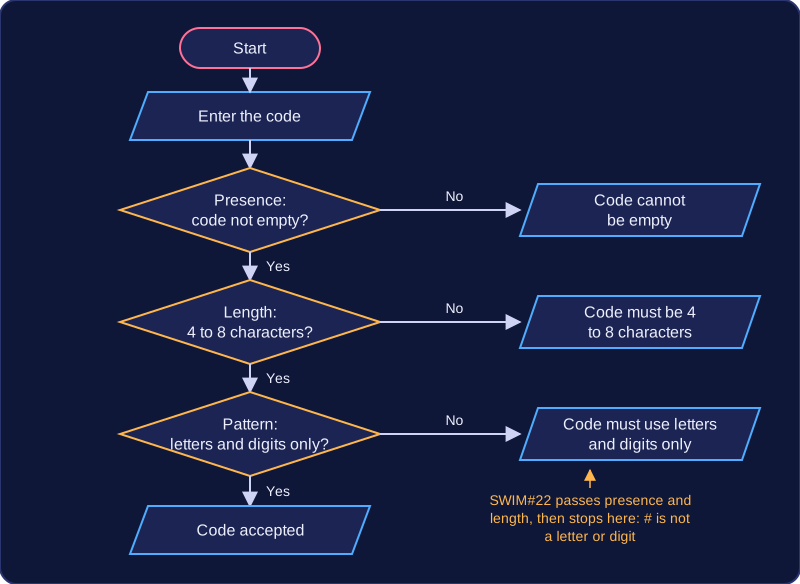
| Code entered | Presence | Length 4 to 8 | Letters and digits only | Result |
|---|---|---|---|---|
| (nothing) | fail | fail | fail | rejected |
| SW7 | pass | fail | pass | rejected |
| SWIM#22 | pass | pass | fail | rejected |
| Swim2024 | pass | pass | pass | accepted |
The checks can be joined into one long condition with and and or, or they can be tested one after another. Testing them one at a time lets you print a message naming the rule that failed, so the user knows what to change. Combining everything into a single condition is shorter, but you can usually only give one general message such as "Invalid code".
code = input("Enter your library code: ")

if len(code) == 0:
    print("Code cannot be empty")
elif len(code) < 4 or len(code) > 8:
    print("Code must be 4 to 8 characters")
elif not code.isalnum():
    print("Code must use letters and digits only")
else:
    print("Code accepted")
Output when the user types SWIM#22:
Enter your library code: SWIM#22
Code must use letters and digits only
Here the code is rejected as soon as a rule fails, and the message tells the user which rule to fix. Only a code that clears all three checks reaches the final line.
Work through every rule the data must meet before you write the checks: a rule you forget is a rule the program never enforces.
Validation checks that input follows a set of rules before a program accepts it. Passing validation only means the value fits those rules. It cannot prove that the value is true or accurate.
A valid value is not always a true value
Imagine a leisure centre booking system that asks for a membership number. The validation rule checks that the number is exactly six digits. The input 004821 passes the rule, but it could still be a mistyped version of a real membership number, or it could be another member's number. The rule checks the shape of the data, not who it belongs to or whether it is correct.
Rules that are too strict
Validation rules can also reject genuine data. If the leisure centre later issues seven-digit membership numbers, the six-digit rule would refuse a valid new number. The rule was designed around old data, so it no longer matches the real data being accepted. Rules must be based on the values that genuinely occur, including any new formats.
Validation can stop unsuitable input, but it is not a guarantee of correctness. It cannot prevent every crash or security problem, because it only compares input with the programmed rules. Data that passes can still be wrong, so validation is one safeguard rather than a complete solution.
Authentication by lookup checks someone's credentials by searching stored records for a matching pair, instead of comparing them with a single password written into the program.
How the lookup works
The program asks for a user ID and a password, then searches the stored credentials for an entry whose user ID matches the one typed. It then checks that the password in that same entry matches the password typed.
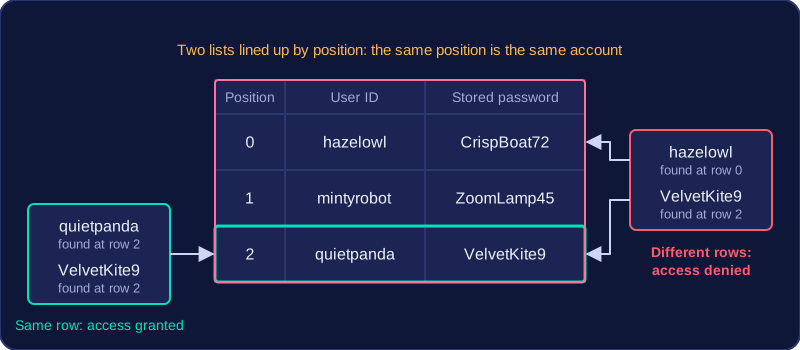
The two values must belong to the same stored record. If a program only checked that the user ID appeared somewhere in the list and the password appeared somewhere else, someone could type their own user ID with another person's password and still be let in.
Credentials can be held in a list, a dictionary, a file or a database. Here they are two lists lined up by position, so the entries at the same position belong to the same account:
| Position | User ID | Stored password |
|---|---|---|
| 0 | hazelowl | CrispBoat72 |
| 1 | mintyrobot | ZoomLamp45 |
| 2 | quietpanda | VelvetKite9 |
Typing quietpanda with VelvetKite9 is accepted: the user ID is at position 2 and the password at position 2 matches it. Typing hazelowl with VelvetKite9 is refused, because hazelowl's stored password is CrispBoat72 — VelvetKite9 is a real password, but it belongs to a different account. If the pair matches, access is granted; if not, access is denied and the user may be asked to try again.
user_ids = ["hazelowl", "mintyrobot", "quietpanda"]
passwords = ["CrispBoat72", "ZoomLamp45", "VelvetKite9"]

entered_id = input("Enter user ID: ")
entered_pass = input("Enter password: ")

found = False
for i in range(len(user_ids)):
    if user_ids[i] == entered_id and passwords[i] == entered_pass:
        found = True

if found:
    print("Access granted")
else:
    print("Access denied")
Output when the user types quietpanda, VelvetKite9:
Enter user ID: quietpanda
Enter password: VelvetKite9
Access granted
Validating before the lookup
Before searching, presence, length and pattern checks can confirm that both fields have been filled in, that the user ID is a sensible length and that it contains only permitted characters. This stops the program searching for blank or impossible entries and gives the user a clear message straight away, rather than a plain refusal that hides the real problem. Validation only shows the input looks right; the lookup still decides whether the pair is correct.
user_id = input("Enter user ID: ")
password = input("Enter password: ")

if len(user_id) == 0 or len(password) == 0:
    print("Both fields must be filled in")
elif len(user_id) < 4 or len(user_id) > 16:
    print("User IDs are 4 to 16 characters")
elif not user_id.isalnum():
    print("User IDs use letters and digits only")
else:
    print("Credentials ready to look up")
Output when the user types hazel owl, CrispBoat72:
Enter user ID: hazel owl
Enter password: CrispBoat72
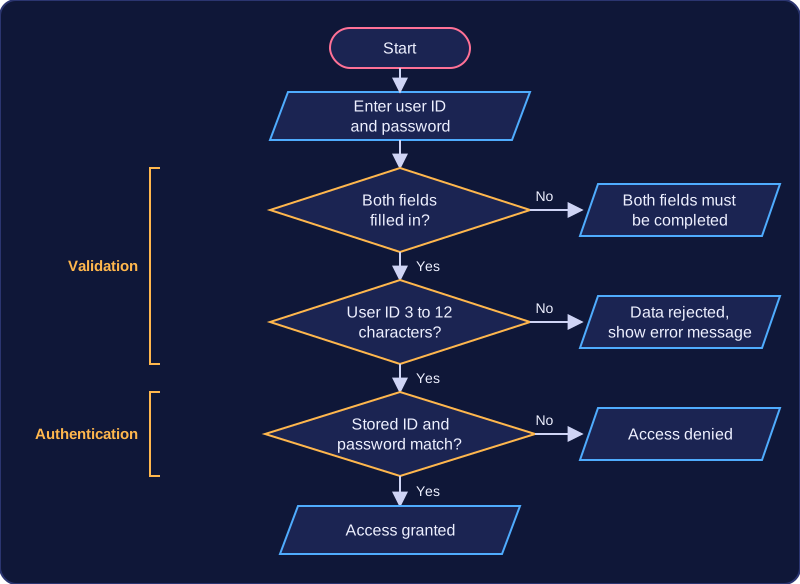
User IDs use letters and digits onlyValidation and authentication are two different checks that often guard the same login screen. Validation asks whether the data is in an acceptable form; authentication asks who the user is.
Validation checks the data
Validation tests input against rules the programmer has written, such as a presence check, a length check, a range check or a pattern check, and rejects anything that breaks them. A login form might use a presence check so neither field is blank, plus a length check so the user ID has between three and twelve characters.
Passing those rules only shows the data looks sensible. A user ID of hx24 passes a length check because it has four characters, but that tells you nothing about whether an account with that ID exists or whether the password typed beside it belongs to it.
Authentication checks the person
Authentication compares the credentials entered with the details stored for an account, then grants or refuses access to the system, its files and its features. The login only succeeds when the user ID and the password belong to the same stored account, so a valid-looking user ID paired with somebody else’s password is still refused. This is authentication by lookup, because the program searches the stored credentials for a matching pair.
| Validation | Authentication | |
|---|---|---|
| Question it answers | Is this data allowed by the rules? | Is this user who they claim to be? |
| What it compares | The input and a rule | The entered credentials and the stored credentials |
| What a pass means | The data is in an acceptable form | The account exists and the password matches it |
| What a fail means | The data is rejected, usually with an error message | Access is refused |
The program below checks that both fields are present, then looks up the matching pair.
user_ids = ["hx24", "priya_r"]
passwords = ["cobalt9", "sunrise2"]

entered_id = input("User ID: ")
entered_password = input("Password: ")

if len(entered_id) == 0 or len(entered_password) == 0:
    print("Both fields must be completed")
else:
    granted = False
    for i in range(len(user_ids)):
        if entered_id == user_ids[i] and entered_password == passwords[i]:
            granted = True
    if granted:
        print("Access granted")
    else:
        print("Access denied")
Output when the user types hx24, cobalt9:
User ID: hx24
Password: cobalt9
Access granted