Input Validation
Authentication by Lookup
Authentication by lookup checks someone's credentials by searching stored records for a matching pair, instead of comparing them with a single password written into the program.
How the lookup works
The program asks for a user ID and a password, then searches the stored credentials for an entry whose user ID matches the one typed. It then checks that the password in that same entry matches the password typed.
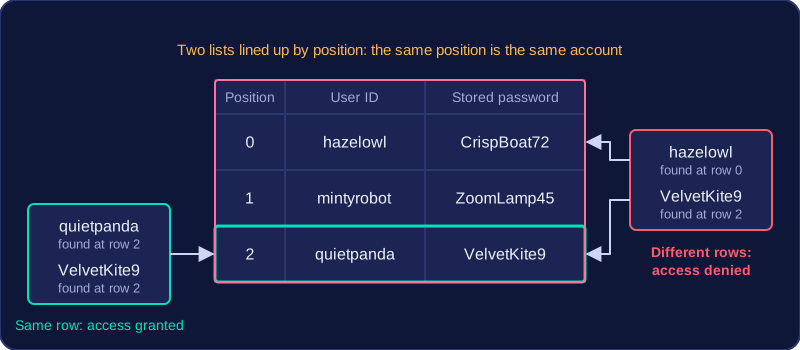
The two values must belong to the same stored record. If a program only checked that the user ID appeared somewhere in the list and the password appeared somewhere else, someone could type their own user ID with another person's password and still be let in.
Credentials can be held in a list, a dictionary, a file or a database. Here they are two lists lined up by position, so the entries at the same position belong to the same account:
| Position | User ID | Stored password |
|---|---|---|
| 0 | hazelowl | CrispBoat72 |
| 1 | mintyrobot | ZoomLamp45 |
| 2 | quietpanda | VelvetKite9 |
Typing quietpanda with VelvetKite9 is accepted: the user ID is at position 2 and the password at position 2 matches it. Typing hazelowl with VelvetKite9 is refused, because hazelowl's stored password is CrispBoat72 — VelvetKite9 is a real password, but it belongs to a different account. If the pair matches, access is granted; if not, access is denied and the user may be asked to try again.
user_ids = ["hazelowl", "mintyrobot", "quietpanda"]
passwords = ["CrispBoat72", "ZoomLamp45", "VelvetKite9"]

entered_id = input("Enter user ID: ")
entered_pass = input("Enter password: ")

found = False
for i in range(len(user_ids)):
    if user_ids[i] == entered_id and passwords[i] == entered_pass:
        found = True

if found:
    print("Access granted")
else:
    print("Access denied")
Output when the user types quietpanda, VelvetKite9:
Enter user ID: quietpanda
Enter password: VelvetKite9
Access granted
Validating before the lookup
Before searching, presence, length and pattern checks can confirm that both fields have been filled in, that the user ID is a sensible length and that it contains only permitted characters. This stops the program searching for blank or impossible entries and gives the user a clear message straight away, rather than a plain refusal that hides the real problem. Validation only shows the input looks right; the lookup still decides whether the pair is correct.
user_id = input("Enter user ID: ")
password = input("Enter password: ")

if len(user_id) == 0 or len(password) == 0:
    print("Both fields must be filled in")
elif len(user_id) < 4 or len(user_id) > 16:
    print("User IDs are 4 to 16 characters")
elif not user_id.isalnum():
    print("User IDs use letters and digits only")
else:
    print("Credentials ready to look up")
Output when the user types hazel owl, CrispBoat72:
Enter user ID: hazel owl
Enter password: CrispBoat72
User IDs use letters and digits only
Practise this
Edexcel GCSE Computer Science · Input Validation