Input Validation
Multiple Validation Checks
Some fields must satisfy several rules at once, so you apply more than one validation check to the same input. Each check tests one rule, and the value is accepted only when every check passes.
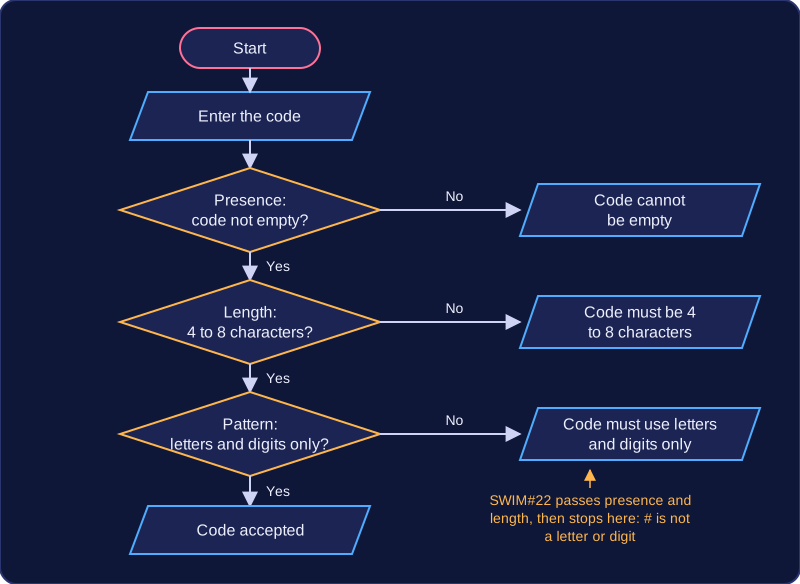
Imagine a library membership code. It must not be left blank (presence check), it must be between 4 and 8 characters (length check), and it must contain only letters and digits (pattern check). Three separate rules, three separate checks, and one wrong character is enough to reject the code.
| Code entered | Presence | Length 4 to 8 | Letters and digits only | Result |
|---|---|---|---|---|
| (nothing) | fail | fail | fail | rejected |
| SW7 | pass | fail | pass | rejected |
| SWIM#22 | pass | pass | fail | rejected |
| Swim2024 | pass | pass | pass | accepted |
The checks can be joined into one long condition with and and or, or they can be tested one after another. Testing them one at a time lets you print a message naming the rule that failed, so the user knows what to change. Combining everything into a single condition is shorter, but you can usually only give one general message such as "Invalid code".
code = input("Enter your library code: ")

if len(code) == 0:
    print("Code cannot be empty")
elif len(code) < 4 or len(code) > 8:
    print("Code must be 4 to 8 characters")
elif not code.isalnum():
    print("Code must use letters and digits only")
else:
    print("Code accepted")
Output when the user types SWIM#22:
Enter your library code: SWIM#22
Code must use letters and digits only
Here the code is rejected as soon as a rule fails, and the message tells the user which rule to fix. Only a code that clears all three checks reaches the final line.
Work through every rule the data must meet before you write the checks: a rule you forget is a rule the program never enforces.
Practise this
Edexcel GCSE Computer Science · Input Validation