Selection (IF)
Comparison Operators and Conditions
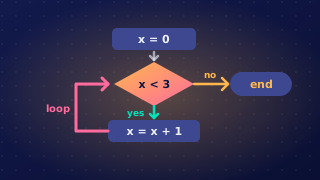
A condition is a Boolean expression: a test that always works out to either True or False. Selection statements such as if use a condition to decide whether a block of code runs.
The six comparison operators
Most conditions compare two values using a comparison operator. There are six of them, and each one produces a Boolean result.
| Operator | Meaning | Example condition |
|---|---|---|
== | equal to | age == 13 |
!= | not equal to | day != "Friday" |
> | greater than | tickets > 0 |
< | less than | speed < 30 |
>= | greater than or equal to | height >= 140 |
<= | less than or equal to | lives <= 2 |
Use == to test equality. A single = is the assignment operator that stores a value in a variable, so it cannot be used as a test: Python rejects if score = 10: with a syntax error, and you must write if score == 10:.
Why the boundary matters
The operator you choose changes the result when a value sits exactly on the boundary. A roller coaster needs riders to be at least 140 cm tall, so height >= 140 lets in someone who measures exactly 140. Writing height > 140 would turn that same person away, because > excludes the boundary value. In the same way, < excludes the boundary and <= includes it.
height = int(input("Height in cm: "))
if height >= 140:
    print("You can ride")
else:
    print("Sorry, too short")
Output when the user types 140:
Height in cm: 140
You can ride
Conditions that are not comparisons
A condition does not have to contain a comparison operator. A Boolean variable already holds True or False, so if is_member: tests it directly, and any other value that comes back as True or False can be used in the same way.
Comparisons between strings are case-sensitive: "Yes" and "yes" are different strings, so they are not equal. Your condition only passes when the text is typed exactly as it is written in the condition, capital letters included. To accept any capitalisation, a program would need to change the case of the text before comparing it.
answer = input("Do you want a receipt? ")
if answer == "yes":
    print("Printing receipt")
else:
    print("No receipt")
Output when the user types Yes:
Do you want a receipt? Yes
No receipt
Practise this
Edexcel GCSE Computer Science · Selection (IF)
Edexcel GCSE Computer Science · Condition Controlled Iteration (While Loops)
Edexcel GCSE Computer Science · Input Validation
Edexcel GCSE Computer Science · Relational Operators