Constructs
Selection IF
Contents
A condition is a Boolean expression: a test that always works out to either True or False. Selection statements such as if use a condition to decide whether a block of code runs.
The six comparison operators
Most conditions compare two values using a comparison operator. There are six of them, and each one produces a Boolean result.
| Operator | Meaning | Example condition |
|---|---|---|
== | equal to | age == 13 |
!= | not equal to | day != "Friday" |
> | greater than | tickets > 0 |
< | less than | speed < 30 |
>= | greater than or equal to | height >= 140 |
<= | less than or equal to | lives <= 2 |
Use == to test equality. A single = is the assignment operator that stores a value in a variable, so it cannot be used as a test: Python rejects if score = 10: with a syntax error, and you must write if score == 10:.
Why the boundary matters
The operator you choose changes the result when a value sits exactly on the boundary. A roller coaster needs riders to be at least 140 cm tall, so height >= 140 lets in someone who measures exactly 140. Writing height > 140 would turn that same person away, because > excludes the boundary value. In the same way, < excludes the boundary and <= includes it.
height = int(input("Height in cm: "))
if height >= 140:
    print("You can ride")
else:
    print("Sorry, too short")
Output when the user types 140:
Height in cm: 140
You can ride
Conditions that are not comparisons
A condition does not have to contain a comparison operator. A Boolean variable already holds True or False, so if is_member: tests it directly, and any other value that comes back as True or False can be used in the same way.
Comparisons between strings are case-sensitive: "Yes" and "yes" are different strings, so they are not equal. Your condition only passes when the text is typed exactly as it is written in the condition, capital letters included. To accept any capitalisation, a program would need to change the case of the text before comparing it.
answer = input("Do you want a receipt? ")
if answer == "yes":
    print("Printing receipt")
else:
    print("No receipt")
Output when the user types Yes:
Do you want a receipt? Yes
No receiptelif is short for else if. It gives an if statement another condition to test, and it is only tested when every condition written above it was False. One if statement can have several elif branches, so you can choose between many alternatives without writing a separate if statement for each one.
Only the first True branch runs
Python works down the chain of branches and stops at the first one whose condition is True. That branch's block runs, and every branch below it is skipped — even the ones whose conditions would also have been True.
temperature = int(input("Temperature: "))
if temperature >= 30:
    print("Hot")
elif temperature >= 20:
    print("Warm")
elif temperature >= 10:
    print("Cool")
else:
    print("Cold")
Output when the user types 22:
Temperature: 22
Warm
If you enter 22, the test temperature >= 20 is True, so "Warm" is printed. The test temperature >= 10 would also be True, but it is never reached, because the chain has already finished.
The order of the branches decides the answer
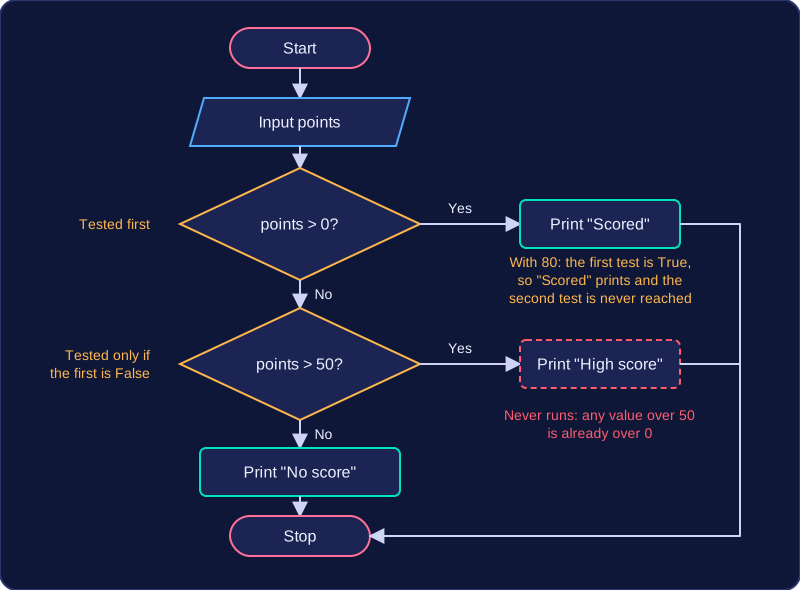
Conditions are checked in the order you write them, so when more than one could be true, the branch written first wins. In the program below the tests overlap and the branches are in the wrong order, so the messages depend on that order rather than on the values:
points = int(input("Points: "))
if points > 0:
    print("Scored")
elif points > 50:
    print("High score")
else:
    print("No score")
Output when the user types 80:
Points: 80
Scored
An entry of 80 matches points > 0 first, so "Scored" prints and the points > 50 branch never runs. Swap those two branches round and the same entry would print "High score" instead. When tests overlap, put the narrowest, most specific test first.
Rules for building the chain
- if comes first; it is the only branch that is always tested.
- Any number of elif branches follow, each with its own condition.
- else comes last, carries no condition, and you can write it only once.
- An elif written after an else is an error: the else has already caught everything that was left, so Python rejects the code.
Every condition line ends with a colon, and the block underneath is indented so Python knows which statements belong to which branch.
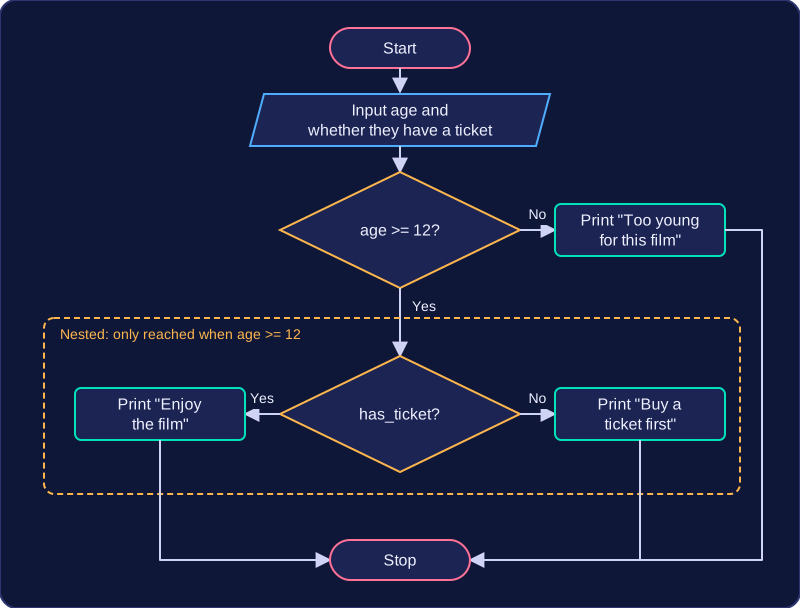
Nested selection means putting an if statement (or a whole if/elif/else structure) inside the block of another if. The inner selection is indented under the outer condition, so it is only reached when the outer condition is True. If the outer condition is False, the inner tests are never looked at at all.
Indentation is what makes nesting work: every line indented under an if belongs to that if. An else pairs with the if whose indentation level it lines up with, so you can tell which decision an else belongs to by looking at how far it is pushed in.
How nesting changes what runs
Imagine a cinema that checks age first. Only if the customer is old enough does it then check whether they have a ticket, because selling a ticket to someone too young to watch the film would be a wasted step.
age = int(input("How old are you? "))
has_ticket = input("Do you have a ticket? ") == "yes"

if age >= 12:
    if has_ticket:
        print("Enjoy the film")
    else:
        print("Buy a ticket first")
else:
    print("Too young for this film")
Output when the user types 14, yes:
How old are you? 14
Do you have a ticket? yes
Enjoy the film
The second if is indented one level in from the first, so it belongs to the outer block. Each else lines up with its own if: the outer else sits at the far left, and the inner else sits inside the outer block.
Two tests, one condition
Often you can flatten the nesting into a single selection whose condition joins the tests with Boolean operators. The same three messages can be chosen with one if/elif/else that uses and and not:
age = int(input("How old are you? "))
has_ticket = input("Do you have a ticket? ") == "yes"

if age >= 12 and has_ticket:
    print("Enjoy the film")
elif age >= 12 and not has_ticket:
    print("Buy a ticket first")
else:
    print("Too young for this film")
Output when the user types 9, yes:
How old are you? 9
Do you have a ticket? yes
Too young for this film
Both versions print the same message for every pair of answers, because the logic is the same. Neither is more correct than the other: what matters is that the conditions give the right result for every input. Nesting reads well when the second test only makes sense after the first one has passed; here the flat version has to repeat the age test, which is one reason the nested version is easier to follow. A combined condition is shorter when the tests are independent — write it the way you would say the rule out loud: "aged 12 or over and has a ticket".
Selection is how a program chooses between alternatives. Without it, a program can only work through the same steps every time; with an if statement it can react to the values it is given.
You need selection at any point where the next step depends on a value the program holds:
- checking that input is valid before you use it, so bad data never reaches the rest of the program
- choosing which message to display, so the user is told something that actually applies to them
- choosing which calculation to apply, so different cases get the correct maths
- choosing between different values to store in a variable, so later steps work with the right one
In this program the battery level decides which message the user sees:
battery = int(input("Battery percentage: "))
if battery <= 10:
    print("Plug in now")
elif battery <= 30:
    print("Battery low")
else:
    print("Battery OK")
Output when the user types 45:
Battery percentage: 45
Battery OK
Selection works anywhere in a program
An if statement is not just for the main program. Put one inside a loop and the condition is tested again on every pass, so the same decision can be made many times with different values. Put one inside a subprogram and the choice is made each time that subprogram is called. The keywords, the colon at the end of each condition line and the indentation rules are identical wherever the selection appears — only the values being tested change.
One entry point, one exit point
A well-written block has a single entry point — one place at the top where it begins — and a single exit point — one place at the bottom where it finishes. Nothing jumps into the middle of the block, and no branch leaves early, because anyone tracing the code would lose track of which line runs next. A subprogram follows the same rule: it is entered by its name, and it returns from one place at the end rather than from several.
A simple way to keep to this is to set a variable to a sensible starting value before the selection, change it inside a branch, then use it once afterwards:
weight = float(input("Parcel weight in kg: "))
postage = 3.50
if weight > 2:
    postage = 3.50 + (weight - 2) * 1.20  # extra charge above 2 kg
print("Postage: " + str(round(postage, 2)))
Output when the user types 3.5:
Parcel weight in kg: 3.5
Postage: 5.3
Both routes through the selection arrive at the same final line, so the block has one way in and one way out.