Constructs
Count Controlled Iteration For Loops
Contents
A for loop repeats the same block of statements once for each value in a sequence. Programmers call it count-controlled iteration because the number of repetitions is fixed in advance by those values, rather than by a condition that gets tested each time round.
The parts of a for loop
Every for loop header in Python 3 is built from the same five parts, in this order:
- for — the keyword that starts the loop.
- a loop variable — a name you choose, which holds the current value.
- in — the keyword that links the variable to the values.
- an iterable — the object that supplies the values.
- a colon — the mark that ends the header line.
The indented lines underneath the header are the loop body. They run once for each value the iterable supplies, and the loop stops by itself once the last value has been used. The loop variable can be used inside the body, where it holds a different value on each repetition.
The iterable is usually range(...), which produces a sequence of integers, or a data structure such as a string, a list or an array. Each one hands over its items one at a time, so the same header copes with three values or three hundred.
# Print a label for each of the six tables in a cafe
for tableNumber in range(1, 7):
    print("Table " + str(tableNumber) + " is ready")
Output:
Table 1 is ready
Table 2 is ready
Table 3 is ready
Table 4 is ready
Table 5 is ready
Table 6 is ready
Here the iterable supplies six numbers, so the print statement runs six times and every table gets its own label.
Why no condition is needed
The iterable decides everything. If it supplies six values, the body runs six times; if it supplies three, the body runs three times. There is no condition for you to test and no counter for you to add to: Python moves on to the next value automatically and stops when the values run out. That makes a for loop the natural choice when you know in advance how many repetitions you need, or when you want to visit every item in a data structure in turn.
The range() function produces a sequence of integers. Put it after in in a for loop and the loop variable takes each value from that sequence in turn, one value per repetition. Because range() fixes exactly how many values there are, the loop is count-controlled.
Three ways to write a range
range(stop) starts at 0, goes up in steps of 1 and stops before stop. So range(4) gives 0, 1, 2 and 3 — four repetitions, not five.
range(start, stop) starts at start instead of 0, still going up in 1s and still stopping before stop.
range(start, stop, step) adds a third value, the step, which is the gap between neighbouring values. A positive step counts upwards, so range(2, 11, 3) jumps 2, 5, 8. A negative step counts downwards, which is how you make a loop run backwards; here start must be larger than stop.
In every form the stop value is never included, so the loop ends before reaching it. With a negative step, start must be larger than stop for the loop to run at all.
| Call | Values the loop variable takes |
|---|---|
range(4) | 0, 1, 2, 3 |
range(2, 6) | 2, 3, 4, 5 |
range(1, 8, 3) | 1, 4, 7 |
range(9, 3, -2) | 9, 7, 5 |
Worked example
Here the loop uses a negative step so the checkpoints are scored from 4 down to 1. The loop variable checkpoint holds 4 on the first repetition and 1 on the last, and the line inside the loop runs four times because the range supplies four values.
# Score four checkpoints, counting down from 4 to 1
for checkpoint in range(4, 0, -1):
    points = checkpoint * 10
    print("Checkpoint " + str(checkpoint) + " scores " + str(points))
Output:
Checkpoint 4 scores 40
Checkpoint 3 scores 30
Checkpoint 2 scores 20
Checkpoint 1 scores 10Direct iteration is when a for loop steps through a data structure — a string, a list or an array — one item at a time, without you writing how many items there are. You name a loop variable and the data structure, then end the line with a colon. Python sets the loop variable to each item in turn, starting with the first and finishing with the last, so the indented body runs once for every item.
Because the loop visits every item, it suits jobs where each item must be processed and you never need an item's position. If you do need the position, use index-based iteration instead, where the loop variable holds an index rather than an item.
Why it copes with change
Nothing in the loop says how many items to visit, so the same loop works on a three-character code and a twelve-character one. Adding or removing an item changes the number of repetitions automatically. This is still count-controlled repetition: the count comes from the size of the data structure rather than from a number you typed in.
The program below counts the digits in a locker code, whatever its length.
lockerCode = input("Enter your locker code: ")
digitCount = 0

for character in lockerCode:
    if character.isdigit():
        digitCount = digitCount + 1

print("Digits found: " + str(digitCount))
Output when the user types P4T9:
Enter your locker code: P4T9
Digits found: 2
Typed in as P4T9, the loop variable and the count change like this:
| Repetition | character | character.isdigit() | digitCount |
|---|---|---|---|
| 1 | P | False | 0 |
| 2 | 4 | True | 1 |
| 3 | T | False | 1 |
| 4 | 9 | True | 2 |
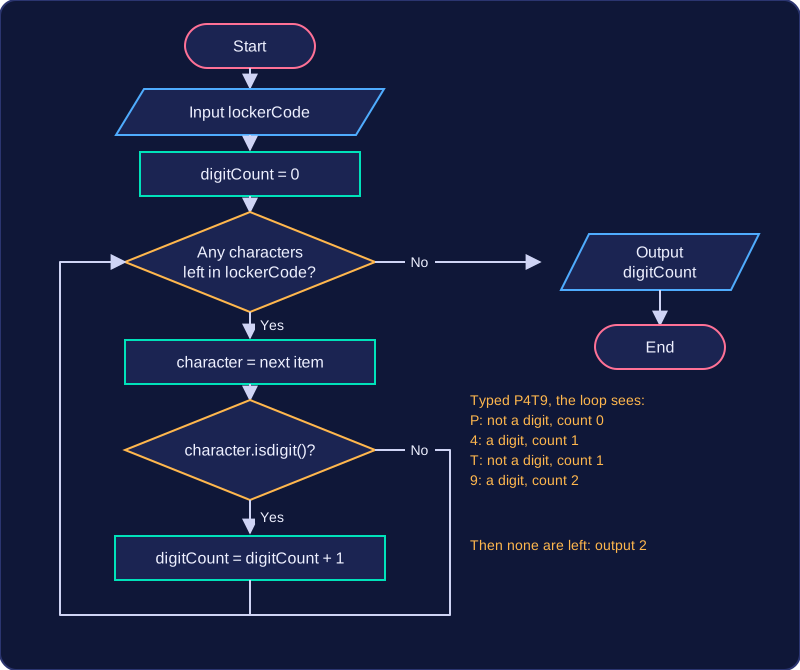
The loop ends by itself once the last item has been used, so there is no condition for you to check and no way to run past the end of the data.
Index-based iteration means using a for loop to visit every position in a data structure in turn, instead of visiting the items directly. The loop variable holds an index (a position number), and you use that index to reach the item, for example word[i] for a string.
Matching the range to the indexes
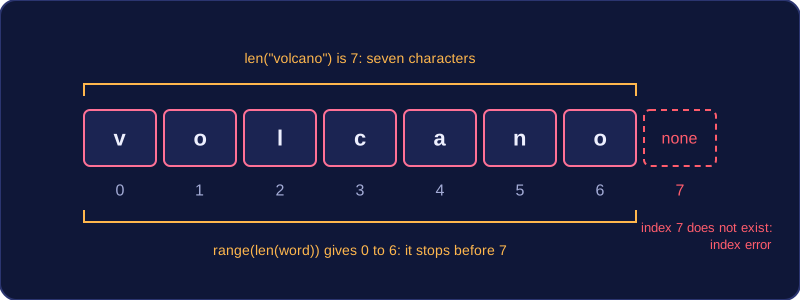
The len() function returns the number of items a data structure holds, so len("volcano") is 7 because the string holds seven characters. Indexes start at 0, so those seven characters sit at positions 0, 1, 2, 3, 4, 5 and 6. Writing range(len(word)) starts at 0 and stops before 7, giving exactly 0 to 6: every valid index and nothing beyond. Using range(len(word) + 1) would run one step too far and ask for position 7, which does not exist, so the program would crash with an index error.
word = "volcano"

# i takes each index from 0 up to len(word) - 1
for i in range(len(word)):
    print(str(i + 1) + ". " + word[i])
Output:
1. v
2. o
3. l
4. c
5. a
6. n
7. o
Because the loop now knows the position, the output can show each character with its position number, which direct iteration cannot do. Building the range from len() also means the loop still visits every item if the data is later made longer or shorter, with no numbers to edit by hand.
When to use it
Choose index-based iteration when the position itself matters: numbering items as you print them, comparing an item with the one before it, or picking out the item at the same position in a second structure. It is also count-controlled, because len() fixes the number of repetitions before the loop starts.
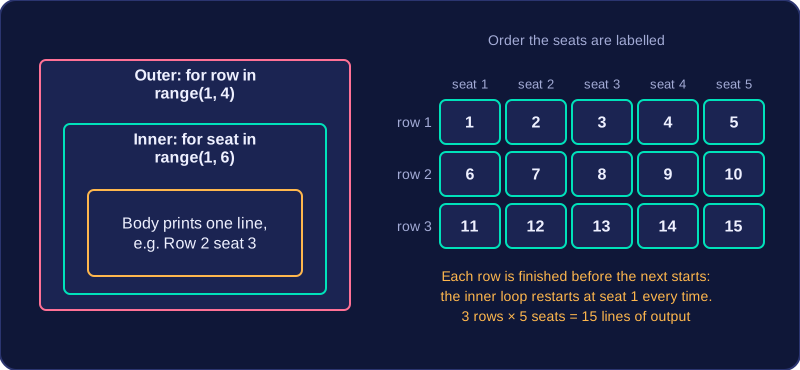
A nested loop is a for loop written inside the body of another for loop. The outer loop controls the larger job and the inner loop carries out a smaller job for each step of it. The inner loop completes all of its repetitions before the outer loop moves on to its next repetition, so the two loops never run side by side.
How the repetitions multiply
If the outer loop repeats 3 times and the inner loop repeats 5 times, the inner loop's body runs 3 × 5 = 15 times. Following the loop variables makes this easy to see: the outer loop variable stays fixed while the inner loop variable counts all the way through, then it starts again from its first value.
| Outer loop variable | Inner loop variable counts | Inner loop body runs |
|---|---|---|
| 1 | 1, 2, 3, 4, 5 | 5 times |
| 2 | 1, 2, 3, 4, 5 | 5 times |
| 3 | 1, 2, 3, 4, 5 | 5 times |
In the program below the outer loop picks a row of the hall and the inner loop visits each seat in that row, so every seat is labelled exactly once.
# Labels every seat in a hall with 3 rows of 5 seats
for row in range(1, 4):
    for seat in range(1, 6):
        print("Row " + str(row) + " seat " + str(seat))
Output:
Row 1 seat 1
Row 1 seat 2
Row 1 seat 3
Row 1 seat 4
Row 1 seat 5
Row 2 seat 1
Row 2 seat 2
Row 2 seat 3
Row 2 seat 4
Row 2 seat 5
Row 3 seat 1
Row 3 seat 2
Row 3 seat 3
Row 3 seat 4
Row 3 seat 5
Records and fields in a two-dimensional structure
A two-dimensional data structure stores data in rows and columns, like a table. In a table of records, each row is one record and each column is a field. Nested loops are ideal for this because they can process every field in every record: the outer loop traverses the records, working down the table one row at a time, and the inner loop traverses the fields in that record, working across the row. Because the inner loop restarts for each new record, every field in that record is processed before moving to the next record.
A for loop can do more than repeat a line: it can build up a total, find a maximum or minimum, count items, or join a string together. Each one works the same way — a variable initialised outside the loop is updated once per repetition.
The variable you update is an accumulator (for totals, counts and strings) or a tracking variable (for maximums and minimums). It must be initialised before the loop, because the first pass adds to whatever the variable already holds. A total starts at 0, and so can a maximum when no value can be negative. Miss the initialisation and Python raises an error, as you cannot add to something that does not exist yet.
| Job | Variable | Set before the loop | Update inside the loop |
|---|---|---|---|
| Running total | total | total = 0 | total = total + value |
| Counting items | count | count = 0 | count = count + 1 |
| Highest so far | best | best = 0 | if value > best: then best = value |
| Building a string | word | word = "" | word = word + letter |
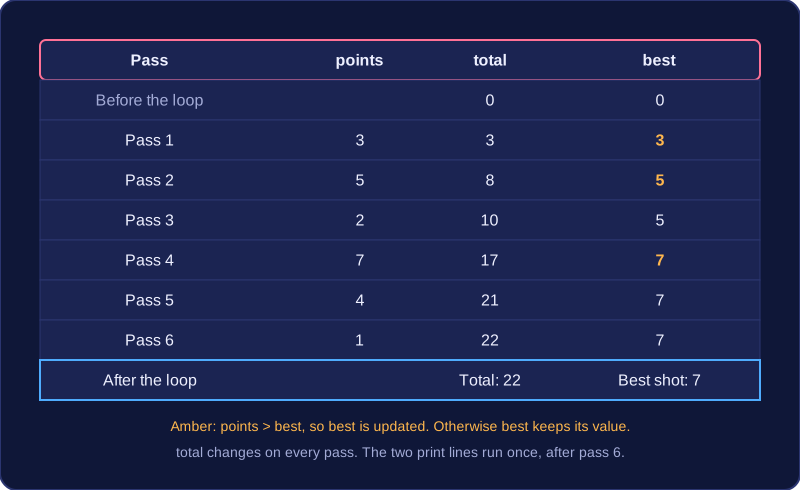
Here a player takes six shots at a basketball hoop. total collects the points and best tracks the highest single shot:
total = 0
best = 0
for attempt in range(6):
    points = int(input("Points scored: "))
    total = total + points
    if points > best:
        best = points
print("Total: " + str(total))
print("Best shot: " + str(best))
Output when the user types 3, 5, 2, 7, 4, 1:
Points scored: 3
Points scored: 5
Points scored: 2
Points scored: 7
Points scored: 4
Points scored: 1
Total: 22
Best shot: 7
Only the indented lines repeat. The two print lines sit at the original indentation, so they run once, after the sixth shot has been added — put them inside the loop and you would see a running commentary instead of one final result.
Sometimes a variable must start fresh for each record. If an outer loop handles one player at a time, total = 0 goes inside the outer loop, just before that player's shots are processed. Otherwise the second player's total begins with the first player's points, and every figure after the first is wrong.
Finally, do not reuse the loop variable for another job inside the body. In for attempt in range(6), attempt already holds the current repetition number. Changing it will not alter how many times the loop repeats, but it wipes out the count you may need, so give your accumulator its own name.