Constructs
Condition Controlled Iteration While Loops
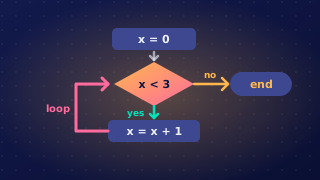
A while loop repeats its body as long as its condition is True, so you must set it up so that the condition can eventually become False — otherwise the loop never stops.
Giving the condition a chance to change
Any variable used in the condition must be given a value before the loop is reached, because the condition is tested before the very first pass. Without a value, the program stops with a runtime error; if the value given already makes the condition False, the body is skipped altogether.
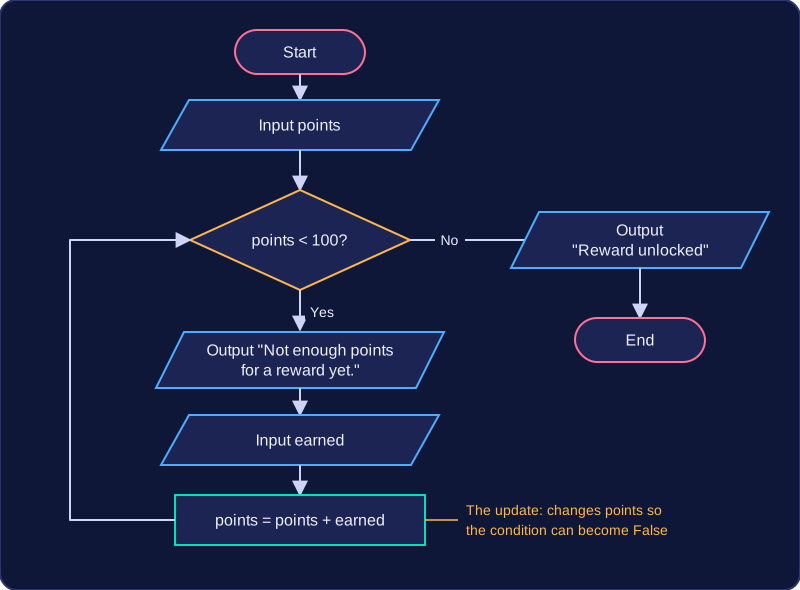
At least one of those variables must then be changed inside the loop body. Changing it after the loop is no use, because the loop never gets that far. Here a reward card collects points until it reaches 100:
points = int(input("How many points do you have? "))
while points < 100:
    print("Not enough points for a reward yet.")
    earned = int(input("How many points did you earn today? "))
    points = points + earned  # update the variable used in the condition
print("Reward unlocked!")
Output when the user types 40, 70:
How many points do you have? 40
Not enough points for a reward yet.
How many points did you earn today? 70
Reward unlocked!
Each pass adds the day's points to points, so the total creeps towards 100 and the condition points < 100 finally becomes False. The condition is tested again at the start of every pass, using the new value.
Infinite loops
If nothing inside the loop can make the condition False, you have an infinite loop. The condition is still True, so the body runs again and again: the program keeps repeating that block and never moves on to the statements after the loop. It looks frozen, or simply never finishes.
This is not a syntax error — every line is legal, so the program does run. It is a logic or runtime problem, and you fix it by adding or repairing the update inside the loop, or by correcting the condition so it tests the right thing.
Why choose a while loop
A while loop is more flexible than a for loop when you do not know in advance how many repetitions are needed — the points total might reach 100 after three turns or thirty. The price of that flexibility is that you, the programmer, are responsible for making sure the loop will terminate.
A validation loop uses a while loop to keep asking until the user enters acceptable data. The loop repeats while the data is invalid, so the program does not continue with bad input.
Take the first input before the loop so the condition has a value to test.
players = int(input("How many players (2 to 6)? "))
while players < 2 or players > 6:
    print("That number is not allowed.")
    players = int(input("How many players (2 to 6)? "))
print("Starting a game for " + str(players) + " players.")
Output when the user types 1, 9, 4:
How many players (2 to 6)? 1
That number is not allowed.
How many players (2 to 6)? 9
That number is not allowed.
How many players (2 to 6)? 4
Starting a game for 4 players.
The condition in the example checks for values outside the allowed range: players < 2 or players > 6. It is written as invalid rather than valid because a while loop repeats while its condition is true. When the input is invalid, the error message and a new input are placed inside the loop. The new value is stored in the same variable, so the condition can change the next time it is checked. If the first value is already valid, the condition is false straight away and the loop body is skipped.
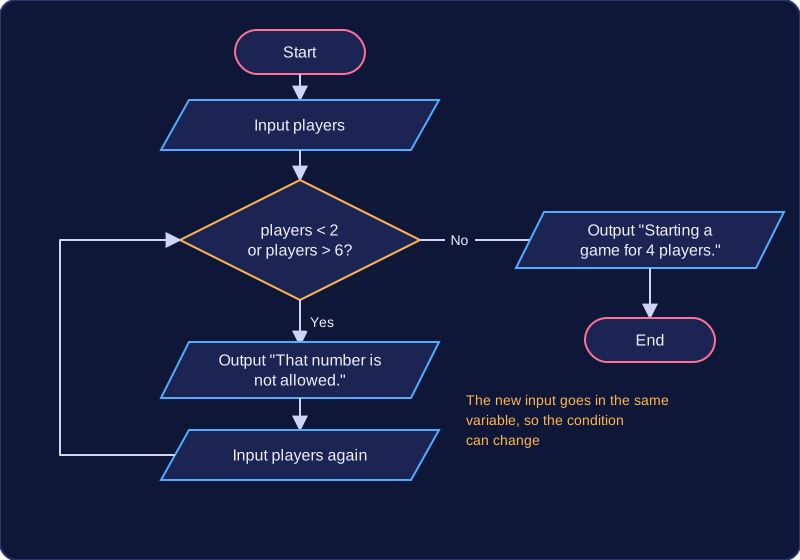
The condition is checked again at the start of every iteration, so invalid entries can be corrected one at a time. Once the value is valid, the loop ends and the program continues after it. Taking a new input inside the loop is essential; without it the same invalid value would be tested again and again.
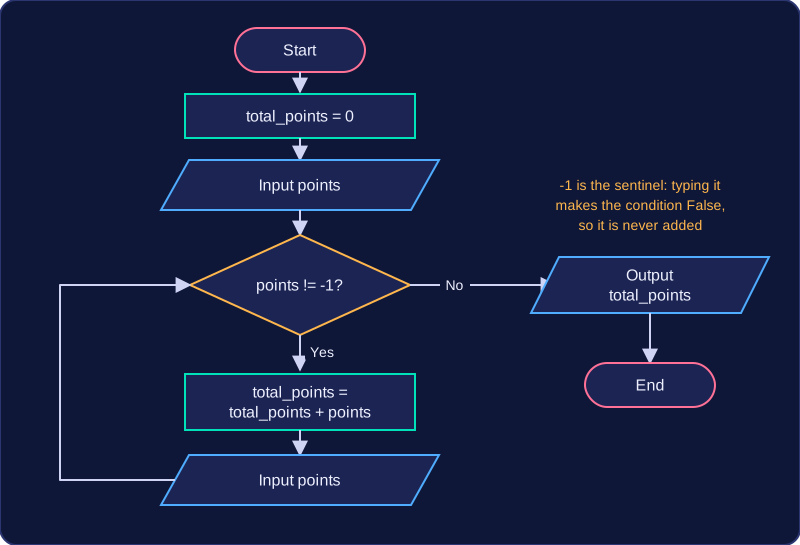
A sentinel value is a special value that means “stop”. It is not ordinary data: it is the signal that ends a while loop. The loop condition compares the latest input with the sentinel, so the loop repeats while the input is not equal to it. Choose a sentinel that normal data would not use, such as -1 for a points total, because a value that could be real data would end the loop too early.
In this program, -1 is the sentinel. Points are added to the total while the entered value is not -1. The input is taken once before the loop and again inside it, so the condition can change. Because the condition is tested before every pass, entering -1 first skips the body and the total stays at zero: the sentinel itself is never added.
total_points = 0
points = int(input("Enter points (-1 to finish): "))
while points != -1:
    total_points = total_points + points
    points = int(input("Enter points (-1 to finish): "))
print("Total points: " + str(total_points))
Output when the user types 4, 6, -1:
Enter points (-1 to finish): 4
Enter points (-1 to finish): 6
Enter points (-1 to finish): -1
Total points: 10
Menus that repeat
A menu can use its exit option as the sentinel. The loop condition checks the user’s choice, and selection inside the loop handles each menu option. Choosing the exit option makes the condition false, so the loop ends and the closing message prints once, outside the loop.
Here, Q is the sentinel. Option B books one seat and option C cancels one, but only while a seat is booked, so the number of seats can never drop below zero.
seats_taken = 0
option = ""
while option != "Q":
    print("B Book a seat, C Cancel a seat, Q Quit")
    option = input("Choose an option: ")
    if option == "B":
        seats_taken = seats_taken + 1
    elif option == "C" and seats_taken > 0:
        seats_taken = seats_taken - 1
print("Seats booked: " + str(seats_taken))
Output when the user types B, C, Q:
B Book a seat, C Cancel a seat, Q Quit
Choose an option: B
B Book a seat, C Cancel a seat, Q Quit
Choose an option: C
B Book a seat, C Cancel a seat, Q Quit
Choose an option: Q
Seats booked: 0A while loop can visit every item in a data structure by using an index – a variable holding the position of the item you are looking at. The loop repeats while the index still points at a real item, so each item is reached once, in order.
Four jobs, four places
The index has four separate jobs, and each one belongs in a particular place:
| Job | Where it goes |
|---|---|
| Initialise the index | Before the loop starts |
| Test the index | In the while condition |
| Use the index | Inside the body |
| Update the index | Inside the body |
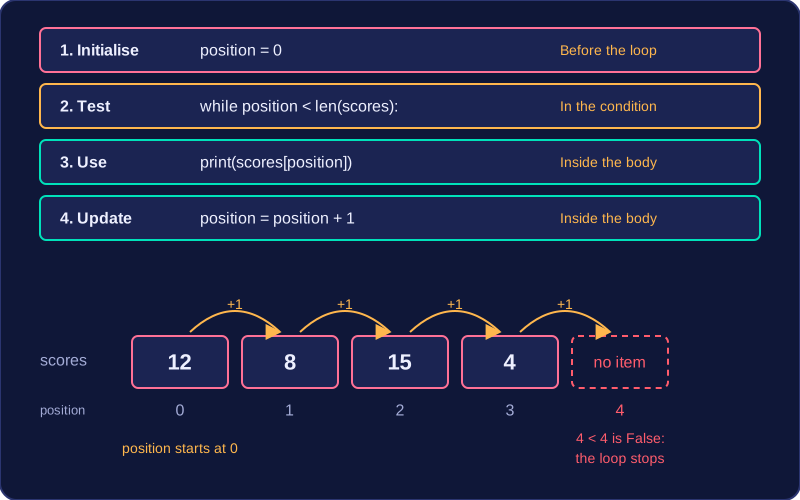
Moving a job changes the loop. If you initialise the index inside the body, it resets on every iteration. If you test the index but never update it, the condition never becomes false once it is true, so the loop never finishes.
Base the bound on the length
Testing the index against the length, using len(), means the same loop works whether the data structure holds 4 items or 400. A fixed bound suits only one size and fails when the data changes.
Use less than, not less than or equal to. Positions begin at 0, so the last item of a seven-item structure sits at position 6. An index equal to the length is past the end, so asking for the item at that position is invalid.
Worked example
Suppose a list holds four scores: 12, 8, 15 and 4. The loop prints each score; the trace table shows the index moving through the list.
| position | Is the position less than the length? | Score at that position | Output |
|---|---|---|---|
| 0 | 0 is less than 4: True | 12 | 12 |
| 1 | 1 is less than 4: True | 8 | 8 |
| 2 | 2 is less than 4: True | 15 | 15 |
| 3 | 3 is less than 4: True | 4 | 4 |
| 4 | 4 is less than 4: False | – | – |
The index starts at 0 before the loop, the condition tests it against the length, the body picks out one score per iteration, and the last line moves it on. After four iterations the index reaches 4, the condition is false and the loop stops.