Trace Tables
Tracing Selection

When a trace reaches a selection, test the condition with the values the variables hold at that moment instead of tracing every branch you can see. Decide whether the condition is True or False, then follow only the branch that actually runs.
Test once, then take one path
Substitute the current value into the condition. If it is True, trace the body of the if and ignore any elif and else that follow. If it is False, skip the if body and move on to the next condition in the chain. With elif, test the conditions in order from top to bottom and stop at the first one that is True, because only that block is executed.
A condition column in your trace table is worth adding: writing True or False beside each row shows the marker exactly which branch you followed and why.
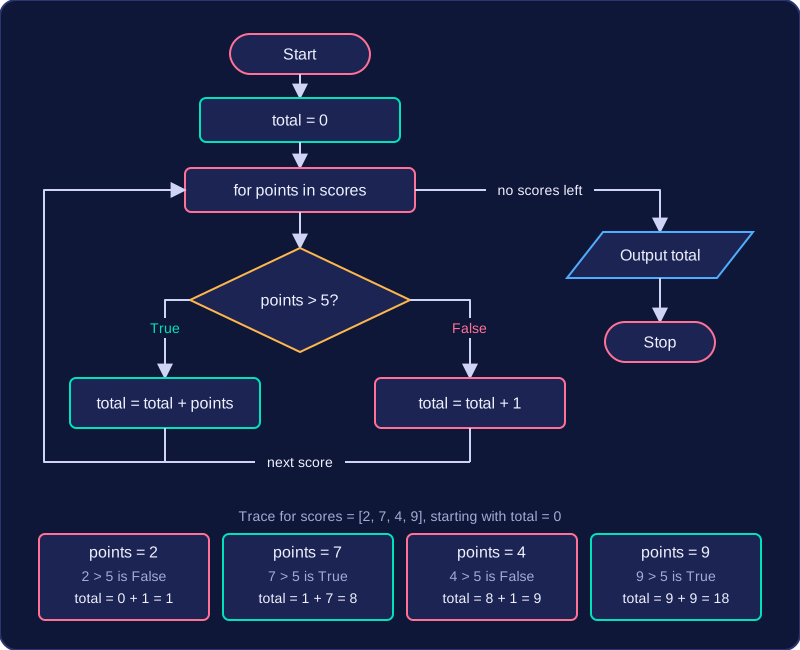
The program below works through four scores, choosing one of two assignments for each one.
scores = [2, 7, 4, 9]
total = 0
for points in scores:
    if points > 5:
        total = total + points   # high score
    else:
        total = total + 1        # low score
print(total)
Output:
18| points | points > 5 | total | Output |
|---|---|---|---|
| 2 | False | 1 | |
| 7 | True | 8 | |
| 4 | False | 9 | |
| 9 | True | 18 | |
| 18 |
Only one of the two assignments happens on each pass, so the total moves on by either the points or one, never both. Reading the total column on any row gives you the value of total at that point in the program.
When there is no else
If the condition is False and there is no else, nothing inside the block happens at all: jump straight to the statement after it. A variable that would have been changed inside the skipped block keeps its old value, so carry that value forward into the next row of the table.
Practise this
Edexcel GCSE Computer Science · Trace Tables
Edexcel GCSE Computer Science · Selection (IF)