Algorithms
Trace Tables

Contents
A trace table is a table that records the values held by variables as an algorithm is executed step by step. You fill it in as you work through the statements, so at the end it shows exactly how every value changed and what the algorithm produced.
Setting out the columns
Give each variable its own column, usually in the order the variables first appear, so the table matches the order you meet them in the algorithm. Add an output column for anything the algorithm displays, plus a column for a condition where checking it helps you decide which branch runs or when a loop should stop.
Each row records the state after one step or one iteration. Only fill in the output column when an output statement actually runs. You can leave a variable cell blank when its value does not change — a blank means the earlier value carries forward, not zero.
Worked example
This program gives 5 points for every even level:
points = 0
for level in range(1, 5):
    if level % 2 == 0:
        points = points + 5
print(points)
Output:
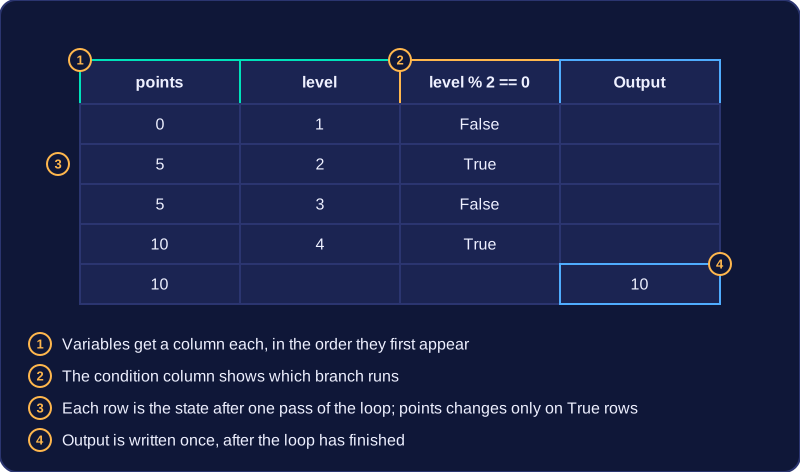
10points is given a value before level appears, so it takes the first column:
| points | level | level % 2 == 0 | Output |
|---|---|---|---|
| 0 | 1 | False | |
| 5 | 2 | True | |
| 5 | 3 | False | |
| 10 | 4 | True | |
| 10 | 10 |
The condition column explains why only levels 2 and 4 add points, while the odd levels leave the total alone. The output is only written once the loop has finished, so it sits in its own final row.
Layouts vary
Some trace tables put the condition before the variable columns, some finish with a separate output row, and some hand you spare rows underneath. Any of these is acceptable as long as the values and the order of execution are clear, so spare rows left blank cost you nothing. You can also record one row per statement instead of one per iteration, provided you keep the same pattern all the way down.
Before you trace any input or loop, write down the starting value of every variable in the first row of your trace table. That includes any counter or total that the algorithm sets to zero. If you skip this row, values can seem to appear from nowhere later.
When a statement does not change a variable, its previous value carries forward to the next row. In a trace table, an empty cell normally means the value is unchanged, not zero. So if a variable is still 5 from an earlier row, you can leave that cell blank and read it as 5. This keeps the table tidy without inventing new values, and it prevents values appearing or disappearing between rows.
Here is a short program. The variable bonus is set once and never changed, so its value carries forward through every loop row.
bonus = 5
score = 0
for question in range(1, 4):
    score = score + 10  # 10 points for each question
print(score + bonus)
Output:
35In the trace table, the first row records the starting values before the loop runs: score is 0 and bonus is 5. question has no value yet because the loop has not started, so its cell is blank. Inside the loop, score changes each time, but bonus stays at 5, so its cells are left empty and read as 5.
Worked example
| score | bonus | question | output |
|---|---|---|---|
| 0 | 5 | ||
| 10 | 1 | ||
| 20 | 2 | ||
| 30 | 3 | ||
| 30 | 35 |
The output column is only filled when print() actually runs, which is after the loop has finished. The final output is 35, not 0, because the carried-forward bonus of 5 is added to the final score of 30. The empty cells in the last row are read as unchanged too: bonus is still 5 and question is still 3.
An algorithm that takes in data and displays results needs both input and output values recorded as you trace it. Input values arrive when an input statement runs, and output values appear only when an output statement runs.
Recording input
When you reach an input statement such as int(input()), take the next value from the supplied data and write it in that variable's column on the row where the input happens. The supplied data is used in order: the first input statement takes the first value, the second takes the second, and so on. Before a variable's first input row, its cells stay empty. Values are not collected at the start of the trace; a later input statement picks up the next unused value at the moment it runs, which matters when an input sits inside a loop.
Recording output
Write in the output column only on rows where a print() statement actually runs. Many rows produce no output at all, so those cells stay empty. A variable's value belongs in its own column; it goes in the output column only if the algorithm really displays it.
This program reads four scores, displays a message for each score of 10 or more, then displays how many there were:
count = 0
for entry in range(4):
    score = int(input())
    if score >= 10:
        print("pass")
        count = count + 1
print(count)
Output when the user types 12, 4, 15, 9:
12
pass
4
15
pass
9
2| Step | entry | score | count | output |
|---|---|---|---|---|
| before loop | 0 | |||
| 1 | 0 | 12 | 1 | pass |
| 2 | 1 | 4 | 1 | |
| 3 | 2 | 15 | 2 | pass |
| 4 | 3 | 9 | 2 | |
| after loop | 2 | 2 |
When the algorithm finishes, the values left in the output column are the final output, in the order they were produced. Here that is pass, then pass, then 2. The value 2 appears in the output column only because the last statement printed it.
When a trace reaches a selection, test the condition with the values the variables hold at that moment instead of tracing every branch you can see. Decide whether the condition is True or False, then follow only the branch that actually runs.
Test once, then take one path
Substitute the current value into the condition. If it is True, trace the body of the if and ignore any elif and else that follow. If it is False, skip the if body and move on to the next condition in the chain. With elif, test the conditions in order from top to bottom and stop at the first one that is True, because only that block is executed.
A condition column in your trace table is worth adding: writing True or False beside each row shows the marker exactly which branch you followed and why.
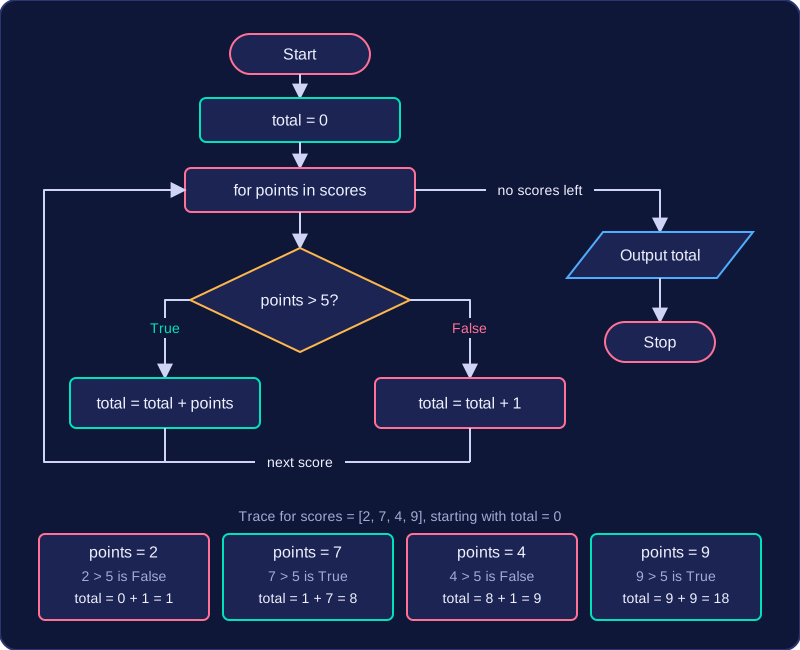
The program below works through four scores, choosing one of two assignments for each one.
scores = [2, 7, 4, 9]
total = 0
for points in scores:
    if points > 5:
        total = total + points   # high score
    else:
        total = total + 1        # low score
print(total)
Output:
18| points | points > 5 | total | Output |
|---|---|---|---|
| 2 | False | 1 | |
| 7 | True | 8 | |
| 4 | False | 9 | |
| 9 | True | 18 | |
| 18 |
Only one of the two assignments happens on each pass, so the total moves on by either the points or one, never both. Reading the total column on any row gives you the value of total at that point in the program.
When there is no else
If the condition is False and there is no else, nothing inside the block happens at all: jump straight to the statement after it. A variable that would have been changed inside the skipped block keeps its old value, so carry that value forward into the next row of the table.
A for loop repeats its body once for each value it is given. With range(), those values are numbers, so tracing the loop means working out which numbers, in which order.
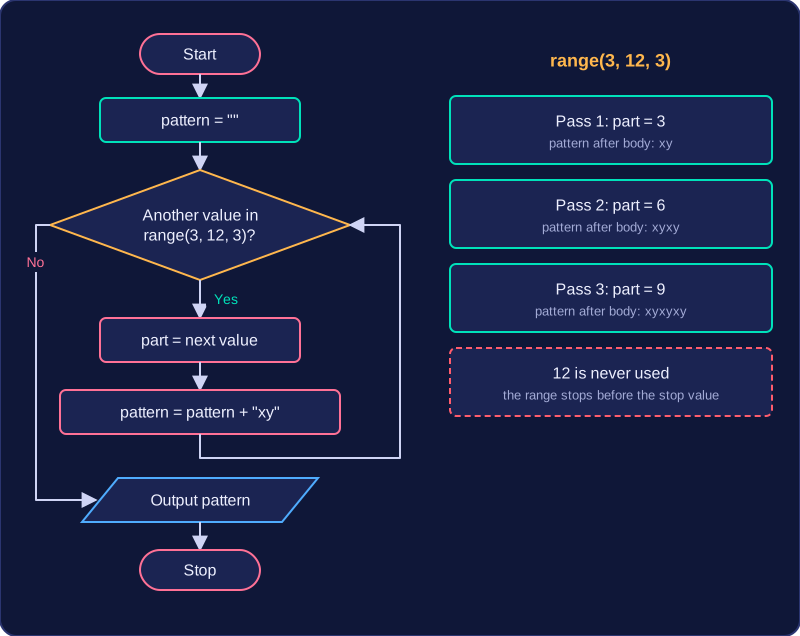
For a range() with a start, stop and step, begin at the start and keep adding the step until the next value would reach or pass the stop. The stop value is not included. A range from 2 to 9 with a step of 2 gives 2, 4, 6 and 8: four values, so four passes. Without a step, a range from 4 to 7 gives 4, 5 and 6. With only a stop value, a range of 3 gives 0, 1 and 2.
To trace the loop, make a new row for each pass, write the loop variable's value in that row, and update any variable that the body changes.
pattern = ""
for part in range(3, 12, 3):
    pattern = pattern + "xy"
print(pattern)
Output:
xyxyxyThe table shows each pass. The loop variable part takes three values, so the body runs three times, building up pattern two characters at a time. The stop value 12 never appears: the range ends before reaching it. The last entry shows the value left in pattern when the loop finishes.
| Stage | part | pattern after body |
|---|---|---|
| Before loop | not set | (empty string) |
| Pass 1 | 3 | xy |
| Pass 2 | 6 | xyxy |
| Pass 3 | 9 | xyxyxy |
A while loop repeats its body while a condition is true. To trace it, test the condition before each iteration using the current values of the variables. If the condition is true, trace the loop body and record every change. Then test the condition again. When it is false, stop tracing the loop body and continue with the statement after the loop.
In the program below you start with £1 saved and put away another £2, saving again only while you have £5 or less. The trace table shows the condition test before every pass, and the final false test that ends the loop.
saved = 1
while saved <= 5:
    saved = saved + 2
print(saved)
Output:
7| saved | saved <= 5 | What happens |
|---|---|---|
| 1 | True | Body runs: saved becomes 1 + 2 = 3 |
| 3 | True | Body runs: saved becomes 3 + 2 = 5 |
| 5 | True | Body runs: saved becomes 5 + 2 = 7 |
| 7 | False | Body is skipped; continue after the loop |
After the false test, saved still holds 7, so the print() after the loop outputs 7. The false row is not an extra iteration: its body never runs. Recording it shows exactly why the loop stopped and where tracing continues.