Algorithms
Logical Operators

Logical operators are the operators in an algorithm that combine conditions together, or reverse a condition. You need three of them: AND, OR and NOT. A logical operation always produces a Boolean result: either true or false, never a number. Because of this, logical operators are also called Boolean operators.
They are a separate operator type from arithmetic operators, which calculate with values, and from relational operators, which compare two values. Each type does a different job, so each gives you a different kind of answer back.
- Arithmetic operators calculate with values and give a number, such as + and /.
- Relational operators compare two values and give true or false, such as != and >.
- Logical operators combine or reverse conditions and give true or false, such as OR and NOT.
Because logical operators work on conditions, you use them when a decision depends on more than one test, or on the opposite of a test. A decision such as whether a cyclist may enter a race needs a straight yes or no, so the final test must produce true or false: AND and OR join two conditions into one, and NOT turns a condition round. Each of the three has its own rule for when it gives true.
In Python the three are written in lowercase as and, or and not, but they do the same job as AND, OR and NOT.
minutes_practised = 45
laps_completed = 12
print(minutes_practised + 15)
print(minutes_practised >= 40)
print(minutes_practised >= 40 and laps_completed >= 10)
Output:
60
True
TrueAND is a logical operator that combines conditions. The combined condition is true only when every condition joined by AND is true. If any one of them is false, the result is false. A single true condition is not enough.
In Python, AND is written as and. It sits between the conditions, for example a condition that checks whether the quiz score is at least 8 and the homework is done. This is true only for someone who scored at least 8 and also completed the homework. Scoring 8 with no homework gives false, because the AND rule needs every part to pass. It does not let one condition make up for another.
| A | B | A AND B |
|---|---|---|
| True | True | True |
| True | False | False |
| False | True | False |
| False | False | False |
The truth table shows the only row that produces true: both inputs are true. Every other combination produces false.
For a worked rule, a school trip goes ahead only if the deposit is paid and the consent form is returned. If the deposit is paid but the form is missing, the trip does not go ahead. The missing form makes the whole AND condition false.
When you write an algorithm, check that the rule really needs every condition. AND does not choose between alternatives; it requires all the conditions it combines to pass. If one condition alone should be enough, AND is the wrong choice.
points = int(input("Points: "))
time_left = int(input("Time left: "))

if points >= 10 and time_left > 0:
    print("Bonus awarded")
else:
    print("No bonus")
Output when the user types 12, 3:
Points: 12
Time left: 3
Bonus awardedOR is a logical (Boolean) operator that joins two conditions into one. The joined condition is true when at least one of the conditions is true, and it is false only when every condition inside it is false.
A truth table lists every combination of inputs and the result OR produces:
| Condition A | Condition B | A OR B |
|---|---|---|
| True | True | True |
| True | False | True |
| False | True | True |
| False | False | False |
Look at the first row. OR is inclusive: when both conditions are true, the result is still true. It does not mean "one or the other but not both". If a rule can be met in two ways and you meet both of them, you have certainly met the rule.
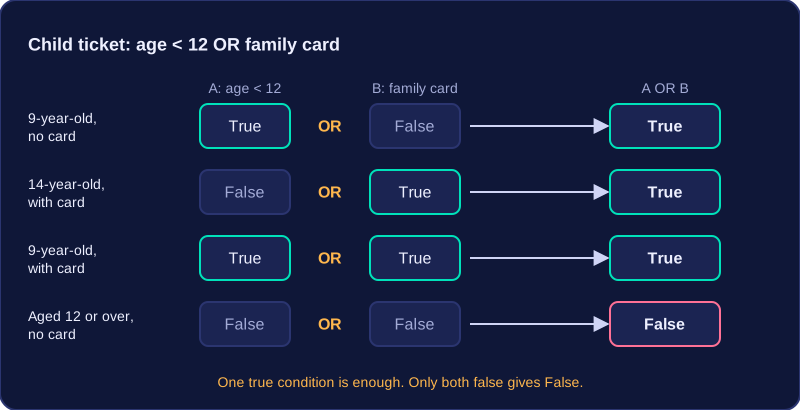
Use OR in an algorithm when a rule can be satisfied in more than one way. A cinema sells child tickets to anyone whose age < 12 OR who has a family card. A 9-year-old with no card qualifies because the first condition is true; a 14-year-old with a card qualifies because the second condition is true; a 9-year-old with a card also qualifies, because a true condition on either side is enough. Only someone aged 12 or over with no card fails, since both conditions are then false.
age = int(input("How old are you? "))
card = input("Do you have a family card? yes or no: ")

if age < 12 or card == "yes":
    print("Child ticket price")   # one true test is enough
else:
    print("Full ticket price")    # both tests were false
Output when the user types 9, no:
How old are you? 9
Do you have a family card? yes or no: no
Child ticket price
The two tests are joined by or, so the program takes the reduced-price branch as soon as one test passes. Run through the four combinations of the two tests and you get exactly the pattern in the truth table.
NOT is a logical operator that reverses a single condition. If the condition is true, NOT makes it false; if it is false, NOT makes it true. It works on exactly one condition, or on one group of conditions held together in brackets.
Because NOT flips the result, it is useful when an algorithm needs to check the opposite of a test. A ticket desk only shows the sold-out message when tickets are not left in stock. Writing that reversed test with NOT keeps the rule in one place.
How NOT is written
Put not in front of the condition you want to reverse, and add brackets when the condition contains a relational operator, so it is clear which part is being reversed.
| Condition | Value of the condition | Value with NOT |
|---|---|---|
| tickets_left > 0 | True | False |
| tickets_left > 0 | False | True |
| speed <= 30 | True | False |
| speed <= 30 | False | True |
Every output is the opposite of the input, so NOT never produces a number: it only ever gives the Boolean value True or False.
A worked example
NOT (tickets_left > 0) is true whenever no tickets remain. Reversing > by hand gives tickets_left <= 0, so both forms describe the same rule.
Where the reversal goes matters. A bike shed lends a bike only when (bike_free AND paid) is true, so a bike cannot be lent when NOT (bike_free AND paid) is true: that reversed group is true when the bike is out, when the payment is missing, or when both happen. Writing NOT bike_free AND paid would reverse only the first test and give a different rule, so put the brackets around the whole group.
In a program
The program below asks whether a locker is locked and reverses your answer with NOT, so it can decide whether to show the storage message.
locked_answer = input("Is the locker locked? Type 1 for yes or 0 for no: ")
locked = locked_answer == "1"

if not locked:
    print("You can put your bag inside.")
else:
    print("Find a member of staff for the key.")
Output when the user types 0:
Is the locker locked? Type 1 for yes or 0 for no: 0
You can put your bag inside.A truth table lists every possible combination of input truth values for a logical expression and the output produced for each combination. It lets you check what an expression does in every case, rather than just one example.
An expression with one input condition has two possible input combinations: True and False. With two input conditions there are four combinations. Write them systematically, such as True/True, True/False, False/True, False/False. The rows can be in any order, but each combination must appear once and no input combination should be left out, even when its output is False.
Applying the operator
Complete a truth table by applying the logical operator to each row of inputs.
- AND outputs True only when both inputs are True.
- OR outputs True for any row with at least one True input, including when both are True.
- NOT has one input and outputs the opposite value.
| A | B | A AND B | A OR B |
|---|---|---|---|
| True | True | True | True |
| True | False | False | True |
| False | True | False | True |
| False | False | False | False |
If A stands for has_key and B stands for score_at_least_100, the AND column shows that the level unlocks only in the first row, where both are True. The OR column is True in the first three rows because at least one input is True.
| A | NOT A |
|---|---|
| True | False |
| False | True |
NOT reverses its single input, so NOT has_key is True exactly when has_key is False.
You can write truth values as True and False, or as 1 and 0. Choose one style and use it for the whole table; do not mix them, and avoid ticks or crosses.
Combining conditions means joining tests together, or reversing a test, so that a decision can depend on more than one fact, or on the opposite of a fact. You do this with the logical operators AND, OR and NOT, which work alongside relational operators such as >= and ==.
A relational operator compares two values and produces True or False. AND and OR combine two of those results. AND is True only when both conditions are True; OR is True when at least one condition is True. NOT acts on one condition, or on one bracketed group, and reverses it, so True becomes False and False becomes True: NOT (day == "Saturday") is True on a Monday.
Conditions control the flow
In a selection, such as an if statement, the condition decides which branch runs. In iteration, a condition decides whether a loop repeats: a while loop might continue while a player has lives left AND the timer has not run out. The combined condition is still a single True or False result, so it can control either kind of flow.
Brackets show the grouping
A climbing wall allows entry when someone is at least 140 cm tall and has a wristband, or when they are an instructor. That rule is (height >= 140 AND has_wristband) OR is_instructor. It lets in a short instructor. The different condition height >= 140 AND (has_wristband OR is_instructor) does not: it requires the height check to pass first. Brackets show exactly which parts are worked out and then combined, and which part a NOT reverses.
A community centre books its meeting room when there are no more than 8 people and an adult is present, or whenever a staff member asks.
people = int(input("How many people? "))
adult = input("Adult present? yes or no: ")
staff = input("Staff member? yes or no: ")

if (people <= 8 and adult == "yes") or staff == "yes":
    print("Room booked")
else:
    print("Booking refused")
Output when the user types 6, yes, no:
How many people? 6
Adult present? yes or no: yes
Staff member? yes or no: no
Room booked
When you follow or write an algorithm, state each comparison fully, for example score >= 40 AND score < 70, and add brackets wherever the grouping changes the meaning.