Constructs
Variables & Constants
Every variable and constant needs a name, called an identifier. Python only accepts identifiers that follow its rules, so a name that breaks them is a syntax error and the program will not run at all.
An identifier may contain letters, digits and underscores. It cannot contain spaces, cannot start with a digit, and cannot be a Python keyword such as if, for or while. Keywords are words Python reserves for its own instructions, so Python rejects them as names.
| Identifier | Valid? | Reason |
|---|---|---|
bus_number | Valid | Uses letters and an underscore, and starts with a letter. |
bus number | Invalid | Contains a space. |
2nd_score | Invalid | Starts with a digit. |
while | Invalid | Is a Python keyword. |
Identifiers are case-sensitive: total, Total and TOTAL are three separate names, and creating one does not create the others. You must also spell a name consistently. If you assign a value to lap_time, then write laptime later, Python treats the second name as a new, undefined identifier rather than the one you meant.
The same rules apply whether the name is for a variable or a constant.
score = 15
print(Score)
Output:
NameError: name 'Score' is not defined (line 2)A program is built from structural components: the pieces a programmer fits together to make a working solution. They are constants and variables (which hold values), initialisation and assignment statements (which store those values), command sequences, selection, repetition and iteration, data structures (which hold groups of values), subprograms and parameters (which make reusable blocks of code), and input and output.
The simplest component is the command sequence: a series of statements carried out one after another, in exactly the order they are written. The computer runs the first statement in full, then the second, then the third, and so on until it reaches the end of the program. Nothing in the sequence is skipped and nothing is repeated.
Order matters
Statements in a sequence usually depend on each other, so where you place each one changes what the program does. In the program below, questions_right and points_per_question must be given their values before score can be calculated, and score must exist before it can be printed.
# Points scored in a quiz round
questions_right = 14
points_per_question = 3
bonus_points = 10
score = questions_right * points_per_question + bonus_points
print("Final score: " + str(score))
Output:
Final score: 52If you moved the line that works out score to the top of the program, it would fail, because questions_right would not have a value at that point. The statements would still run in order — but the wrong order gives a program that cannot work.
A command sequence on its own always follows the same path, because every statement runs once. To make a program skip a statement or repeat one, you need the other components, such as selection and repetition, alongside the sequence.
A subprogram is a named block of code you can call whenever you need it. Parameters are the values a subprogram is given each time it is called, so the same code can work with different data.
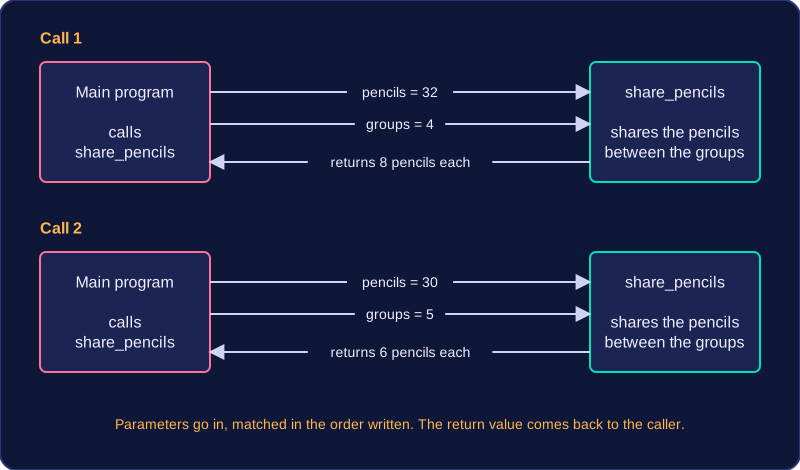
Imagine a subprogram that shares out coloured pencils between table groups. It needs to know how many pencils there are and how many groups are sharing them, so those two values are passed in as parameters. Call it once with 32 pencils for 4 groups and again with 30 pencils for 5 groups: the same code gives a different answer each time, 8 pencils each then 6 pencils each. You write the code once, and it copes with any data you give it, which is why parameters make a subprogram reusable.
The values in the brackets of a call are matched to the parameters in the order they are written in the subprogram, so the order matters. Writing share_pencils(4, 32) swaps the meanings: it asks for 4 pencils shared between 32 groups, which is less than one pencil each and nonsense.
Returning a value
When a subprogram finishes, it can return a value to the part of the program that called it. The returned value is the answer the subprogram worked out, handed back so the caller can decide what to do with it.
For example, a subprogram that converts miles to kilometres takes the number of miles as a parameter and returns the distance in kilometres. The part of the program that called it might print that answer, store it in a variable, or use it in a further calculation. Handing the answer back instead of printing it inside makes the subprogram more useful, because several parts of the program can call it and each do something different with the result.
| What the subprogram does | Parameters | Value returned |
|---|---|---|
| Works out the average speed of a journey | the distance travelled and the time taken | the average speed |
| Works out a player's new score | the current score and the bonus points | the updated score |
| Prints a name badge for a visitor | the visitor's name | no value: it only displays text |