Variables & Constants
Parameters and Return Values
A subprogram is a named block of code you can call whenever you need it. Parameters are the values a subprogram is given each time it is called, so the same code can work with different data.
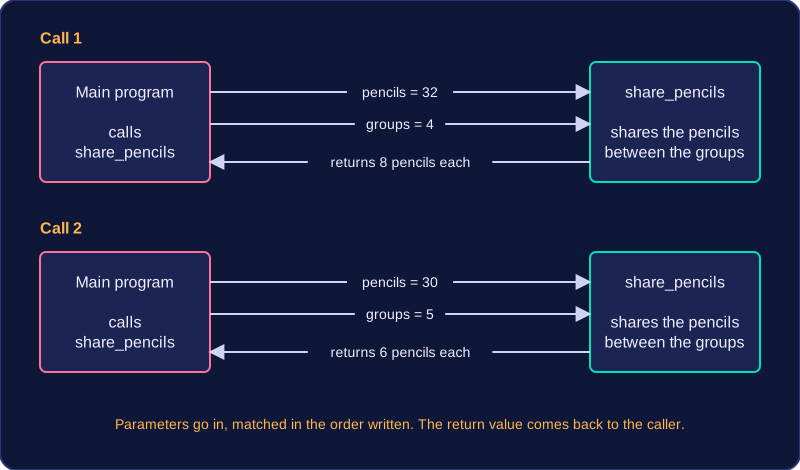
Imagine a subprogram that shares out coloured pencils between table groups. It needs to know how many pencils there are and how many groups are sharing them, so those two values are passed in as parameters. Call it once with 32 pencils for 4 groups and again with 30 pencils for 5 groups: the same code gives a different answer each time, 8 pencils each then 6 pencils each. You write the code once, and it copes with any data you give it, which is why parameters make a subprogram reusable.
The values in the brackets of a call are matched to the parameters in the order they are written in the subprogram, so the order matters. Writing share_pencils(4, 32) swaps the meanings: it asks for 4 pencils shared between 32 groups, which is less than one pencil each and nonsense.
Returning a value
When a subprogram finishes, it can return a value to the part of the program that called it. The returned value is the answer the subprogram worked out, handed back so the caller can decide what to do with it.
For example, a subprogram that converts miles to kilometres takes the number of miles as a parameter and returns the distance in kilometres. The part of the program that called it might print that answer, store it in a variable, or use it in a further calculation. Handing the answer back instead of printing it inside makes the subprogram more useful, because several parts of the program can call it and each do something different with the result.
| What the subprogram does | Parameters | Value returned |
|---|---|---|
| Works out the average speed of a journey | the distance travelled and the time taken | the average speed |
| Works out a player's new score | the current score and the bonus points | the updated score |
| Prints a name badge for a visitor | the visitor's name | no value: it only displays text |
Practise this
Edexcel GCSE Computer Science · Variables & Constants
Edexcel GCSE Computer Science · Arrays (Lists)
Edexcel GCSE Computer Science · Libraries
Edexcel GCSE Computer Science · Functions