Networks
Topologies

Contents
A network topology is the physical layout of a network: the pattern its devices are connected in. It tells you which device is joined to which, whether each connection is a cable or a wireless signal, and whether one device sits at the centre joining all the others. A network can be fully wired, fully wireless, or a mixture of both.
Topology is only the layout. Two networks with the same pattern of connections have the same topology, even if the devices on them do completely different jobs.
An example layout
Picture a small climbing centre with a till computer, a booking tablet and an office laptop. In one arrangement every cable runs back to a single cupboard behind the till. In another, the three devices are joined directly to each other. The devices do the same jobs in both cases — only the pattern of the connections has changed, so only the topology is different.
Star and mesh
- Star — each device has its own separate connection to a central switch, and wireless devices join through a wireless access point.
- Mesh — devices connect directly to one another rather than through one central switch, so there is more than one route between two devices. A mesh does not have to join every device directly to every other one.
Both layouts can be wired, wireless or a mix. Neither is automatically faster than the other, because speed depends on the connections and what they are made of.
A star topology is a network layout in which every device has its own connection to a central switch. The switch sits in the middle and passes data between the devices, so no device is wired straight to another one.
A separate link for every device
Each wired device has a cable of its own that plugs into a port on the switch. Two computers sitting side by side do not share one cable back to the switch: each has a separate link. The switch sends data to the intended device rather than to everything on the network.
Wireless devices and shared devices
A tablet or phone has no cable, so it connects by radio to a wireless access point. The wireless access point has its own cable to the switch, so wireless devices stay part of the same star: their data travels over the air to the access point, then down the cable to the switch.
Servers and shared printers join the star in the same way, each with a cable of its own to the switch. A computer is never cabled directly to the server.
A switch is not a server: it stores no files and runs no programs for users, it only moves data between the devices connected to it.
For example, a veterinary practice keeps its switch in a cupboard. The two reception computers, the server holding the animal records and the printer in the consulting room each have their own cable to the switch. The vets' tablets join through a wireless access point that is cabled to the switch, so when a vet sends a prescription to the printer, the data goes over the air to the access point, down its cable to the switch and out through the printer's cable.
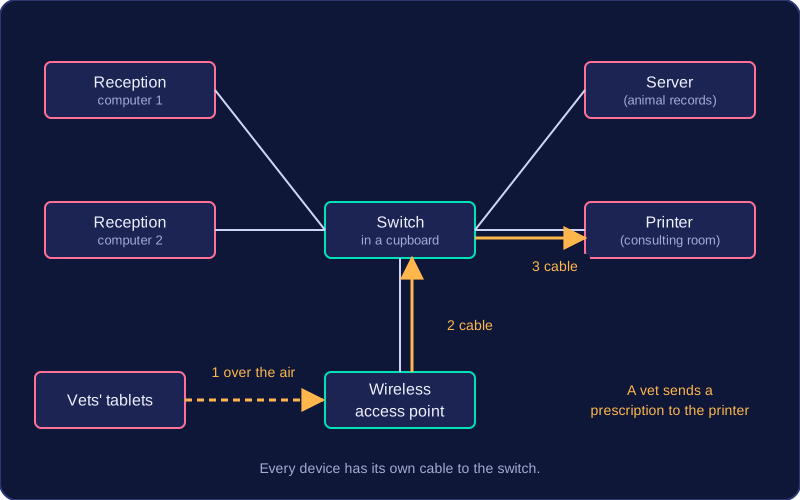
The star layout is the most common topology used for a local area network.
A star topology has a central switch, with a separate cable from each wired device back to it. Wireless devices join through a wireless access point connected to the switch. Judging a star means asking what happens when something breaks, how easily it grows, and what it costs.
Advantages
- Faults stay isolated. If one device or one cable fails, only that device drops off the network. Every other device still has a working link to the switch, so the rest carry on as normal.
- Easy to extend. To add a device you run one cable to a free port on the switch, or let it join through the wireless access point. Nothing already connected has to be moved or rewired.
- Data goes only to the device that needs it. The switch forwards each message along the link to its destination rather than sending it to everybody, so less unnecessary traffic is created.
- Fault-finding is simpler. Each device has its own cable and switch port, so a machine that cannot connect narrows the problem to one lead and one port, rather than a shared cable.
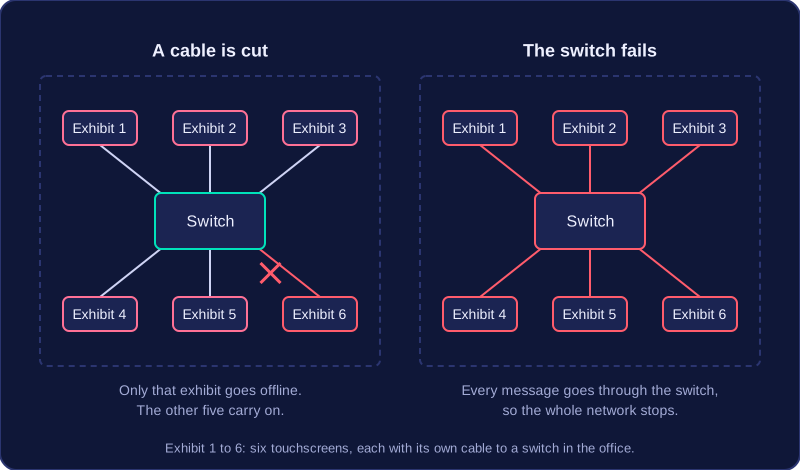
For example, a museum has six interactive touchscreen exhibits, each with its own cable to a switch in the office. A cleaner's trolley cuts the cable to one exhibit. Only that exhibit goes offline; the other five carry on working, and staff know the fault is in that one lead.
Disadvantages
- One switch failure stops everything. Every message travels through it, so if it loses power or breaks, the whole network stops, even though every device and cable still works.
- The switch costs money. A star cannot work without one, so there is a bill for equipment before you connect a single device.
- A lot of cabling. Every wired device needs its own cable back to the switch, so a large building needs a great deal of cable and the time and effort to install it.
A mesh topology is a network layout where devices connect directly to one another instead of each one plugging into a central switch. Each link joins two devices, and there is more than one route between devices, so data can travel along different paths.
Devices pass data along
Because the devices are joined to each other, one device can relay data for another: it receives a message and forwards it towards its destination. A device sitting in the middle of the network can act as a stepping stone, so two devices can exchange data even when they have no direct link of their own.
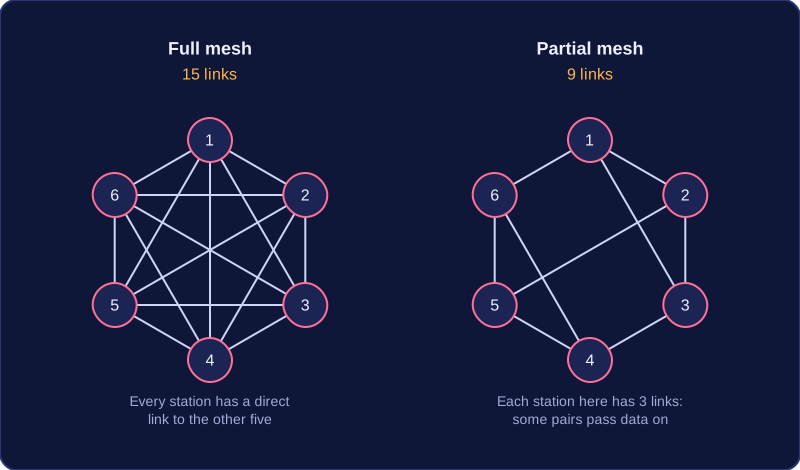
A mesh does not have to connect every device to every other device. Some devices may be joined directly while others reach each other through other devices in between, as long as there is more than one route available. No central switch is needed, because the devices themselves form the network.
Wired, wireless or mixed
The links can be cables, wireless signals, or a mixture of both. In a wireless mesh, each device can relay data for the others, so a device far from the rest can still join in by passing its data through the devices nearer to it. This extends the range of the network further than a single wireless link could reach.
A wired mesh in which every device connects to every other device needs a great deal of cable, which is why it is rare in a local area network. Picture a recording studio with six computers that all have to be cabled to all the others: that is fifteen separate cables, counted as five from the first machine plus four from the second, three from the third, two from the fourth and one from the fifth. Bringing in a seventh computer would mean laying six more cables.
A mesh topology connects devices directly to each other, with more than one possible route between any two of them. That design brings real strengths, but it also brings costs you need to weigh up.
Advantages of a mesh
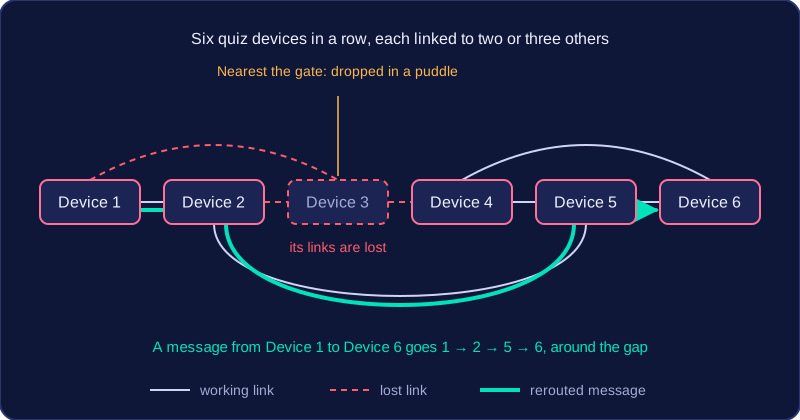
A mesh has no single point of failure. If one device or cable fails, another path can carry the data, so the rest of the network keeps working. Those extra, redundant routes are what make a mesh reliable. They also let traffic share the load, so one crowded link need not block the rest of the communication.
A mesh needs no central switch, which can reduce cost, especially when the links are wireless. It also grows easily: you add a device and a connection, and it joins in, with no central switch to replace.
For example, timing posts set around a karting circuit can pass lap times back to the office through each other. If one post loses power, the others relay around it, and lap times keep arriving.
Disadvantages of a mesh
A wired mesh needs a great many cables, so it is expensive and awkward to install. All those links make it complex to set up and maintain, and with less central management it is harder to oversee data transfers and keep security under control. More routes and more devices mean more chances for data interception or unauthorised access, so redundancy on its own does nothing for security.
Faults are harder to track down because there are many routes where the problem could sit, and data passing through more devices can use more power.
Remember that a mesh does not mean every device is wired to every other one: each device links to one or more others, and data travels through the devices in between.
A topology recommendation needs two parts: name star or mesh, then justify it by linking its features to the needs of that network. Saying “mesh is better” is not a justification; saying “mesh gives multiple routes, so one broken link does not disconnect the devices” links the feature to reliability.
Comparing the two
| Feature | Star | Mesh |
|---|---|---|
| Cabling | Each wired device has its own cable to the central switch. | A wired mesh connects many pairs of devices, so it uses far more cable. |
| Cost | Fewer cables than an all-connected wired mesh, but the switch costs money. | Wired cabling can be expensive; a wireless mesh can avoid some cable costs. |
| Reliability | The central switch is a single point of failure. | Multiple routes make it generally more reliable. |
| Faults | A failed device or its cable affects only that device. | Faults can be harder to find, though other routes keep data moving. |
| Expansion | Add a device with one new connection. | Add a device by linking it to one or more existing devices. |
| Typical setting | A business local area network with a switch at the centre. | Where reliability, redundancy or avoiding long cable runs matter. |
Making a recommendation
For example, a new escape room venue has four game rooms, each holding a control computer, plus one switch in the staff area. Star is the better choice: the layout is simple, each room is wired separately to the switch, which is less cabling than an all-connected wired mesh linking every room to every other room, and adding a fifth room later means one new connection. If the cable to one room is damaged, the other three games keep running, so the fault is contained. The switch is still a single point of failure, so keeping a spare is sensible. A wireless mesh might suit a temporary outdoor cinema spread across a field, where multiple routes improve reliability and long cable runs are avoided.
Do not claim that either topology is automatically faster: performance depends on the transmission media and other network factors.
A topology diagram shows the physical layout of a network: which devices are present and how each one is linked to the others.
Drawing a star
In a star topology diagram, draw the switch in the centre. Add a solid line from the switch to every wired device, including each server and printer, so that every device has its own cable back to the switch and none is daisy-chained through another. Do not join devices directly to each other.
For wireless devices, draw a wireless access point (WAP) and join it to the switch with a solid line, because the WAP itself is wired. Then draw a dashed line from the WAP to each wireless device; those devices do not connect straight to the switch.
If the network needs the internet, add a router, join it to the switch with a solid line, then draw a solid line out to a cloud labelled Internet.
For example, a small climbing centre might have a central switch with solid lines to two tills and a card printer, a WAP with dashed lines to the two tablets the instructors carry, and a router linked to the Internet cloud. Label every box: Switch, Till, Card printer, WAP, Tablet, Router, Internet.
Drawing a mesh
Start with no central switch and draw a direct line between each device and at least one other device. A mesh topology does not have to link every device to every other, because data can pass through a device in between. If the design does need every device to reach every other directly, draw a line between every pair; three devices need three links. Use solid lines for cabled links and dashed lines for wireless links.
Lines and labels
Use the line style to show the type of connection, and label every device so the reader knows what each box represents.
| Connection | Line style |
|---|---|
| Wired link | Solid line |
| Wireless link | Dashed line |
Labels name the device or its type, such as Switch, WAP, Router, Internet, File server or Tablet.