Networks
Network Devices

Contents
A stand-alone computer is not connected to a network. It works on its own, so it cannot share files, printers or an internet connection with other devices over a network.
Computers like these can be linked together to form a local area network (LAN), but only once the right network hardware is in place. That hardware is a wireless access point, a router, a switch, a NIC and transmission media.
Each type has a different job:
| Hardware | Job |
|---|---|
| NIC | Lets a device connect to the network. |
| Transmission media | Carries the data between devices. |
| Switch | Connects wired devices within the LAN. |
| Wireless access point (WAP) | Lets wireless devices join the network. |
| Router | Links the LAN to other networks. |
For example, imagine a recording studio with a single stand-alone computer holding every finished track. Fit it with a NIC and run a cable to a switch. A second computer in the live room, also fitted with a NIC and cabled to the switch, can now join the LAN and play back the same tracks. Add a WAP and a wireless controller at the mixing desk can send recordings across without a cable. Add a router and the studio can send a finished track to a producer working in another building. Take the hardware away and each machine works on its own again.
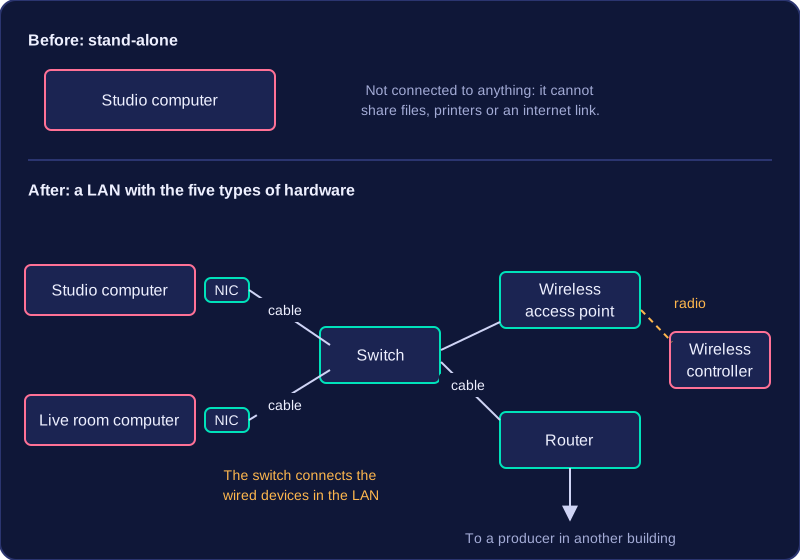
Only these five types of hardware are needed: hubs, modems, bridges and repeaters are not required.
A Network Interface Controller (NIC), also called a Network Interface Card, is the hardware inside a device that lets it join a network. Without a NIC, a device has no way to send or receive data over a network.
Data inside a device is held as digital data (binary), which cannot travel along a cable or through the air as it is. The NIC's main job is conversion: it turns the device's data into signals for the transmission medium, and turns incoming signals back into data the device can use. For example, a weather station on a school roof sends readings down a copper cable to a science lab; its wired NIC changes the readings into electrical signals, and the NIC in the lab changes those signals back into data.
Wired and wireless NICs
A wired NIC has a port where a cable plugs in. A wireless NIC connects without a cable, using radio waves. NICs are usually built into the motherboard rather than being separate cards you add, so do not assume a NIC is always something you can take out.
One NIC per connection type
Every networked device needs a NIC, and each NIC handles one type of connection. A device that can use both a cable and a wireless link therefore needs a NIC for each: a wired NIC for the cable and a wireless NIC for the radio link. Such a device uses its wired NIC when a cable is plugged in and its wireless NIC when it is not.
Transmission media are the paths that carry data between devices in a network. Without a medium there is nothing for the data to travel along, so every link in a network is made of one. Each medium carries the data as a signal in a form that suits it, and the network hardware at each end, such as the NIC, turns the data into that signal and back again.
The three media
| Medium | Form the data travels in | Example use |
|---|---|---|
| Copper cable | Electrical signals | A fixed desktop computer in a dance studio wired to a wall socket |
| Fibre optic cable | Pulses of light through glass or plastic | A media department sending large video files to its main data store |
| Wireless | Radio waves through the air | A card reader carried by a waiter moving between tables |
Copper is the cheaper of the two cables and is fine for ordinary amounts of data over short runs. Fibre costs more but carries far more data and keeps the signal strong over long distances, which is why it is chosen when huge files have to travel a long way. Wireless needs no cable at all, so it is usually the only sensible choice when a device has to move around, but the radio waves must travel through the air to reach the network, so the device has to stay in range.
Choosing the right medium
Think about what the device does and where it is. A device that never moves and sits near a socket can use copper cable. A link that must shift enormous amounts of data a long way, such as a media department sending video to a data store, is better on fibre optic cable. A device that is carried from room to room cannot be tied to a cable, so it uses wireless. A wireless link still has a medium: the radio waves travelling through the air, not a cable.
A switch is network hardware that connects devices together on a LAN. For example, a village cinema might connect its ticket till, projector control laptop and box-office computer to a switch so they can share booking files. In a wired LAN, each device connects to the switch with a cable that plugs into one of its ports.
When a switch receives data from a device, it checks which device the data is meant for and forwards it only to that device. The other connected devices do not receive a copy. Unlike a hub, which sends every piece of data to every device, forwarding only where it is needed means the network carries less unnecessary traffic and other devices' data stays more private.
Ports limit the connections
A switch can only accept as many direct cable connections as it has ports. If an 8-port switch has eight cables plugged in, there is no free port for a ninth connection. To provide more ports, you can connect another switch to a free port on the first switch. The second switch adds its own ports, so more devices can join the LAN.
A switch does not connect different networks; that is the job of a router. It also does not store files or act as a server. Its role is to connect devices within a LAN and pass data only to the device that needs it.
A wireless access point (WAP) lets wireless devices join a network without a cable. It sends and receives data to and from nearby devices as radio waves, then passes that data on to the rest of the network.
Most WAPs are connected by a cable to a switch. The radio waves carry data only over the short hop between the wireless device and the WAP; from the WAP onwards the data travels down the cable into the switch, which forwards it to the intended device. The WAP is therefore the link between the wireless part of the network and the cabled part.
Access to the network, not the internet
A WAP gives wireless devices access to the rest of the local area network (LAN) — for example, a tablet sending a photo to a desktop computer that is cabled into the switch. That is all it does on its own: it does not provide an internet connection. Reaching the internet needs a router further along, connecting the LAN to another network.
Coverage is limited
Radio signals only reach so far and are weakened by thick walls and floors, so a single WAP covers a limited area. In a large building, one WAP would leave some rooms with a weak or missing signal, so several WAPs are placed around the building, each cabled back to a switch. A device connects to whichever WAP gives it the strongest signal.
Worked example: a sports centre has a reception area, a gym and a swimming pool building. One WAP in reception gives a good signal at the front desk but a poor one in the pool building, so a second WAP is fitted there and cabled to the same switch. Staff on a tablet can now stay connected with the network as they move around the centre.
A router links two or more separate networks together and forwards data between them. You use one to join a LAN to another network, such as the internet, so devices on your network can reach devices that are not on it. A router does not link individual devices together inside a LAN in the way a switch does.
How a router handles packets
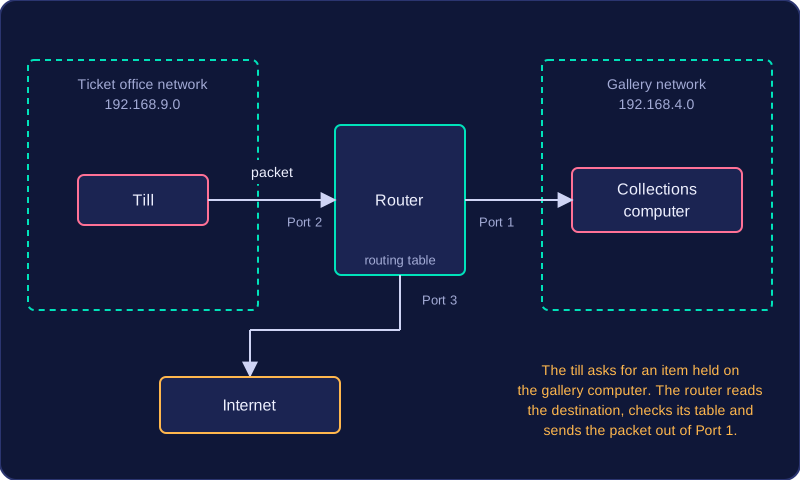
Data sent across networks is split into packets. A router receives each packet, reads the destination address and forwards the packet towards the network it is addressed to. It keeps a routing table: a list of networks it knows about and which connection to send data out through.
| Destination network | Sent out through |
|---|---|
| 192.168.4.0 | Port 1 (gallery network) |
| 192.168.9.0 | Port 2 (ticket office network) |
| Any other address | Port 3 (internet link) |
A routing table can hold more than one possible route to the same network, so the router can identify an efficient path, such as the one with the fewest links or the least busy connection. Packets then arrive sooner and crowded links are avoided.
Other tasks
A router can assign IP addresses to devices joining its network, so each device has its own address and replies can find their way back to that device. It can also convert packets between protocols: a packet arrives following one set of rules and leaves following the rules the next network expects, so networks following different rules can still exchange data.
The internet
The internet is not one network but many networks joined by routers. A packet is passed from router to router, each one reading the destination and choosing where to send it next, until it reaches the network holding the destination device.
Example: a museum has one network in its main gallery and another in the ticket office across the car park. A router joins the two, so a till can look up an item held on the gallery's collections computer. The router reads each packet's destination, checks its routing table and forwards the packet down the correct link.
Choosing network hardware means matching each device to the kind of connection it needs. Every device that joins the network, such as a computer, a till or a scanner, needs a NIC (Network Interface Controller): a wired NIC if it plugs into a cable, and a wireless NIC if it joins the network without one. Once you know how each device will connect, the rest of the hardware follows.
Matching hardware to the connection
| Connection the device needs | Hardware to choose |
|---|---|
| To join the network at all | A NIC inside the device — wired for a cable, wireless for a wireless link |
| To join by cable | A wired NIC, plus copper or fibre optic cable running into a free port on a switch |
| To join without a cable | A wireless NIC that communicates with a wireless access point (WAP) |
| To reach another network, such as the internet | A router |
| To carry the data between the hardware | A transmission medium: copper cable, fibre optic cable or wireless |
For example, a garden centre might have two till computers joined by copper cable to a switch, a handheld stock scanner that connects wirelessly through a WAP, and a router linking the whole network to the outside world. The cable from each till to the switch, and from the switch and WAP to the router, is the transmission medium for the wired links; the scanner uses a wireless medium, radio waves, to reach the WAP.
One box or several devices?
A single device can do the job of a router, a switch and a WAP at the same time. In a one-room print shop, one box could give the two wired computers their switch ports, let the owner's wireless devices join, and link the shop out to the internet. Choosing a combined device means buying, powering and managing just one piece of hardware, which suits a small network.
A larger organisation is more likely to choose separate routers, switches and WAPs. Each device then does one job, so it can be the right size and in the right place: a switch with plenty of ports in a busy room, a WAP in each area where people work wirelessly, and a router where the network meets other networks. If one of them fails or needs upgrading, it can be replaced on its own.
A network diagram is a drawing of the hardware in a network and the connections between the devices. It shows what is linked to what, not where each device sits in a room.
Label every device
Write the correct name next to each piece of hardware: router, switch, wireless access point (WAP), NIC and the transmission medium. If a network has two switches, label each one so a reader can tell them apart. A NIC is usually built inside a device, so label it at that device rather than drawing it as a separate box.
Use the exact device name. A switch and a router are different pieces of hardware, so they must not share one general label.
Show every connection
Draw a line for each cabled link and label the medium, such as copper cable or fibre optic cable. Show a wireless link with a dashed line or a clear wireless symbol, and label it wireless. Every line must start at one device and end at another.
The diagram should make three things easy to see:
- which devices connect to which switch;
- where the WAP is, and which devices connect to it wirelessly;
- where the router joins the LAN to another network, shown as a labelled outside network.
Worked example
For a small theatre box office network, draw two wired computers (one at the ticket desk, one in the manager's office), a switch, a WAP, a router and one wireless card reader. Join each computer to the switch with a labelled cable and label each computer's wired NIC. Join the WAP to the switch by cable, and join the card reader to the WAP with a dashed wireless link, labelling its wireless NIC. Join the router to the switch and to a labelled outside network, such as the theatre group's head office network. A reader can now trace every connection without guessing.