Network Devices
Stand-alone Computers and Network Hardware

A stand-alone computer is not connected to a network. It works on its own, so it cannot share files, printers or an internet connection with other devices over a network.
Computers like these can be linked together to form a local area network (LAN), but only once the right network hardware is in place. That hardware is a wireless access point, a router, a switch, a NIC and transmission media.
Each type has a different job:
| Hardware | Job |
|---|---|
| NIC | Lets a device connect to the network. |
| Transmission media | Carries the data between devices. |
| Switch | Connects wired devices within the LAN. |
| Wireless access point (WAP) | Lets wireless devices join the network. |
| Router | Links the LAN to other networks. |
For example, imagine a recording studio with a single stand-alone computer holding every finished track. Fit it with a NIC and run a cable to a switch. A second computer in the live room, also fitted with a NIC and cabled to the switch, can now join the LAN and play back the same tracks. Add a WAP and a wireless controller at the mixing desk can send recordings across without a cable. Add a router and the studio can send a finished track to a producer working in another building. Take the hardware away and each machine works on its own again.
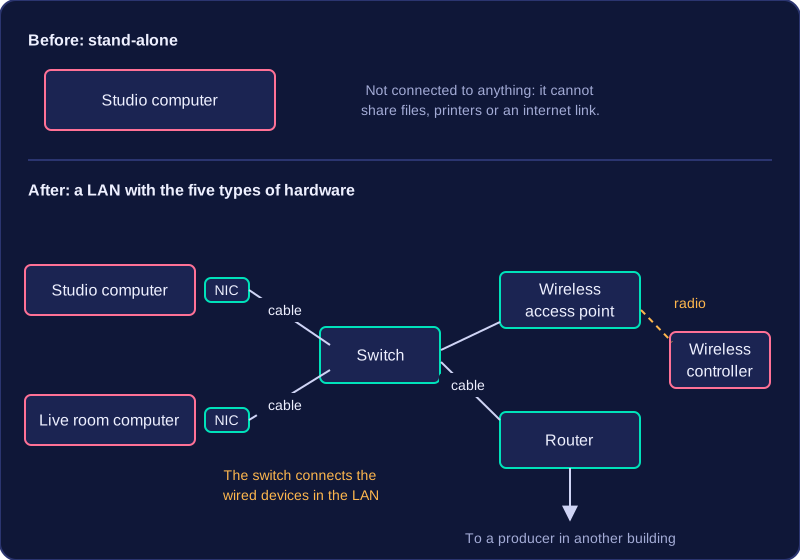
Only these five types of hardware are needed: hubs, modems, bridges and repeaters are not required.
Practise this
OCR GCSE Computer Science · Network Devices