Topologies
Mesh Topology Advantages and Disadvantages

A mesh topology connects devices directly to each other, with more than one possible route between any two of them. That design brings real strengths, but it also brings costs you need to weigh up.
Advantages of a mesh
A mesh has no single point of failure. If one device or cable fails, another path can carry the data, so the rest of the network keeps working. Those extra, redundant routes are what make a mesh reliable. They also let traffic share the load, so one crowded link need not block the rest of the communication.
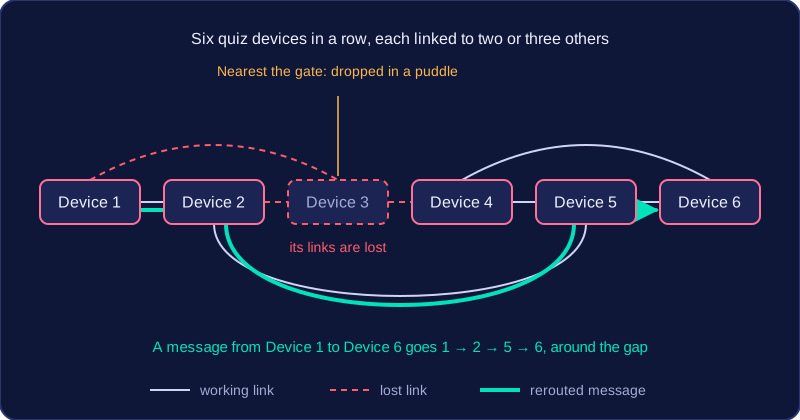
A mesh needs no central switch, which can reduce cost, especially when the links are wireless. It also grows easily: you add a device and a connection, and it joins in, with no central switch to replace.
For example, timing posts set around a karting circuit can pass lap times back to the office through each other. If one post loses power, the others relay around it, and lap times keep arriving.
Disadvantages of a mesh
A wired mesh needs a great many cables, so it is expensive and awkward to install. All those links make it complex to set up and maintain, and with less central management it is harder to oversee data transfers and keep security under control. More routes and more devices mean more chances for data interception or unauthorised access, so redundancy on its own does nothing for security.
Faults are harder to track down because there are many routes where the problem could sit, and data passing through more devices can use more power.
Remember that a mesh does not mean every device is wired to every other one: each device links to one or more others, and data travels through the devices in between.
Practise this
OCR GCSE Computer Science · Topologies