Networks
Sharing Resources

Contents
A network lets connected computers share resources. One file, printer, storage space, piece of software or internet connection can be used by more than one user or device, usually on different computers. This is one of the main reasons for networking computers: you do not need a separate copy of everything for every machine, which saves money and keeps information consistent.
What can be shared
| Resource | How it is shared and why it helps |
|---|---|
| Files and data | One copy is kept in a shared location, so everyone opens the same up-to-date version instead of swapping copies. |
| Printer | Several computers send their printing to one printer, so you buy and maintain fewer printers. |
| Storage | A shared drive gives every computer extra space to save to, without fitting a large drive in each one. |
| Software | A program can be installed on a shared computer or covered by a network licence, so you do not buy a separate copy for every machine. |
| Internet connection | One connection is shared by all the devices, so you pay for one connection rather than one per computer. |
Sharing in practice
A resource is shared either from a central server or directly between the computers in a peer-to-peer network. Either way, the resource is reached over the network rather than copied onto each machine.
For example, a youth hostel has a reception computer and a housekeeping tablet. Both open the same room-cleaning checklist from a shared folder. When a cleaner marks a room as finished on the tablet, reception can see straight away that the room is ready to let. The checklist is stored once, so both devices always see the same version instead of two copies that could disagree.
Computers on a network share resources using either the client-server model or the peer-to-peer model. The difference is the role each computer plays: in client-server the roles are not equal, with some computers providing services and others using them, while in peer-to-peer every computer has an equal role.
Server and client roles
A server is a computer whose job is to make a service or resource available to other devices on the same network. Servers usually have powerful hardware and stay switched on, so the service is ready whenever a client needs it, but a server can also be an ordinary computer running server software, and one server can run several services at once.
A client is a computer, or a program running on one, that requests a service from a server and then uses it. The client is the device, not the person using it, and it can send data as well as receive it. For example, a tablet in a leisure centre office might ask the booking server whether a swimming class has spaces: the tablet is the client and the booking server is the server.
File servers and web servers
A file server stores files in one central place. Clients save files to it and fetch them back when they are needed, so a youth theatre group could keep every script and rehearsal recording in one place. A web server stores website files and sends pages to the clients that request them. When a supporter opens the theatre group's website, their phone is the client and the computer holding the site is the web server. A website is not a server, because the server is the computer that stores the site and sends out its pages.
Client-server networks
In a client-server network the servers supply the services and the clients ask for and use them; clients do not normally provide services to each other. Two smart displays in a gym might both use the same scheduling server to show class timetables without offering services to each other.
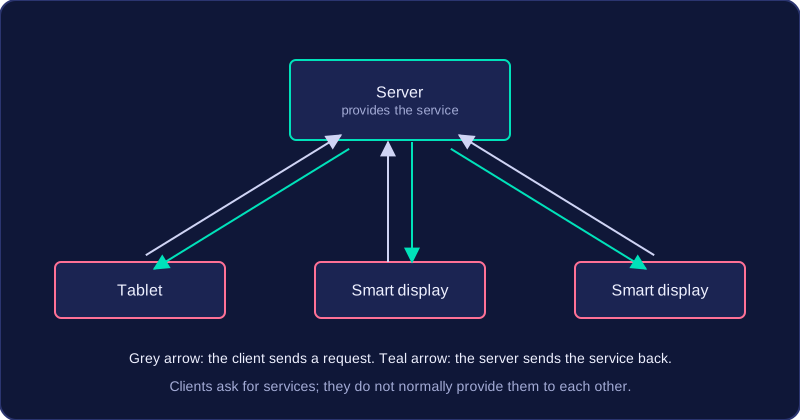
A client-server network has several benefits, and they all come from one idea: central control. The server holds and manages the shared resources, and the client computers ask the server for them, so the managing only has to be done once rather than on every machine.
Files and backups in one place
Users' files are stored on a file server. Your work belongs to your account rather than to one particular computer, so you can open the same files from any computer on the network. Because everything sits on the server, backups can be taken from that one machine instead of being arranged separately on each computer. A chain of five bike repair shops, for example, could keep every job sheet on its file server: a mechanic at any branch can look up a repair started at another branch, and the whole set of records is backed up overnight from a single place.
Security run from one place
The server is where accounts are created and looked after — a username and password for each person, their access rights, the network policies everyone must follow, and the anti-malware software that is installed on each client. A network manager sets an account up once and it works on every computer, and a new restriction, such as blocking a type of file, reaches every machine from the server. This keeps security consistent, because no computer is left running an older, weaker setup that somebody forgot to change.
Software rollouts and availability
New software and updates can be installed on the server and rolled out to every computer from there, so the same job is not repeated machine by machine, which saves a lot of time. Servers are also designed to stay switched on and available all the time, so the services and files they provide are there whenever a client needs them. That makes the model work well for large networks with many users: the server supplies the shared services once, rather than every computer having to manage and share its own resources.
In a client-server network, computers rely on a central server to provide services. That reliance brings drawbacks.
Cost and specialist staff
Server hardware is expensive because it is built to be powerful and reliable, and server software often needs its own licence, sometimes charged per user. A specialist, usually a network manager, is needed to install and look after the network: creating accounts, setting access rights, installing updates and fixing faults. That means paying a salary or a support contract, and without that expertise the server may be set up insecurely or not work properly.
For example, a community radio station with eight computers may find the cost of a server, its software and a network manager hard to justify.
Failure and overload
If a server fails, clients lose the services that server provides. This is a single point of failure: one broken server can stop everyone using shared files or a web server. It does not necessarily mean the whole network stops, because the client computers may still work, but the failed server's services are unavailable. Backup servers can reduce this risk, but they add more cost.
Many clients using a server at the same time can overload it, making responses slow for everyone. A central server has a limited amount of processing power and network capacity, so a rush of requests can build up in a queue.
A peer-to-peer network is a network where every computer has equal status as a peer. There is no central server, so no single computer is in charge of sharing resources across the network.
Every peer can be a client and a server
In a peer-to-peer network, a computer can take on either role. It works as a server when it shares its own files or printer with another computer, and as a client when it uses a file or printer that another computer is sharing.
For example, a village photography club has five members, each with a laptop. Priya shares a folder of photos from her laptop. When another member opens one of those photos, Priya's laptop is acting as a server and the other laptop is acting as a client. If Priya then opens a checklist stored on another member's laptop, her laptop switches to acting as a client.
| Action | Role of the computer | What the computer does |
|---|---|---|
| Another member opens Priya's shared photo folder | Server | Sends the shared files to the other computer |
| Priya opens a checklist shared by another member | Client | Requests and receives the file from the other computer |
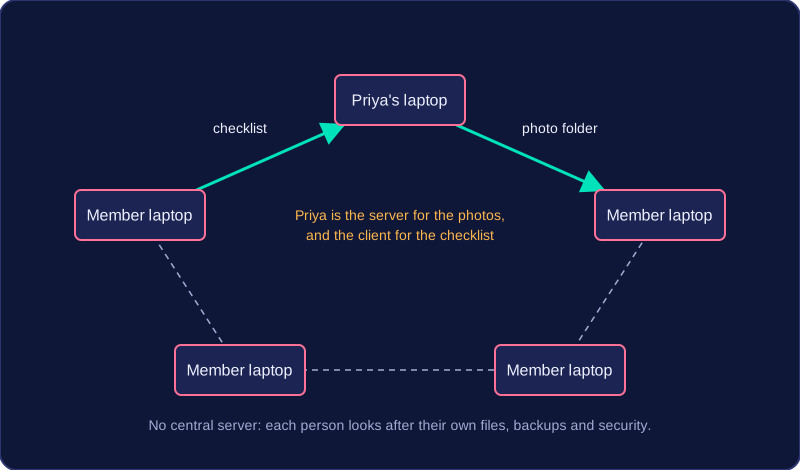
Peer-to-peer does not mean that no computer ever acts as a server. Any peer can provide a shared resource to another peer; the difference is that no central server manages the sharing.
You manage your own computer
With no central server, each user is responsible for their own computer. That includes organising their files, making backups and setting up security. There are no automatic central backups, so each person must back up their own files. If Priya wants her photos kept safe, she has to arrange that herself rather than relying on a server to do it for her.
Peer-to-peer networks have advantages that all come from one feature: there is no central server. Every computer is an equal peer, and each one can share its own resources and use resources shared by the others.
Cheap and simple to set up
With no server, you do not buy server hardware or server software, so the cost is low. You connect the computers and switch on file and printer sharing on each one. No specialist network manager is needed: someone who is comfortable using the computers can set it up. A school robotics club running four laptops in a design technology room could share a folder of robot design files stored on Amara's laptop and send jobs to a 3D printer plugged into Jonah's laptop, without buying a server or paying an expert.
No central computer to rely on
Because no server runs the sharing, there is no central server whose failure would stop all sharing. If Amara's laptop is switched off, the other three still work and can still use the 3D printer and swap files between themselves. Only the design files on Amara's laptop become unavailable. Each peer shares directly, so the club can begin sharing files and its 3D printer with the equipment it already owns.
A peer-to-peer network has no central server, so the drawbacks follow from each computer having to look after its own files, backups and security. Files are not stored centrally, and there is no central place to manage the network.
Files are scattered
Each file is stored on an individual computer, often the one where it was created, rather than on a central server. To find a file you need to know which computer holds it, so you may have to search several machines before you track it down. Backups have the same problem: there is no automatic central backup, so every computer has to be backed up separately. If one person forgets, their files are at risk.
For example, a Scout troop's leaders keep their records on six different laptops: permission forms, kit lists and photos from each camp. To find a photo from last summer's camp, a leader has to remember which laptop it was saved on, and each leader has to copy their own files onto an external drive in case their laptop breaks.
Shared resources depend on the owner
A shared folder or printer is only available while the computer sharing it is switched on and working. If that computer is off, or its hard drive fails, everyone else loses access to whatever it was sharing. The same computer can also slow down for its own user, because it is using some of its processing power and network connection to send files to other people at the same time.
Security and growth
Security is set up on each computer separately, so the owner of each machine chooses the passwords and access rights. With no central control it is easy for one computer to be left unprotected, and keeping the settings consistent across the network becomes harder. The network is also harder to manage as it grows: more computers mean more separate machines to check, and performance drops because each computer has to deal with requests from a larger number of peers.
A network model is either client-server or peer-to-peer. Recommending one for a scenario means matching its benefits and drawbacks to that scenario's needs: how many users there are, whether central management is needed, cost and ease of setup.
Client-server suits a large organisation with many users that needs central management, central storage, central backup and central security. Servers provide shared services and files, so backups and security can be handled in one place. The drawbacks are expensive server hardware and specialist setup and maintenance, which are worth paying for when many users depend on those services.
Peer-to-peer suits a small network with few devices that does not need central management and values low cost and simple setup. Each computer shares its own resources and uses resources shared by others, so no server has to be bought or managed. The drawbacks are that files and backups are spread across the computers and security is set up on each one, which becomes harder as more users join.
Justify the choice
A recommendation must be justified with reasons from the roles of the computers and the advantages or disadvantages of the chosen model, not just a statement that one model is better. Point to who provides the resource and who uses it: the server stores the files and controls access, or each peer shares its own files.
For example, a five-a-side football club with four laptops and a tiny budget wants to swap training videos between them. Peer-to-peer fits: each laptop can share its own videos and no server or specialist is needed, so the cost stays low. A charity's fundraising office with 250 staff who must all work from the same donor records needs client-server: a central server can store the records, back them up and limit who sees donation amounts, all in one place.
Choosing the model is a separate decision from the network's physical topology.