Networks
Wired and Wireless Networks

Contents
Devices can join a network in two main ways. A wired connection uses a physical cable. A wireless connection uses radio waves travelling through the air, so no cable is needed between the device and the network.
| Connection type | How data travels | Common example |
|---|---|---|
| Wired | Through a physical cable | Ethernet in a local area network |
| Wireless | Through the air as radio waves | Wi-Fi and Bluetooth |
Ethernet is the usual standard for wired connections in a local area network, so a fixed computer can connect to a wall socket with an Ethernet cable. Wi-Fi lets a device join a network without a cable, so it suits devices that move around. Bluetooth is a wireless connection used for short-range links between a device and something close by, such as a printer.
Many networks use both
Networks often mix wired and wireless connections because different devices have different needs. In a bike repair workshop, a till computer that stays by the counter could use an Ethernet cable, while a tablet carried around the workshop could join the same network by Wi-Fi. The workshop still has one network; only the way each device connects is different.
Connection type is separate from network size
Wired and wireless describe how a device connects, not how large the network is. A local area network covering a single room can be fully wired, fully wireless or a mixture of the two.
In a local area network (LAN), a wired connection uses Ethernet. Ethernet is a family of standards for wired local area networks, and it is a widely used standard for joining devices together with cables in a LAN.
A family of standards, not a cable
Ethernet is not one particular cable, and it is not a wireless connection. It is a set of agreed rules covering things such as how signals are sent along a cable, what the connectors look like and how fast data can travel. Different manufacturers build equipment that follows these same rules, so a device made by one company can be connected to equipment made by another without extra adapters.
The cable is simply the physical path the data travels along; Ethernet is the agreed set of rules for using it. The standard is the rules themselves, not any one device built to follow them, so saying a network is "Ethernet" tells you how the devices communicate, not which single cable has been used.
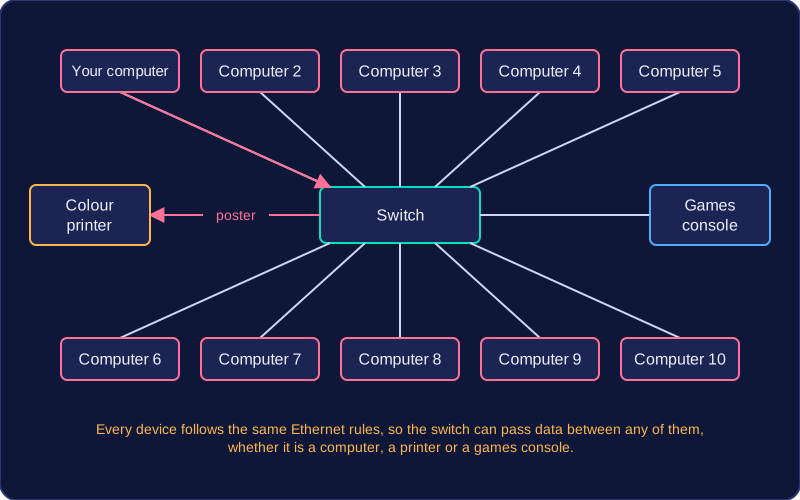
Using cables instead of radio waves
Ethernet carries data along cables rather than through the air using radio waves. For example, in a small bike repair shop, the till, the back-office computer and the label printer could each be joined by Ethernet cables to the same network. When a customer pays at the till, the sale is recorded on the back-office computer because the data travels along those cables.
Because the connection is fixed, a device using Ethernet usually stays in one place, but it does not depend on a radio signal reaching it. That use of cables is why wired connections are described separately from wireless ones such as Wi-Fi and Bluetooth.
Wi-Fi is the wireless way of connecting a device to a network. Instead of a cable carrying the data, Wi-Fi sends it through the air using radio waves, so a device can join a network without a network cable plugged into it.
A family of standards
Wi-Fi is not a single product: it is a family of standards for wireless local area networks. A wireless local area network is a LAN where devices join without wires. Each standard in the family sets out agreed rules for sending data over radio, which is why devices that follow the same standard can work together.
Joining without a cable
The big practical effect is that a device can join the network wherever there is a signal, rather than wherever a socket happens to be. A hospital nurse can carry a handheld tablet from ward to ward and stay on the same network, logging patient observations as they go. No cable means nothing to trip over and nothing to unplug, and a room can gain an extra device without anyone installing new cabling.
Other wireless connections
Wi-Fi is not the only type of wireless connection used in a local area network. It is the main one used to join devices to a LAN, and many devices can use it at the same time. Bluetooth is the other main example, but it is used differently: for short-range, direct links between two nearby devices rather than joining devices into a network.
Bluetooth is a wireless standard that links devices which are close together, and it needs very little power to do it. Two devices connect directly to each other, with no network in between.
What Bluetooth is used for
Bluetooth suits peripherals – devices that work alongside another device rather than joining a network. A games controller connected to a console, or a small handheld scanner in a shop sending each item's code straight to the till, both use it. The link is direct, so the scanner never has to join the shop's network to do its job, and it still works in a building with no Wi-Fi at all.
It also handles short file transfers between two devices sitting close together, such as a tablet sending one page of homework to a printer standing beside it. Sending small amounts of data over a short distance is exactly what Bluetooth is built for.
Why low power matters
Bluetooth uses very little power, which is why it turns up in equipment running from a small battery. A wireless door sensor on a garden gate, powered by a coin cell, can send an alert to a phone for months without a new battery, because the radio it uses sips electricity. A high-power radio would flatten the battery in hours.
Where Bluetooth stops
Two limits hold it back. It has a very short range, so the two devices must stay near each other, and its bandwidth is lower than Wi-Fi, so it carries small bursts of data rather than large amounts at speed.
That is why Bluetooth is a poor fit when computers must be joined into a local area network. A LAN has to link many machines across a room or a whole building and move sizeable files between them; Bluetooth is built for two devices close together, so Ethernet or Wi-Fi is used for the LAN instead.
A standard is a common set of rules covering one area of computing. It describes how something should work so that products built by different people can fit together. A standard is not a protocol, a cable or a device: it is the shared set of rules that those things follow.
Standards let hardware and software from different manufacturers or producers interact. If two products follow the same standard, they can work together even though different companies made them. This means you can buy compatible hardware and software from any maker, and a company can build products that work with equipment made by other businesses. Without standards, two devices might use different rules and not work together at all. For example, a games console from one company and a smart TV from another both follow the Ethernet standards, so the network socket on each device and the plug on a network lead are built to the same agreed shape and wiring rules. A lead from a third company plugs into either device and works. The lead is not the standard; Ethernet is the set of rules that makes the connection possible.
Ethernet, Wi-Fi and Bluetooth are each a standard or a family of standards. Each one is a set of rules rather than a single product. Because many makers follow the same rules, a device from one maker can connect to a device from another, and you are not locked into one brand.
Wired and wireless connections trade convenience against speed, stability and security. A wired connection uses a cable plugged into a network socket. A wireless connection sends data as radio signals through the air, so no cable is needed.
| Feature | Wired | Wireless |
|---|---|---|
| Bandwidth | Usually higher | Usually lower |
| Reliability | Little interference or delay; walls do not block the signal | Limited range; distance, walls and other networks weaken or interfere with the signal |
| Security | Physical access to the cable or equipment is needed to intercept data | Signals spread out; a nearby device could pick them up, so data should be encrypted |
| Mobility | The device must stay near a socket | The device can move around within range |
| Cost and set-up | Cabling costs money and disrupts the building | Easy to add devices with no new cables; cheaper where cabling is difficult |
| Suitability | Fixed equipment; poor for devices with no wired port | Mobile devices and visitors |
Wired links win on performance and security. With higher bandwidth, more data travels each second. Because the signal stays inside the cable, walls and other obstacles do not block it and other networks cannot interfere, so the link is reliable with little delay. To intercept the data, someone must physically reach the cable or equipment. The catch is that every device must stay near a socket: installing cable costs money and disrupts the building, signal strength fades over long cable runs, and loose cables are a trip hazard.
Wireless links win on movement and expansion. You can carry a device around within range, another device joins with no new cable, and visitors can connect easily. Where cabling an existing building is awkward, wireless can be cheaper and quicker to set up. Its weaknesses follow from using radio: bandwidth is usually lower, range is limited, and distance, walls and other networks weaken the signal or interfere with it. Radio signals spread out from the device, so a nearby device could intercept them, which is why the data should be encrypted. Sharing one connection between many devices also slows it down.
Encryption is the process of scrambling data so that it cannot be understood. It uses an algorithm (a set of steps) and a key (a value that controls the scrambling). The sender turns readable data, called plaintext, into ciphertext; at the other end, the same key is used to decrypt the ciphertext back into plaintext.
For example, a simple algorithm could shift every letter forward by a number of places, with the key being that number. Using a key of 3, the word fish becomes ilvk. Anyone who intercepts ilvk cannot understand it without working out the key. Real network encryption uses far more complex algorithms, but the principle is the same.
Why networks need encryption
Wireless signals spread out from an aerial, so any device in range with the right equipment could receive them, and data sent across the internet passes through equipment owned by other organisations. Encryption for network connections protects data while it is being transmitted, so it stays private even if someone captures it. Encryption cannot prevent interception: an eavesdropper may still copy the ciphertext, but it will not make sense to them without the key.
Secured and open Wi-Fi
On a secured Wi-Fi network, traffic is encrypted and a password is needed before devices can connect.
| Type of Wi-Fi | Password needed? | Data encrypted? | If the signal is intercepted |
|---|---|---|---|
| Secured | Yes | Yes | The ciphertext cannot be read without the key |
| Open | No | No | Any traffic with no encryption of its own can be viewed |
The password controls who can join the network, while the encryption protects the data travelling through the air. A password on its own does not encrypt anything — the network must actually apply encryption.
Open Wi-Fi has no password and is not encrypted. Anyone nearby can join, capture the wireless signals and read any traffic that has no encryption of its own. An encrypted wireless signal can still be intercepted, but the captured data is protected by the encryption.
When you choose how a device should join a network, match the connection to what the device has to do. Weigh up six things: the bandwidth needed, the reliability needed, the security needed, whether the device must be mobile, the cost of equipment and installation, and whether the device actually supports the connection.
Matching the connection to the job
- Wired (Ethernet) suits fixed devices that send large amounts of data or hold sensitive data. A desktop in a dentist's reception that holds patient records stays on the desk, so a cable does not limit movement and gives a stable, private link that is hard to tap into from outside.
- Wireless (Wi-Fi) suits devices that move, or places where cable cannot go. A doorbell camera at the end of a long drive can send short clips over Wi-Fi, avoiding the cost of digging a trench for a cable.
- Bluetooth suits short-range, low-power links directly between two devices, such as a games controller sending button presses to a console. It uses little power but is not built for joining computers into a local area network.
Using more than one connection
Real networks mix connection types. A farm could use Ethernet for the office computer storing livestock records because it never moves and the files are sensitive, and Wi-Fi for a handheld scanner used in the barn because cabling across the yard would be costly and easily damaged. Wireless can also act as a backup: if a cable is damaged, staff can keep working over Wi-Fi while it is repaired.
Making a recommendation
A good recommendation names the connection and justifies it from the scenario's needs. For a garden centre wanting a till in each greenhouse to send sales to the office, use Wi-Fi for the greenhouse tills because they are moved as displays change and cabling across a wet site would be costly and easily damaged, but use Ethernet for the office computer holding accounts because it is fixed and the financial data needs the better security and reliability of a cable. Two connections can be recommended for different needs in the same network.