Networks
LAN / WAN

A network is formed when two or more devices are linked together so that they can exchange information and make use of the same files and hardware. The links can be made with cables, wirelessly or a mixture of both; the important thing is that the devices are able to pass information between them.
Networking makes several useful things possible at the same time:
- Sharing files and data: a file saved by one connected device can be opened by another, so you do not have to copy it by hand.
- Sharing hardware: several devices can use one printer or one scanner, so the organisation buys and maintains only one of each.
- Sharing one internet connection: a single connection can serve many connected devices instead of paying for one for every device.
- Communicating: users can send messages or work together on the same project.
- Accessing files from any connected computer: you can log in at a different machine and still reach your work.
For example, a small library with four public computers, a staff laptop and one printer could connect them as a network. A visitor saves a document on one computer; a librarian opens it on the laptop and prints it without moving files on a memory stick. That is still one network, even though it connects only a handful of devices.
Networks are classified by the geographical area they cover, not by how many computers are connected. The two types are a local area network (LAN), which covers a small area such as one building, and a wide area network (WAN), which covers a large area such as several towns, a country or further. A network with many devices in one building is still a LAN, and a network joining a handful of devices spread across different countries is a WAN.
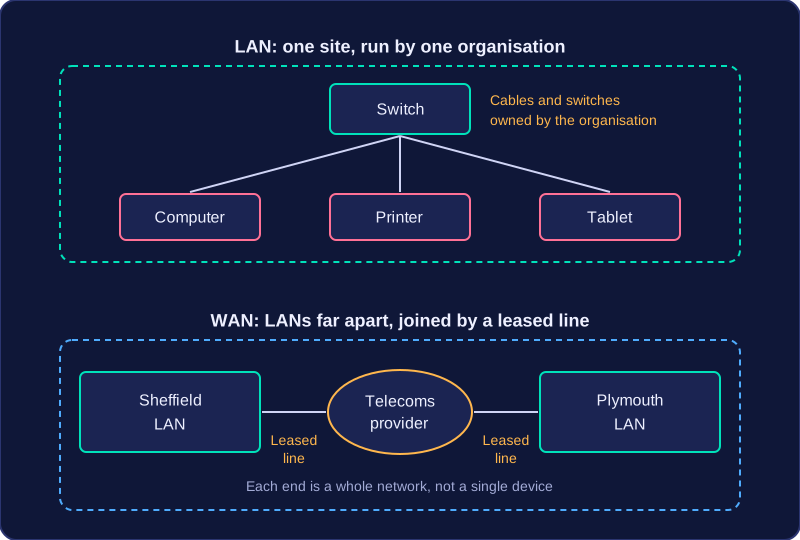
A local area network (LAN) covers a small area, usually one site such as a building. A wide area network (WAN) covers a large area and connects LANs and computers across towns, cities or countries.
LANs
The organisation using a LAN owns and manages its hardware, so it controls who can connect and how the network is secured. A LAN uses dedicated internal hardware and needs no external third-party infrastructure. It links individual devices, called nodes, on one site.
Nodes typically connect using Ethernet cables or Wi-Fi. Data travels short distances through few devices, so a LAN has high bandwidth and answers come back quickly. It is also cheap to set up compared with a WAN. For example, the public computers, staff laptops and catalogue server in a library could all be nodes on its LAN.
WANs
A WAN links separate LANs and individual computers over long distances; it does not mean wireless. The cables, masts and exchanges behind a WAN normally belong to telecommunications companies, and the organisation using the WAN leases access to them. WANs rely on links built for long distances, such as fibre optic cable, telephone lines and satellite links. Signals travel much further through more equipment, so answers usually take longer than on a LAN. Building a WAN is very costly, so organisations rent capacity from a provider instead.
For example, the variable speed limit signs along a motorway each connect to a regional control centre many miles away. The centre's own computers form a LAN, while the long-distance mobile data links, leased from a telecommunications company, make the signs part of a WAN.
Comparing LANs and WANs
| Characteristic | LAN | WAN |
|---|---|---|
| Area | Small, usually one site | Large, may span sites or countries |
| Ownership | User or organisation owns the hardware | Usually rented from a telecoms company |
| Media | Ethernet cables, Wi-Fi | Fibre optic, phone lines, satellite |
| Speed | Usually faster | Usually slower |
| Cost | Cheap to set up | Expensive to set up |
A WAN can be formed by connecting separate LANs: each site keeps its own LAN, while the link between sites is part of the WAN.
To decide whether a network in a scenario is a LAN or a WAN, look at two things: the area covered and who owns or manages the hardware and infrastructure. The number of computers is not a classifying feature: having many devices does not make a network a WAN, and a WAN may connect only two sites.
Justifying your choice
Give separate points. First state the area: a LAN covers a small geographical area, often one building or site, while a WAN covers a large geographical area. Then state ownership: a LAN usually uses hardware owned or managed by the organisation, while a WAN often uses infrastructure not owned by the organisation, such as communication links rented from a provider. Keeping the two points separate makes your justification clearer than one long, mixed sentence.
Defining a WAN
Repeating the name in a definition adds no detail. A WAN is a network that covers a large geographical area and/or uses infrastructure not owned by the organisation. Infrastructure not owned by the organisation includes links supplied by another company.
Why a network is a LAN
- It covers a small geographical area or a single building.
- It uses no external infrastructure, or only infrastructure within the organisation.
- The hardware is owned or managed by the organisation.
- The hardware is dedicated to that organisation and not shared with other organisations.
- It connects individual nodes, such as computers and printers, rather than connecting networks.
For example, a hospital site runs its own network: the laptops carried on the wards, the scanner in the imaging department and the printer in the pharmacy are joined by cabling and switches the hospital owns. That is a LAN — one site, hardware the hospital owns, and no links from another company needed to join those devices. If the hospital then sends a patient's scan to a specialist unit 200 miles away, over a fibre link it rents from a communications company, that link is a WAN: it crosses a large distance and the hospital does not own the infrastructure the scan travels over.