Networks
The Internet

The internet is a global collection of interconnected networks. Because it is built by joining many separate networks together, it is often described as a network of networks.
Many networks, not one
Each network inside the internet is a working network in its own right, run by its own owner. Think of the network in your school, the network a payment company uses to connect card machines in shops, and the network a mobile phone company uses to connect its masts. They are separate systems, owned by separate organisations, yet data can pass from one to another.
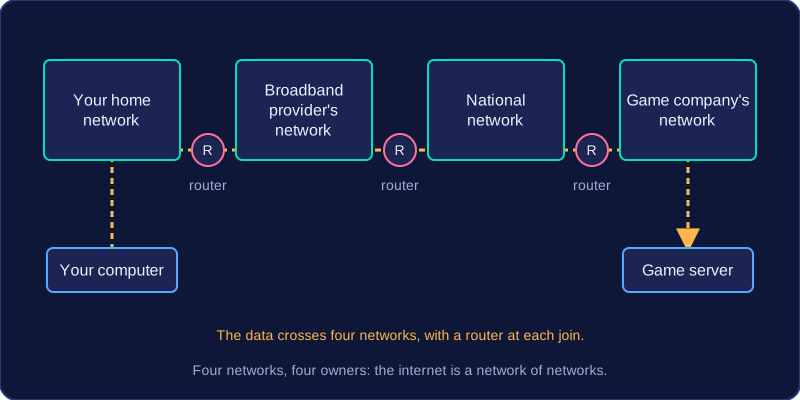
They are linked by routers, devices that connect one network to another and pass data on between them. This is why the internet is not one enormous network owned or controlled by a single organisation, and why it has no single centre: it is many networks, joined together by routers.
Worked example: you join an online multiplayer game whose server sits in another country. Your data crosses your home network, then your broadband provider's network, then a national network run by a communications company, then the game company's network. Four different networks, four different owners, with routers handing the data along at each join.
One infrastructure, many services
The internet is only the infrastructure — the connected networks and the links between them. It carries data without caring what that data is for, in the same way a road carries any vehicle that fits on it.
Separate services run on top of that infrastructure, such as music streaming or online banking. The World Wide Web is just one of these services: the pages and sites you visit in a browser. Asking for a page sends a request across the internet, and the page travels back the same way.
So the web needs the internet, but the internet is not the web. The internet would still exist, and still carry other services, if the web had never been invented.
IP addresses come in two versions: IPv4 and IPv6. Both identify a device so that data can be addressed and routed, but they store the address in different ways.
IPv4 addresses
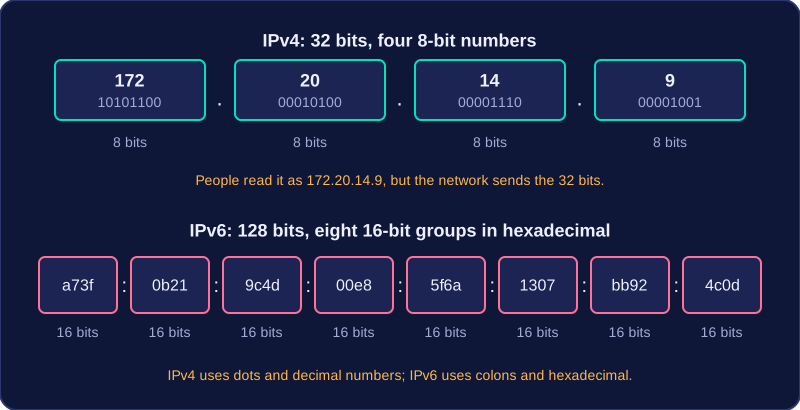
An IPv4 address is 32 bits long. It is written as four 8-bit numbers separated by dots, and each number must be from 0 to 255. For example, 172.20.14.9 has four parts: 172, 20, 14 and 9. Each part is one byte, so four bytes make 32 bits. The dotted format is only how people read it; the network actually sends the 32 bits.
IPv6 addresses
An IPv6 address is 128 bits long. It is written in hexadecimal, using digits 0-9 and letters a-f, usually as eight groups of up to four hexadecimal digits separated by colons. For example, a73f:0b21:9c4d:00e8:5f6a:1307:bb92:4c0d is an IPv6 address. You can tell the two versions apart because IPv4 uses dots and decimal numbers, while IPv6 uses colons and hexadecimal. Hexadecimal keeps a long address compact, and 128 bits provides far more unique addresses than IPv4.
Why IPv6 was developed
IPv4 has only 32 bits, so only about 4.3 billion different addresses are possible. That seemed plenty when IPv4 was designed, but there are now far more devices online. IPv6 was developed because the number of available IPv4 addresses is limited. Its much larger address space means far more devices can each have a unique address.
A router is a device that connects networks together. Data travelling across the internet is split into packets, and a router takes each packet that arrives and forwards it on towards its destination.
Reading the packet header
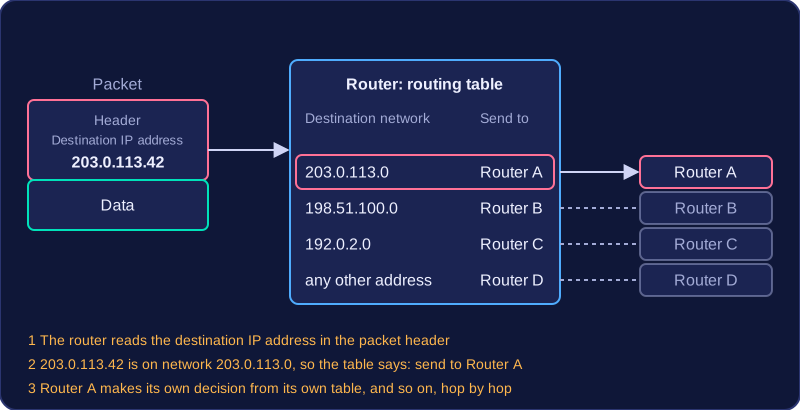
Every packet carries a header, and inside that header is the destination IP address. When a packet reaches a router, the router reads that address to work out which network the packet is heading for. It does not make the decision using a MAC address: a MAC address identifies a piece of hardware on a local network, so it cannot tell a router where a device on a distant network is. Routing decisions are based on IP addresses.
Using the routing table
The router checks the destination IP address against its routing table. This is a list of the networks the router knows about, paired with the next router or link that leads towards each one. For example, a packet addressed to 203.0.113.42 arrives at a router holding this table:
| Destination network | Send to |
|---|---|
| 203.0.113.0 | Router A |
| 198.51.100.0 | Router B |
| 192.0.2.0 | Router C |
| any other address | Router D |
The destination address belongs to the network 203.0.113.0, so the router sends the packet to Router A.
One step at a time
A router does not need to know the whole path. It only chooses the next router on the way, and that router then makes its own decision from its own table. The packet hops from router to router until it reaches the network containing the destination device. You can think of a relay race: each runner only needs to know who to hand the baton to next, not every step of the course.
The internet backbone is the set of very high-speed, high-capacity links that join the world's major networks together. Homes, schools and most offices do not plug straight into it. Their traffic works its way up through a chain of networks until it reaches the backbone, is carried a long way very quickly, and then comes back down to the destination network.
Reaching the backbone through routers
A router is the device that connects one network to another and passes packets between them, so every step on the way up to the backbone goes through a router. Your local network is linked to an Internet Service Provider (ISP) by a router, the ISP's network is linked to larger networks by more routers, and one of those larger networks connects into the backbone itself.
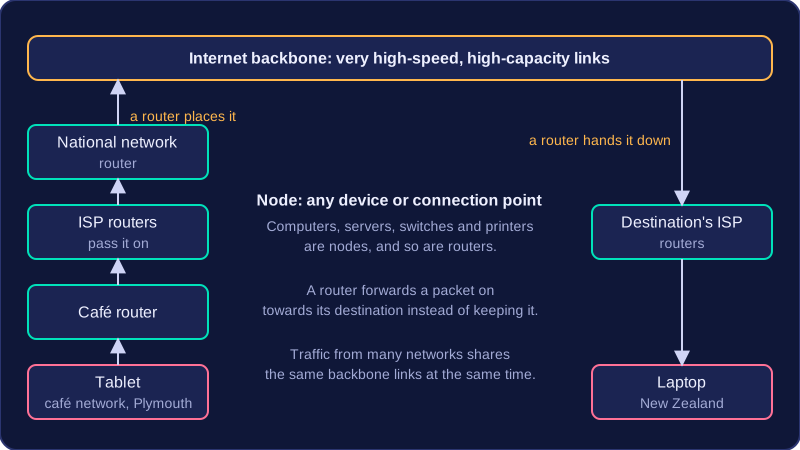
For example, a tablet on a café's network in Plymouth sends a packet to a friend's laptop in New Zealand. The café's router passes the packet to the ISP, routers inside the ISP pass it on to a national network, and a router there places it onto the backbone. The backbone's high-speed links carry it across the world until a router hands it back down through the destination's ISP to the laptop.
Nodes on the network
A node is any device or connection point on a network. Computers, servers, switches and printers are all nodes, and so is the point where two links meet. Routers are nodes too, but they do a special job: a router forwards a packet on towards its destination instead of keeping it, which is what makes the backbone a chain of links and routers rather than one long cable. On the backbone, the nodes are the large routers and the connection points where major networks join the high-speed links, so traffic from many separate networks shares the same backbone links at the same time.