Packet Switching
Packet Switching

Packet switching is how the internet moves data between devices. The sending device splits a file or message into small chunks called packets instead of sending it as one long stream.
Why use packets?
If a whole file travelled as one lump, it would keep a link busy for the whole transmission and nothing else could use that link until it had finished. Packets are small, so a link can carry one of your packets, then a packet from someone else's video call, then another of yours. No link is reserved for one communication, so packet switching lets many communications share the same network links at the same time.
Packets can take different routes
Each packet is sent off on its own. Routers forward each one towards its destination, and two packets from the same file can follow completely different paths. If one link is busy or broken, packets can go another way instead.
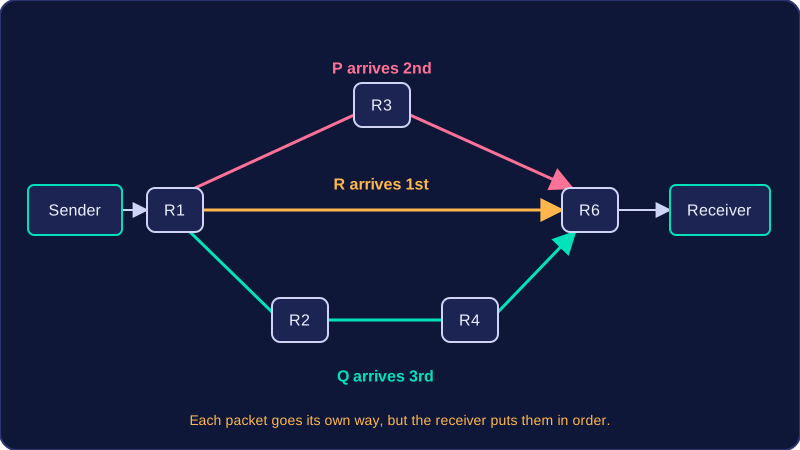
Imagine you send a recording of a school concert to a friend. Suppose your device connects to router R1 and your friend's device connects to router R6. The recording is split into packets, and the network might move them like this:
| Packet | Route through routers | Arrival order |
|---|---|---|
| P | R1 → R3 → R6 | 2nd |
| Q | R1 → R2 → R4 → R6 | 3rd |
| R | R1 → R6 | 1st |
All three packets reach your friend's device, but they may not arrive in the order they were sent. The receiving device puts them back into the right order to rebuild the recording.
Practise this
Edexcel GCSE Computer Science · Packet Switching
Edexcel GCSE Computer Science · The Internet