Networks
Packet Switching

Contents
Packet switching is how the internet moves data between devices. The sending device splits a file or message into small chunks called packets instead of sending it as one long stream.
Why use packets?
If a whole file travelled as one lump, it would keep a link busy for the whole transmission and nothing else could use that link until it had finished. Packets are small, so a link can carry one of your packets, then a packet from someone else's video call, then another of yours. No link is reserved for one communication, so packet switching lets many communications share the same network links at the same time.
Packets can take different routes
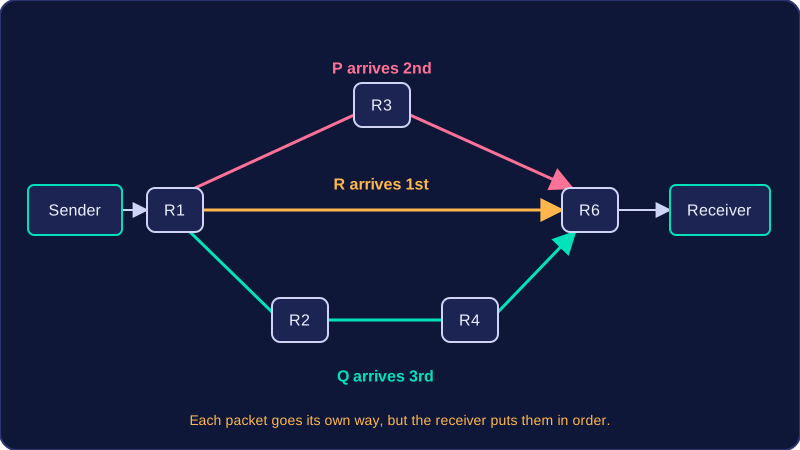
Each packet is sent off on its own. Routers forward each one towards its destination, and two packets from the same file can follow completely different paths. If one link is busy or broken, packets can go another way instead.
Imagine you send a recording of a school concert to a friend. Suppose your device connects to router R1 and your friend's device connects to router R6. The recording is split into packets, and the network might move them like this:
| Packet | Route through routers | Arrival order |
|---|---|---|
| P | R1 → R3 → R6 | 2nd |
| Q | R1 → R2 → R4 → R6 | 3rd |
| R | R1 → R6 | 1st |
All three packets reach your friend's device, but they may not arrive in the order they were sent. The receiving device puts them back into the right order to rebuild the recording.
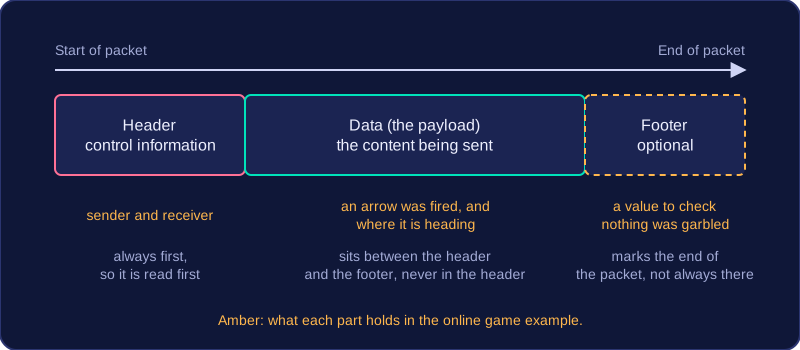
A packet is a small unit of data sent across a network. Packets share the same basic structure: a header at the front, then the data being sent, and sometimes a footer at the very end.
The parts of a packet
| Part | Position | Purpose |
|---|---|---|
| Header | First, at the start of the packet | Holds control information about the packet |
| Data | After the header, in the middle | The actual content being sent |
| Footer | Last, at the end (not always present) | Marks the end of the packet and can carry extra information |
The header sits at the very start because it carries control information — the details about the packet itself rather than the content you are sending. Putting this first means a network device can read it immediately, before it deals with the data behind it.
The data (also called the payload) is the part that actually matters to you: the slice of a photo, a line of a message, a piece of a file. It is never stored inside the header. It sits between the header and the footer, so in a packet with both, the data is sandwiched in the middle.
A footer is optional. Some packets finish straight after the data, while others have a footer at the end to show where the packet stops and to hold any extra information the receiver needs. Because it is optional, you cannot assume every packet has one.
Worked example
You fire an arrow at another player in an online game. The game turns that single action into a packet before it leaves your device. The header goes first and carries the control information — which device sent it and which device should receive it. Next comes the data: the small piece of content saying that an arrow was fired and where it is heading. A footer may follow at the end, holding a value the receiver can check to make sure nothing was garbled on the way. The data never hides inside the header — it sits between the header and the footer, in the middle.
A packet header is the control section at the start of a packet. It holds the details needed to move the packet across a network and to help the receiving device make sense of it. The header does not carry the data itself; it carries the details needed to deliver it.
Two key fields are the destination IP address and the source IP address. The destination IP address identifies where the packet is going, while the source IP address identifies where it came from. For example, if a tablet at home requests a web page from a web server, each packet’s header carries the tablet’s IP address as the source and the server’s IP address as the destination. This means the packet can be directed towards the right device, and the receiver knows who sent it.
Each header also includes a sequence number and the total number of packets in the communication. The sequence number shows the packet’s position in the sequence — for instance, a packet might be number 23 — and the total tells the receiver how many packets make up the whole message, such as 80. A header may also contain error-checking data, which lets the receiving device detect whether the packet was damaged on the way.
| Header field | What it contains | Why it is useful |
|---|---|---|
| Destination IP address | The IP address of the device the packet is being sent to | Shows where the packet should go |
| Source IP address | The IP address of the device that sent the packet | Shows where the packet came from |
| Sequence number | The packet’s position in the sequence | Helps the receiver place packets in order |
| Total number of packets | How many packets are in the whole communication | Tells the receiver how many to expect |
| Error-checking data (may be included) | Data used to check for damage | Helps detect a corrupted packet |
Without these fields, packets could not be directed correctly or identified as part of the same message.
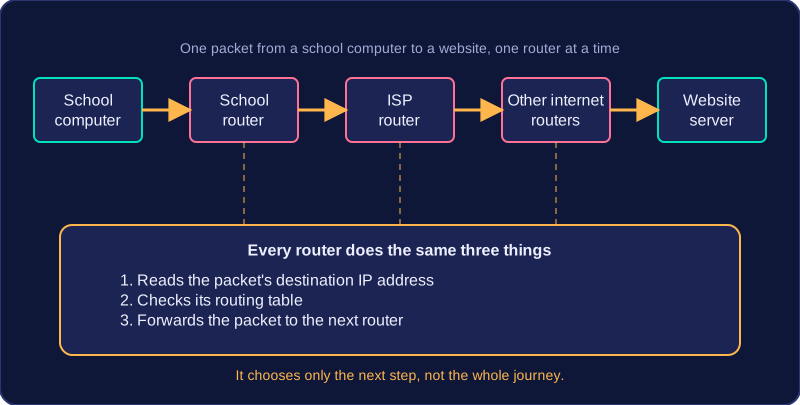
A router is a node that forwards packets from one network to another. A node is a connection point on a network, so a router is one of the places where networks meet.
When a packet arrives, the router reads the destination IP address in the packet. It looks in its routing table, which lists where packets for different addresses should go, and uses it to choose the next step. The router does not deliver every packet itself: it sends the packet on to the next router along the route, and that router repeats the process. A router does not plan the whole journey; it only chooses the next step.
Local networks and the internet
A small office network is joined to the internet by a router. Packets leaving an office computer go to that router first, and packets arriving from the internet are forwarded by it to the correct computer in the office. It is the node where the office network meets the internet. A home router forwards packets to devices on a local network in the same way.
Internet routers forward packets between networks across the internet. The internet is not one single network; it is a set of interconnected networks. Routers are the nodes that link those networks together, so a packet can cross several networks on its journey.
Routers route using IP addresses, not MAC addresses. The IP address tells the router which network the packet needs to reach. A MAC address identifies a device on a local network, so it is not used to choose a route across the internet.
For example, a packet sent from a school computer to a website starts with the school's router. The router reads the destination IP address, checks its routing table and forwards the packet to the school's ISP. The ISP's router then forwards it on to another router, and so on, until the packet reaches the network holding the website.
When a router forwards a packet, it often has more than one connected link it could send the packet on through. A routing decision is the choice of which link to use next. The router aims to choose the route that will carry the packet quickest, which is often the least congested one, so packets keep moving without unnecessary delay.
Tracking traffic
Routers keep track of traffic conditions on the links they use. For example, one link may be carrying a large amount of data and building up a queue, while another is quiet. The router records this information and shares it with other routers. This means routers do not have to rely only on their own experience; they can learn about congestion elsewhere.
Updating routing tables
Each router uses a routing table to store possible next steps for packets. When traffic information changes, routing tables can be updated. A route that was the best choice a moment ago may become a poor choice if it is now busy. The router then forwards later packets by a different link.
For example, a router at a college has two links towards a game server. Link A is faster but is handling lots of video traffic; link B is slower but almost empty. The router sends the packet by link B to avoid the congestion. When link A clears, updated information can make it the preferred choice again.
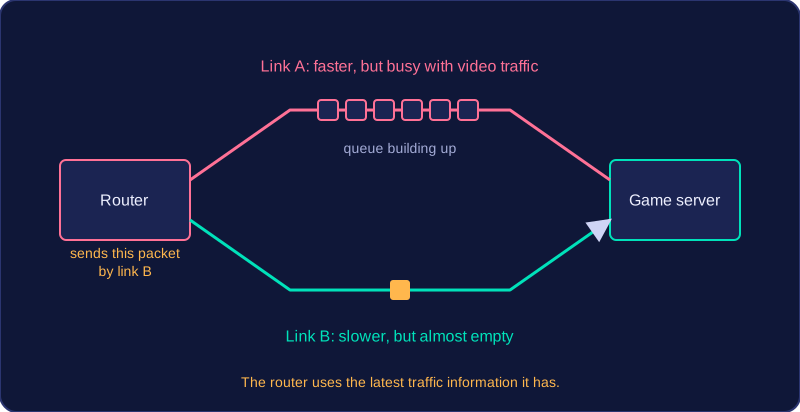
The router decides the next step for each packet using the latest conditions it knows about, rather than working out the whole journey in advance.
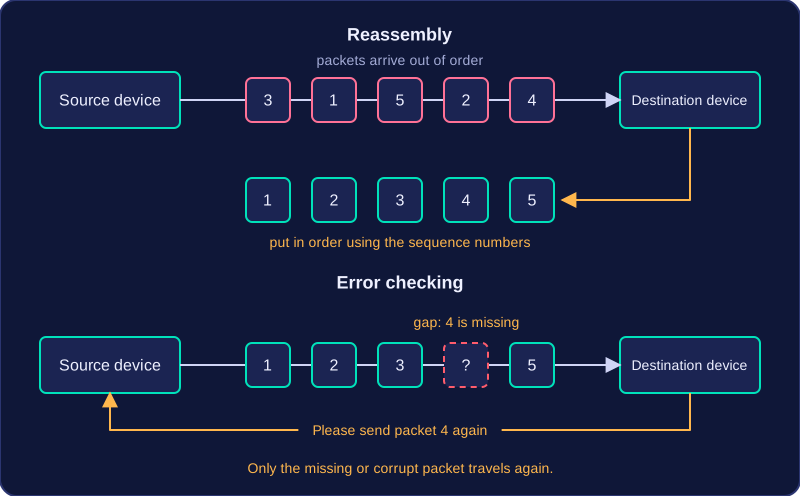
When packets reach their destination, the receiving device turns them back into the original file or message. Because packets can take different routes, they may arrive out of order, so the device uses the sequence number in each packet to put them back into the correct order. This process is called reassembly.
For example, your phone might receive the five packets of a voice message in the order 3, 1, 5, 2, 4. It reads the sequence numbers and places them as 1, 2, 3, 4 and 5, so the whole message is rebuilt and can be played.
Checking for errors
As each packet arrives, the receiving device carries out error checking. It uses any error-checking data in the packet to test whether any bits changed while the packet was travelling. A gap in the sequence numbers shows that a packet is missing. If a packet is corrupt or missing, the destination asks the source device to send that packet again. The other packets are kept, so only the faulty or missing one needs to travel again.
Who does the reassembly?
Reassembly and error checking happen at the destination device, such as your laptop or phone, not at the routers in between. Routers forward packets one at a time towards the destination IP address, but they do not wait for a whole set or put packets in order. This is efficient because different packets can take different routes and still be rebuilt correctly at the end.