Networks
Addressing

Contents
Every device connected to a network needs a unique address so that data reaches the right place. When data is sent across a network it travels in packets, and each packet has to arrive at the correct device rather than being delivered to every device on the network. The address acts like a label that lets the network pass each packet to the right destination.
IP addresses
An IP address is a unique identifier given to a device on a network, used when packets of data are sent and received. For example, a games console on a school network might request a level file from a server. The packets it sends carry the server's IP address as the destination, and the server's reply packets carry the console's IP address as the destination. An IP address can change: a school printer might have one IP address this term and a different one after the network is updated, even though nothing about the printer itself has changed. This means an IP address identifies a device's current connection to a network, not a person or a machine for ever.
MAC addresses
A MAC address is a permanent identifier set by the manufacturer of a network interface. Unlike an IP address, it does not change when the device joins a different network, because it is fixed to the hardware when the device is made. This lets other devices on a local network recognise the same piece of hardware even when its IP address is different.
| Address | Given by | Can change? |
|---|---|---|
| IP address | The network it is connected to | Yes, when it connects to a different network |
| MAC address | The manufacturer of the network interface | No, it is fixed to the hardware |
An IPv4 address is made of four numbers that identify a device so data can be delivered to it across a network. It is always written as four numbers separated by dots, such as 203.17.88.142.
Each of the four numbers is stored in 8 bits, so each one must be a whole number from 0 to 255. Eight bits can take 256 different patterns, and because counting starts at 0 the largest value you can store is 255. Four numbers of 8 bits each make a full address 32 bits long.
| Address | Number of parts | Bits per part | Total bits |
|---|---|---|---|
| 203.17.88.142 | 4 | 8 | 4 × 8 = 32 |
Take the last number, 142. Written in binary it is 10001110, which is exactly 8 bits: 128 + 8 + 4 + 2. The largest an 8-bit group can be is 11111111, which is 255, so a number like 300 could never fit and is not a valid part of an IPv4 address.
This is why the four numbers matter: a valid IPv4 address has exactly four parts, and every part sits between 0 and 255. Something like 192.168.4 or 10.0.512.3 is not a valid IPv4 address, because the first has only three numbers and the second contains a value that is too big to store in 8 bits.
IPv6 is the newer version of Internet Protocol (IP) addressing, and IPv4 is the older version that it replaces. An IPv6 address is 128 bits long, which gives a vastly larger supply of unique addresses than IPv4.
How an IPv6 address is written
An IPv6 address is written as eight groups of hexadecimal digits, with a colon between each group, and each group is four hex digits long. A hexadecimal digit can be 0–9 or A–F, so each digit stores 4 bits and each group stores 16 bits.
For example, 2f7a:0041:9c3d:0000:5b8e:00d2:7a10:3f66 has eight groups. Eight groups × 16 bits = 128 bits. Hexadecimal is used rather than denary because it is far more compact: one hex digit stands for 4 bits, so a group of four digits replaces 16 binary digits.
Why IPv6 was introduced
IPv4 uses 32-bit addresses, so the total number of possible IPv4 addresses is limited to about 4.3 billion (2 to the power of 32). As more phones, laptops, games consoles and other devices connect to networks, the available IPv4 addresses can run out. IPv6 has about 340 trillion trillion trillion possible addresses (2 to the power of 128), so there is plenty of room for every device to have its own unique address and for the internet to keep growing.
Every device on a network needs an IP address so that packets reach the right destination. That address can be given to a device in one of two ways: static or dynamic.
Static IP addresses
A static IP address is set by hand and stays the same every time the device connects. Because it never changes, other devices can always rely on finding that device at the same address. Network managers use static addresses for equipment that must be easy to locate, such as a file server, a shared printer or the router itself.
Dynamic IP addresses
A dynamic IP address is given out automatically when a device joins the network, usually by a DHCP server. It is taken from a pool of free addresses and can be different each time the device connects. When the device leaves, its address returns to the pool for someone else to use. This saves addresses, because a network only needs enough for the devices online at once, not for every device that might ever join.
| Feature | Static | Dynamic |
|---|---|---|
| Who sets it | A person, by hand | A DHCP server, automatically |
| Does it change? | No, it stays the same | Yes, it can change each time |
| Best for | Servers, printers, routers | Laptops, tablets, phones |
| Reuses addresses? | No, each one is reserved | Yes, from a shared pool |
For example, the school's CCTV recorder is set to the static address 172.16.8.5, so the office computers always know where to look for the camera footage. A tablet from the computing trolley, though, might pick up 172.16.8.60 when it is switched on before lunch, then rejoin the same network after lunch as 172.16.8.77, because the DHCP server handed out whichever addresses were free at that moment.
An IP address is not a permanent label for the hardware: it belongs to the connection a device is using, and it is handed back when that connection ends.
Every device that sends and receives data on a network needs an IP address, so replies reach the right place. The IP addresses you meet are either public or private.
Public IP addresses
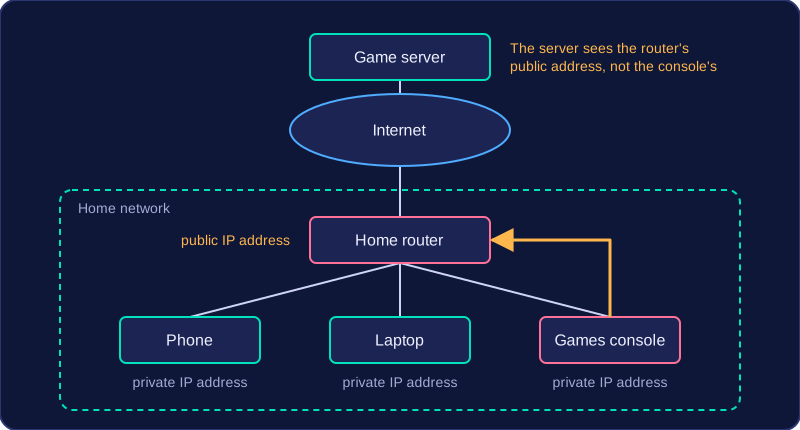
A public IP address can be reached from anywhere on the internet. Your internet service provider gives your home router one public IP address, and every device in your home shares it. When your phone loads a web page, the request leaves your home carrying the router's public address, so the reply comes back to the router, which passes it on to the correct device.
For example, a games console in a house joins an online race. The game server sees the connection coming from the home's public IP address, not from the console itself, because the console has no public address of its own.
Private IP addresses
Inside the home, the router gives each device its own private IP address. Private addresses work only within that local network and are never sent across the internet. They let the router tell your devices apart, so each reply reaches the right one.
| Public IP address | Private IP address | |
|---|---|---|
| Given to | a whole network, such as your home | each device on a local network |
| Given by | the internet service provider | the router |
| Used | across the internet | only inside the local network |
Joining a different network
An IP address belongs to the network you are connected to, not permanently to the device. A school tablet that joins the school Wi-Fi is given a private address by the school router and reaches the internet through the school's public address. Carry the same tablet to a library and connect to its free Wi-Fi, and the library router hands out a different private address and shares the library's public address instead. That is why you cannot rely on a device keeping the same IP address wherever it goes.
A domain name is the readable label that stands in for a numbered IP address. It is the part of a web address you type into a browser, such as homework.oakfieldhigh.org.uk, and the network uses the IP address behind it to reach the correct computer.
Domain names exist because IP addresses are awkward for people. Think about a pupil opening their school's homework portal. They type homework.oakfieldhigh.org.uk; without the name they would have to key in 198.51.100.42 exactly, every single time. A name is far easier to remember and quicker to type, and far less likely to be mistyped. The number still does the real work of the network, but the name gives people a friendly label to use instead.
A domain name is not the same thing as the IP address itself; it is a label that points at it. The label can stay the same even when the address behind it changes, so homework.oakfieldhigh.org.uk keeps working without anyone learning a new number. The matching between label and address happens automatically, so you only have to remember the name.
A DNS server is a computer that translates a domain name, such as sunnybankzoo.org.uk, into the matching IP address. People find names easier to remember and type, but packets travelling across a network are delivered using numbers, so something has to make the conversion. DNS servers store names and addresses — they do not hold the web pages themselves.
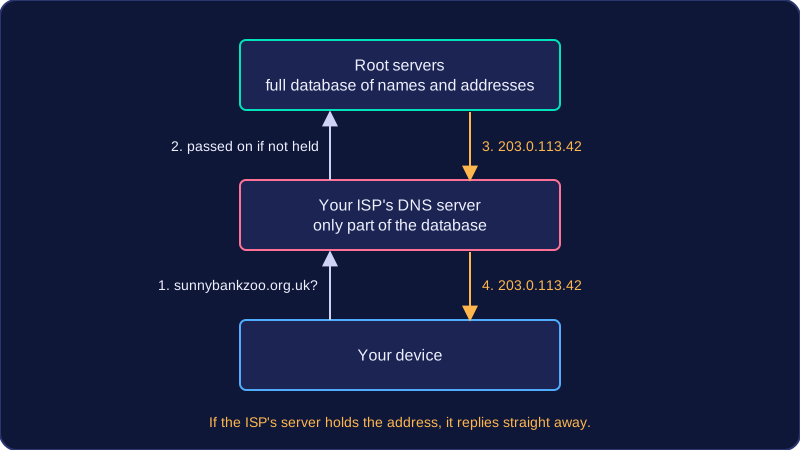
DNS is arranged as a hierarchy, meaning it has layers: the servers at the top hold the full database, while the servers below them hold only parts of it. A request moves between the layers until the correct address is found.
Who holds what
| Level | What it holds | Who owns it |
|---|---|---|
| Root servers (top) | A complete database of domain names and their IP addresses | Run by the organisations that manage the internet, not by a single ISP |
| Lower servers | Only parts of the database | Internet Service Providers (ISPs) |
Splitting the database like this means a lower server does not need to store every name in the world, and the work of answering requests is shared across many machines.
Following a request
Suppose you type sunnybankzoo.org.uk. Your device sends the name to your ISP's DNS server. If that server holds the matching address, it replies straight away. If it does not, it passes the request on to a server higher in the hierarchy, and that server may pass it on again. Eventually a server that holds the record replies with the IP address, such as 203.0.113.42, and the answer is passed back down to your device. Your device can then send its packets to that address.