Addressing
DNS Servers

A DNS server is a computer that translates a domain name, such as sunnybankzoo.org.uk, into the matching IP address. People find names easier to remember and type, but packets travelling across a network are delivered using numbers, so something has to make the conversion. DNS servers store names and addresses — they do not hold the web pages themselves.
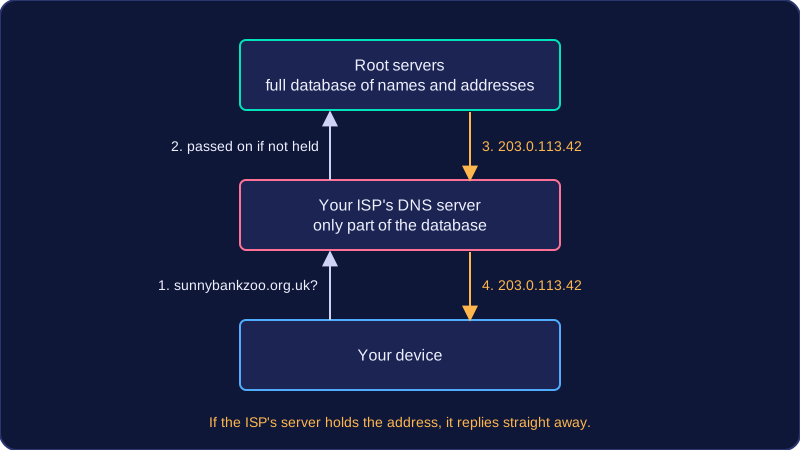
DNS is arranged as a hierarchy, meaning it has layers: the servers at the top hold the full database, while the servers below them hold only parts of it. A request moves between the layers until the correct address is found.
Who holds what
| Level | What it holds | Who owns it |
|---|---|---|
| Root servers (top) | A complete database of domain names and their IP addresses | Run by the organisations that manage the internet, not by a single ISP |
| Lower servers | Only parts of the database | Internet Service Providers (ISPs) |
Splitting the database like this means a lower server does not need to store every name in the world, and the work of answering requests is shared across many machines.
Following a request
Suppose you type sunnybankzoo.org.uk. Your device sends the name to your ISP's DNS server. If that server holds the matching address, it replies straight away. If it does not, it passes the request on to a server higher in the hierarchy, and that server may pass it on again. Eventually a server that holds the record replies with the IP address, such as 203.0.113.42, and the answer is passed back down to your device. Your device can then send its packets to that address.
Practise this
Edexcel GCSE Computer Science · Addressing