Addressing
Public and Private IP Addresses

Every device that sends and receives data on a network needs an IP address, so replies reach the right place. The IP addresses you meet are either public or private.
Public IP addresses
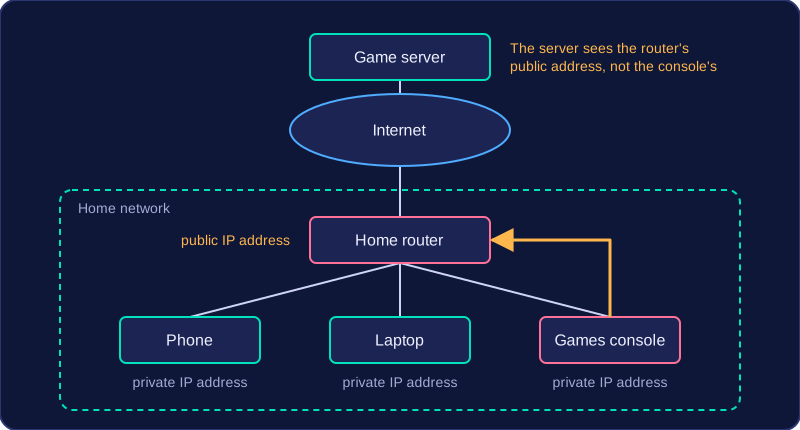
A public IP address can be reached from anywhere on the internet. Your internet service provider gives your home router one public IP address, and every device in your home shares it. When your phone loads a web page, the request leaves your home carrying the router's public address, so the reply comes back to the router, which passes it on to the correct device.
For example, a games console in a house joins an online race. The game server sees the connection coming from the home's public IP address, not from the console itself, because the console has no public address of its own.
Private IP addresses
Inside the home, the router gives each device its own private IP address. Private addresses work only within that local network and are never sent across the internet. They let the router tell your devices apart, so each reply reaches the right one.
| Public IP address | Private IP address | |
|---|---|---|
| Given to | a whole network, such as your home | each device on a local network |
| Given by | the internet service provider | the router |
| Used | across the internet | only inside the local network |
Joining a different network
An IP address belongs to the network you are connected to, not permanently to the device. A school tablet that joins the school Wi-Fi is given a private address by the school router and reaches the internet through the school's public address. Carry the same tablet to a library and connect to its free Wi-Fi, and the library router hands out a different private address and shares the library's public address instead. That is why you cannot rely on a device keeping the same IP address wherever it goes.
Practise this
Edexcel GCSE Computer Science · Addressing