Hardware
Secondary Memory
Contents
Secondary storage is the storage a computer uses to hold data, files and programs on a long-term basis. The CPU cannot reach it directly — anything the processor needs must first be copied into RAM.
Secondary storage is non-volatile, so its contents survive when the power is switched off. RAM is volatile and loses everything at shut-down, which is why a computer needs both kinds. Non-volatile does not mean the data is locked: you can still edit and delete files whenever you choose.
Why a computer cannot manage without it
- Programs and the data they use — a drawing app, a spreadsheet or a folder of photos would vanish at shut-down if it were kept only in RAM.
- Backups — a second copy on a separate device means a lost, damaged or stolen computer does not mean lost work. A school that keeps a duplicate of its timetable files on a second server in another building is a simple example.
- Start-up instructions — when you press the power button, the computer runs start-up instructions held in non-volatile memory, then loads the operating system from secondary storage into RAM so it can run.
Three ways of holding the 0s and 1s
| Method | How the bits are held |
|---|---|
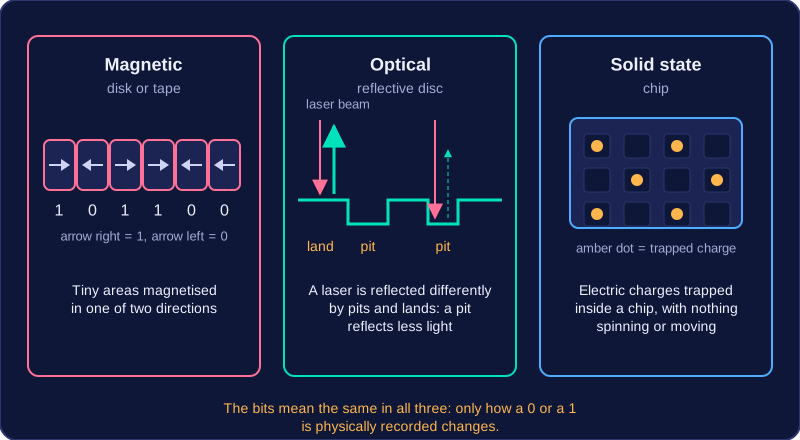
| Magnetic | Tiny areas of a disk or tape are magnetised in one of two directions. |
| Optical | A laser beam is reflected differently by the pits and lands on a reflective disc. |
| Solid state | Electric charges are trapped inside a chip, with nothing spinning or moving. |
So the three methods differ in how a 0 or a 1 is physically recorded, not in what the bits mean. A file stored magnetically, optically or in a solid state chip is the same pattern of bits — only the way it is written down and read back changes.
You can compare secondary storage with primary storage, especially RAM, by looking at four features: volatility, capacity, portability and access speed.
| Feature | Primary storage (RAM) | Secondary storage |
|---|---|---|
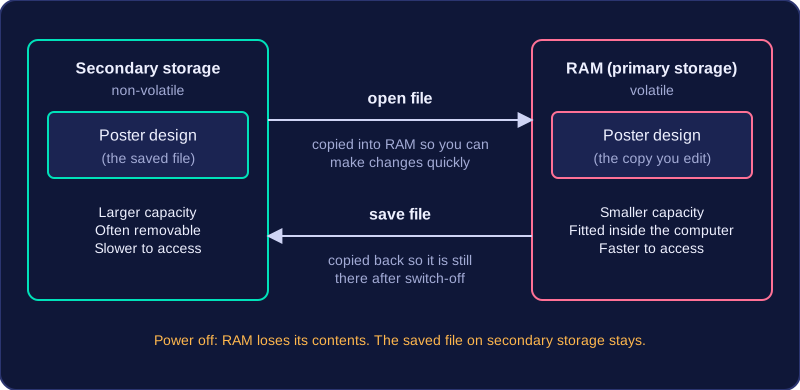
| Volatility | Volatile: contents are lost when the power is switched off | Non-volatile: contents are kept without power |
| Capacity | Usually smaller | Usually much larger |
| Portability | Fitted inside the computer | Often removable or external, so easier to move |
| Access speed | Faster to read from and write to | Slower to access |
Volatile means the contents are lost when the power is switched off, which is true of RAM. Non-volatile means the contents are kept without power, which is why secondary storage is used for anything you want to keep. Non-volatile does not mean the data can never be changed or deleted, only that it survives a power cut.
Secondary storage usually has a much larger capacity because it stores files long-term, while RAM only holds the programs and data being used at that moment. It is often more portable too: RAM is fitted inside the computer and is not meant to be carried around, whereas many secondary storage devices can be taken to another machine. The trade-off is access speed: secondary storage is slower to read from and write to than RAM, which is why the CPU cannot use it directly.
For example, when you open a saved poster design, the file is copied from secondary storage into RAM so you can make changes quickly. When you save, the file is copied back to secondary storage, so your work is still there after the computer is switched off.
Secondary storage keeps programs and files while the power is switched off. The device that does the storing can be internal, built into the computer, or external, plugged in only when you need it.
Internal storage
An internal device is fitted inside the computer's case and connected to the motherboard. A desktop tower might have a hard disk screwed into a drive bay beside a solid state drive slotted into the board, while a tablet has its storage sealed inside with no way to swap it.
- Nothing sticks out, so a laptop still slides into a bag easily.
- It cannot be left behind or unplugged by accident, and the connection inside the case is quick.
- There is nothing extra to carry, but the storage belongs to that one machine, so sharing a file means sending it over a network.
External storage
An external device sits outside the computer and is connected when it is needed, most often through a USB port. A pocket-sized drive or a plug-in solid state drive works this way: you plug it in, the computer detects it, and it appears as an extra drive you can save to.
- A band can record its tracks in a studio, then take the drive to a friend's house and carry on mixing them on a different machine.
- Extra space is added without opening the case, and the device can be locked away from the computer.
- The cable link is usually slower than the connection inside the case, and a small device is easy to lose, drop or knock out of its port mid-save.
The same device in two forms
Internal and external describe where a device sits, not what it is made of. A DVD drive can be screwed into a bay at the front of a tower or sold as a slim box that plugs into a USB port; the laser and the mechanism inside are identical, and only the casing and the connection change.
Magnetic storage keeps data as tiny areas on a disk or tape that are magnetised in one of two directions: one direction stands for a 1, the other for a 0. A read/write head moves over the surface, writing by setting the direction of each area and reading by detecting the direction already stored.
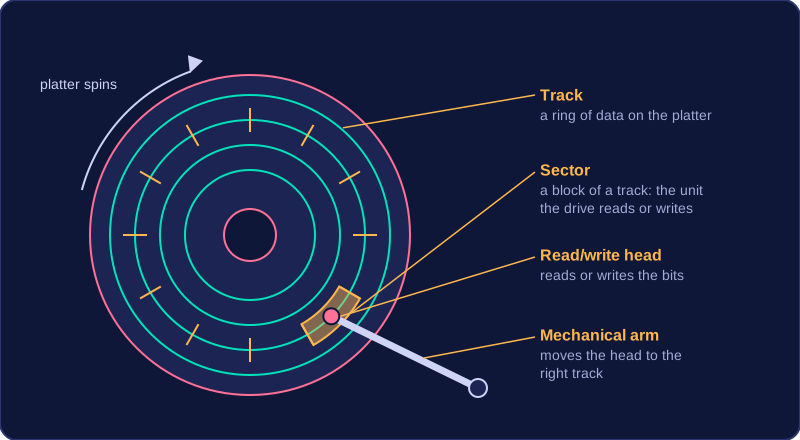
In a magnetic hard disk, those areas sit on a rigid magnetic platter. The data is arranged in rings known as tracks. Each ring is split into small sectors, the blocks the drive reads or writes at a time. The platter spins while a mechanical arm moves the read/write head to the right track, then waits for the correct sector to pass underneath, which is why a hard disk makes a faint whirring sound while it works.
Advantages and disadvantages
Magnetic disks are cheap for the amount of storage they provide, so very large capacities come at a modest price. Reading and writing are also relatively fast, quicker than an optical disc, which helps when loading large files. However, a hard disk contains many moving mechanical parts. A knock can damage the spinning platter or the arm carrying the head, so durability is a weakness. The sealed unit is also fairly heavy, making it less portable than a small flash drive.
Common uses
Magnetic hard disks give computers a large internal store for their programs and files. Magnetic tape, wound on reels inside a cartridge, is used for backups: it is cheap per gigabyte, so huge collections of data can be copied and kept safely. Portable magnetic drives let you carry large files between machines.
Optical storage saves data on a disc in a form that a laser can write and read. It is secondary storage, so the data is kept when the power is switched off.
Writing and reading with light
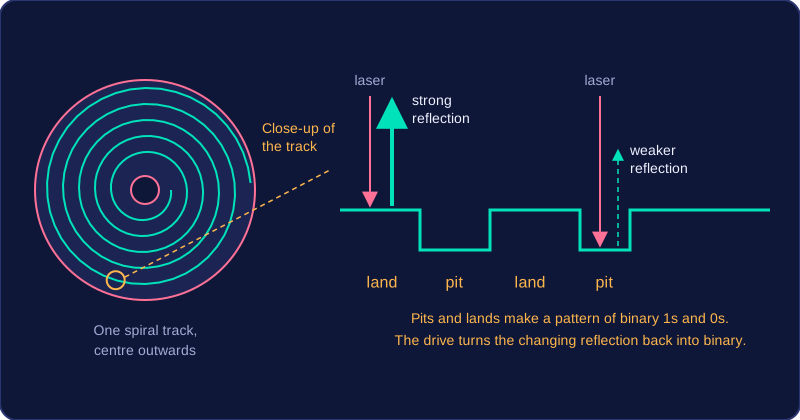
The laser writes data by burning tiny dips called pits into a spiral track running from the centre of the disc outwards. The flat areas between the pits are lands, and this pattern of pits and lands represents binary 1s and 0s. The surface has to be reflective so that light bounces back from it.
To read the disc, the drive shines a laser at the track and measures how strongly the light is reflected. A pit reflects less light than a land, so the reflection keeps changing as the disc spins, and the drive turns that pattern back into binary.
CDs, DVDs and Blu-ray discs
CDs, DVDs and Blu-ray discs are the common optical media. They are the same physical size, but each format holds a different amount of data, with Blu-ray discs storing far more than CDs.
Advantages, disadvantages and uses
- Cheap to buy and to produce, so a free disc on a magazine cover costs the publisher very little.
- Small, light and portable, so a driver disc for a printer can be posted to a customer for the price of a letter.
- Lower capacity than a hard disk or SSD, so a disc suits a single narrated slideshow rather than the school's whole photo archive.
- Easily damaged: a scratch scatters the laser and that part of the disc can no longer be read.
- Needs a suitable drive, and many new laptops do not have one.
- Slow to write, so saving a term's photo folder to a disc takes far longer than saving it to the computer's internal drive.
Optical discs are used to store and distribute music, films and other multimedia, such as a museum gift shop's audio tour. They are also used for backup and archiving, such as a hospital radio station's past interviews.
Solid state storage uses flash memory chips to store data. It is non-volatile, so the data remains when the power is off, and it has no moving parts: unlike a magnetic disk, nothing has to spin or move into position before data can be read.
Inside a flash chip, each memory cell holds a tiny amount of electric charge. Applying a current forces electrons across a barrier, where they stay trapped, and a current in the other direction releases them. Whether a cell is holding charge or not is what the computer reads as a 0 or a 1, so changing the charge is how the cell is written to or erased.
Advantages and disadvantages
Solid state storage is durable because there are no moving parts to knock or wear out. It is also very fast: reading and writing data needs no spinning disk or moving read/write head, so files open quickly and start-up is faster. It is silent and uses less power. However, it costs more than magnetic storage for the same capacity, and its capacity is broadly similar to that of magnetic disks.
Uses and flash memory
Solid state drives are built into laptops, tablets and smartphones, where being light, silent and hard to damage matters. Flash memory is the low-cost form of solid state storage: it is portable, small and tough, so it is used in removable memory cards and in small devices such as fitness trackers and handheld games consoles. A dash cam fixed to a van's windscreen is another good fit, because a bump or a drop is unlikely to lose the data.
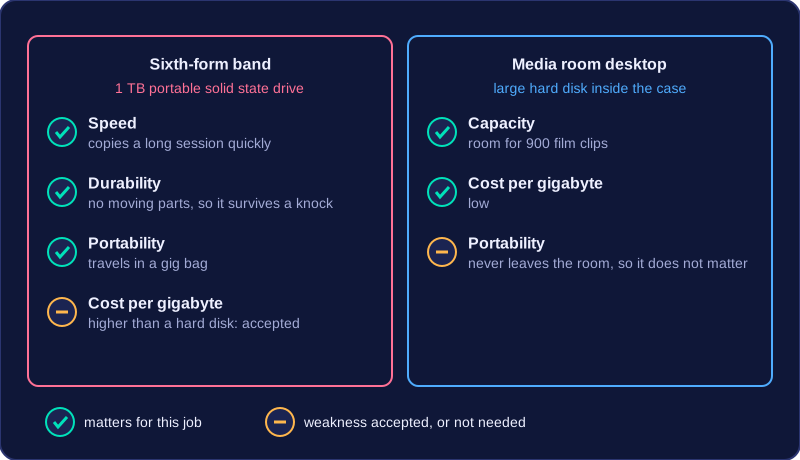
Choosing a secondary storage device means comparing devices on six characteristics — capacity, speed, portability, durability, reliability and cost — then picking the one whose strengths match the job. Very few devices are best at everything: one that holds a lot cheaply may be bulky or slow, so decide which characteristics matter most and accept weaknesses elsewhere.
What each characteristic means
| Characteristic | What it measures | Question it answers |
|---|---|---|
| Capacity | How much data it can store, in GB or TB | Will my files fit? |
| Speed | How quickly data can be read or written, in MB per second | Will files open and save quickly? |
| Portability | How easy it is to carry: size, weight, cable and power needs | Can it travel in a bag daily? |
| Durability | How well it survives knocks, drops, extreme temperatures and magnetic fields | Will it be knocked about or stored somewhere hot? |
| Reliability | How likely data is to be lost through failure or corruption | Can I trust it with the only copy? |
| Cost | The device's price and the cost per GB of storing data on it | Is it affordable for the amount I need? |
Durability and reliability are easy to muddle. Durability is about the device surviving physical harm; reliability is about whether your data stays intact. A device with no moving parts tends to be strong on both: there is no disk to scratch if it is dropped, and no motor to wear out.
A worked example
Two jobs in one school pull the weighting in opposite directions. A sixth-form band rehearses in the hall and mixes recordings at home, so session files travel in a gig bag. A 1 TB portable solid state drive fits: it copies a long session quickly, holds several unfinished tracks, and survives a knock because it has no moving parts. Each gigabyte costs more than on a spinning disk, but speed and toughness matter here. The media room needs the reverse. Its desktop stores 900 film clips opened all day, so a large hard disk inside the case is better: room for everything at a low cost per gigabyte, and it never leaves the room, so portability counts for nothing.