Secondary Memory
Primary and Secondary Storage
You can compare secondary storage with primary storage, especially RAM, by looking at four features: volatility, capacity, portability and access speed.
| Feature | Primary storage (RAM) | Secondary storage |
|---|---|---|
| Volatility | Volatile: contents are lost when the power is switched off | Non-volatile: contents are kept without power |
| Capacity | Usually smaller | Usually much larger |
| Portability | Fitted inside the computer | Often removable or external, so easier to move |
| Access speed | Faster to read from and write to | Slower to access |
Volatile means the contents are lost when the power is switched off, which is true of RAM. Non-volatile means the contents are kept without power, which is why secondary storage is used for anything you want to keep. Non-volatile does not mean the data can never be changed or deleted, only that it survives a power cut.
Secondary storage usually has a much larger capacity because it stores files long-term, while RAM only holds the programs and data being used at that moment. It is often more portable too: RAM is fitted inside the computer and is not meant to be carried around, whereas many secondary storage devices can be taken to another machine. The trade-off is access speed: secondary storage is slower to read from and write to than RAM, which is why the CPU cannot use it directly.
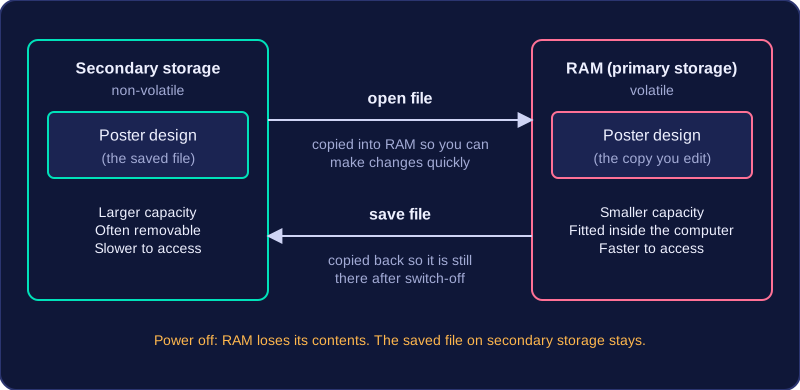
For example, when you open a saved poster design, the file is copied from secondary storage into RAM so you can make changes quickly. When you save, the file is copied back to secondary storage, so your work is still there after the computer is switched off.
Practise this
Edexcel GCSE Computer Science · Secondary Memory