Secondary Memory
Secondary Storage
Secondary storage is the storage a computer uses to hold data, files and programs on a long-term basis. The CPU cannot reach it directly — anything the processor needs must first be copied into RAM.
Secondary storage is non-volatile, so its contents survive when the power is switched off. RAM is volatile and loses everything at shut-down, which is why a computer needs both kinds. Non-volatile does not mean the data is locked: you can still edit and delete files whenever you choose.
Why a computer cannot manage without it
- Programs and the data they use — a drawing app, a spreadsheet or a folder of photos would vanish at shut-down if it were kept only in RAM.
- Backups — a second copy on a separate device means a lost, damaged or stolen computer does not mean lost work. A school that keeps a duplicate of its timetable files on a second server in another building is a simple example.
- Start-up instructions — when you press the power button, the computer runs start-up instructions held in non-volatile memory, then loads the operating system from secondary storage into RAM so it can run.
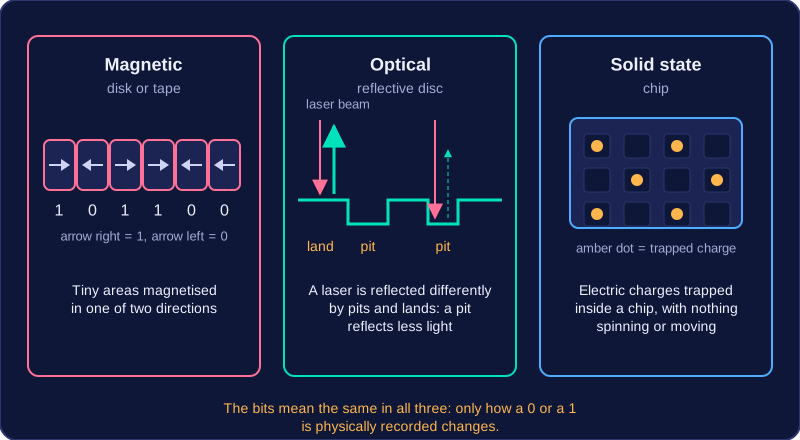
Three ways of holding the 0s and 1s
| Method | How the bits are held |
|---|---|
| Magnetic | Tiny areas of a disk or tape are magnetised in one of two directions. |
| Optical | A laser beam is reflected differently by the pits and lands on a reflective disc. |
| Solid state | Electric charges are trapped inside a chip, with nothing spinning or moving. |
So the three methods differ in how a 0 or a 1 is physically recorded, not in what the bits mean. A file stored magnetically, optically or in a solid state chip is the same pattern of bits — only the way it is written down and read back changes.
Practise this
Edexcel GCSE Computer Science · Secondary Memory