Hardware
Primary Memory
Contents
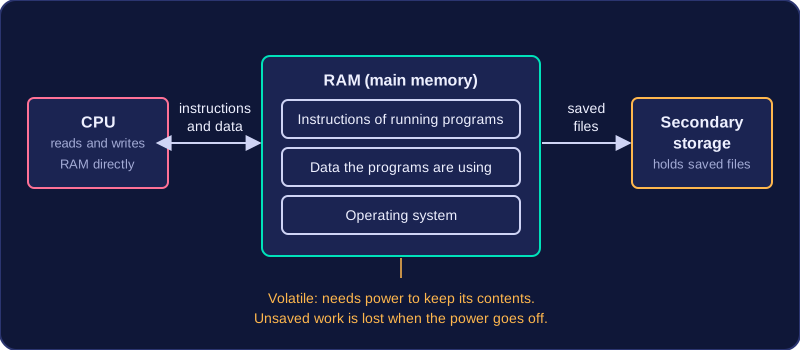
RAM (Random Access Memory) is a computer's main memory, also called primary memory. It sits between the CPU and secondary storage, and the CPU reads from it and writes to it directly rather than going through a storage device, so it is the memory the processor works with constantly.
While a program is running, both its instructions and the data it is working on sit in RAM. A photo editor, for example, keeps its own code there as well as the pixels of the picture you are retouching, and the CPU collects each instruction and each piece of data from RAM as it needs them. RAM also holds the operating system, so it is best pictured as the machine's working area: the programs and data in use are held there.
Volatile memory
RAM is volatile, which means it needs a steady power supply to keep anything stored in it. Switch off the computer, or let a tablet's battery run flat, and every byte inside is lost. Volatile does not mean unreliable or easily damaged — the memory works perfectly; it simply cannot hold its contents without power.
For example, you spend twenty minutes typing a letter into a word processor and the power is cut before you save it. Those words existed only in RAM, so they vanish. Had you saved the file, a copy would be sitting in secondary storage and would still be there afterwards. Clearing RAM never copies anything to storage for you, so unsaved work really is gone.
Why "random access"?
Any location in RAM can be reached directly and in the same amount of time as any other. Picture a rack of 600 numbered pigeonholes: collecting the note from hole 592 takes no longer than collecting the one from hole 7, because you go straight to it instead of checking the holes in order. That equal access time for every address is what the word random refers to.
Before a program can run, its instructions and the data it works on are copied from secondary storage into RAM (main memory). This copying is called loading. Only a working copy is loaded into RAM — the original program file stays on the secondary storage device, which is why the software is still there the next time you switch the computer on.
| While a supermarket self-service till is running | What is held |
|---|---|
| In RAM | The till's instructions, such as how to look up a price from a barcode, plus the live data — the items scanned so far and the running total |
| On the till's secondary storage | The original till software, unchanged — it is copied into RAM, never moved |
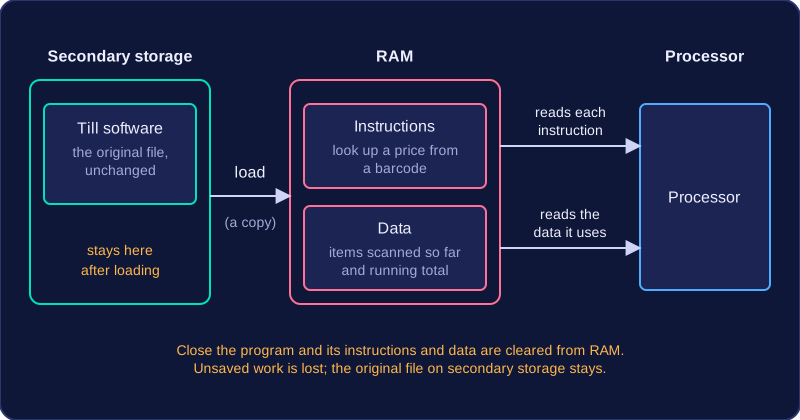
Both parts matter. A chess program needs the instructions that say how a knight is allowed to move, and it also needs data such as the positions of the pieces on the board. The processor reads each instruction from RAM, carries it out, and reads the data the instruction refers to. If only the instructions were loaded, there would be nothing for them to work on.
The instructions and data stay in RAM for as long as the program is in use, because the processor keeps coming back to them. The moment you close the program, they are cleared from RAM, which frees space to load something else next.
Clearing RAM does not save your work, though — a half-finished poster that was never saved to secondary storage is gone once the program is closed.
Main memory, which is RAM, is needed because it can hand instructions and data to the CPU quickly enough to keep it busy.
Speed is the reason it exists
Secondary storage is built to keep files safe for years, and it is much slower to reach than RAM. RAM is built from electronics that respond in a fraction of the time secondary storage needs, so a program's instructions and the data it is working on are held in RAM while the program runs.
The CPU fetches instructions one after another and carries each one out in a tiny slice of time. If it had to collect every instruction straight from secondary storage, it would finish each one long before the next arrived and be left waiting for work. That waiting time is wasted processing power: a very fast processor gives you no benefit if it is starved of instructions. Main memory is the fast stopping-off point that keeps the CPU supplied, so the processor spends its time computing instead of waiting.
A worked example
Picture a game where a skateboarder rolls along a street. Sixty times every second the program calculates the new position, checks whether the skateboarder has hit a bin, and draws the next frame. Each of those jobs needs instructions and numbers, and all of them have to be sitting in RAM. If they had to come from a hard disk each time, the skateboarder would lurch along in slow, uneven jumps, no matter how powerful the processor was. With the instructions and data already in main memory, every frame is ready in time and the movement looks smooth.
During the fetch-decode-execute cycle, RAM is the main memory that holds the instructions the CPU is running and the data it is working on. The CPU and RAM communicate through three buses.
The three buses
| Bus | Direction | Job in the cycle |
|---|---|---|
| Address bus | CPU to RAM | Carries the address of the next instruction or data item |
| Data bus | Between CPU and RAM | Carries the instruction or data item itself |
| Control bus | Between CPU and RAM | Carries signals such as read and write, which tell RAM what to do |
The address bus is one-way because only the CPU needs to say which location it wants. The data bus is two-way, carrying contents to the CPU or a value back to RAM. The control bus carries signals such as read and write.
To fetch an instruction, the CPU sends the address of the next instruction along the address bus. The control unit sends a read signal along the control bus, telling RAM that the CPU wants to read from that address. RAM finds the instruction at that address and returns it along the data bus, ready for the CPU to decode and execute.
Following one instruction
Imagine the next instruction is stored at address 4200. The CPU puts 4200 on the address bus and sends a read signal on the control bus. RAM finds address 4200 and returns the instruction stored there on the data bus. If that instruction needs a data item, say the value at address 8300, the CPU sends 8300 on the address bus and a read signal on the control bus, and RAM returns the value along the data bus.
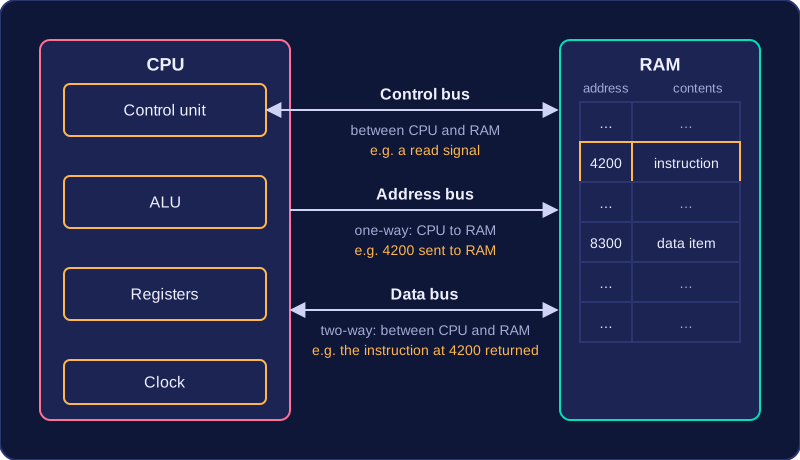
So the address bus carries the location the CPU wants, the data bus carries the instruction or data item itself, and the control bus carries the signals that make the transfer happen.
RAM has a much smaller capacity than secondary storage, and it costs more for each gigabyte it can hold. RAM is built from faster, more complex memory chips that are harder to manufacture, so fitting lots of it would make a computer very expensive. Secondary storage uses cheaper technology, so it can offer far more space for the same money.
RAM capacity is usually measured in gigabytes (GB), while larger secondary storage is often measured in terabytes (TB). A gaming PC advertised with 32 GB of RAM has 32 gigabytes of main memory; the same machine might come with a 4 TB hard disk, which is about 4000 GB of secondary storage.
| Feature | RAM | Secondary storage |
|---|---|---|
| Typical capacity unit | Gigabytes (GB) | Terabytes (TB) |
| Capacity compared | Smaller | Much larger |
| Cost per gigabyte | Higher | Lower |
| Why | Faster, harder-to-manufacture chips | Cheaper technology |
For example, imagine 8 GB of RAM costs £40, which is £5 per GB. A 1 TB (1000 GB) hard disk costing £40 works out at 4p per GB. For the same £40, the hard disk holds 125 times as much data, even though each gigabyte of RAM is far more expensive to make.