Primary Memory
Loading Programs into RAM
Before a program can run, its instructions and the data it works on are copied from secondary storage into RAM (main memory). This copying is called loading. Only a working copy is loaded into RAM — the original program file stays on the secondary storage device, which is why the software is still there the next time you switch the computer on.
| While a supermarket self-service till is running | What is held |
|---|---|
| In RAM | The till's instructions, such as how to look up a price from a barcode, plus the live data — the items scanned so far and the running total |
| On the till's secondary storage | The original till software, unchanged — it is copied into RAM, never moved |
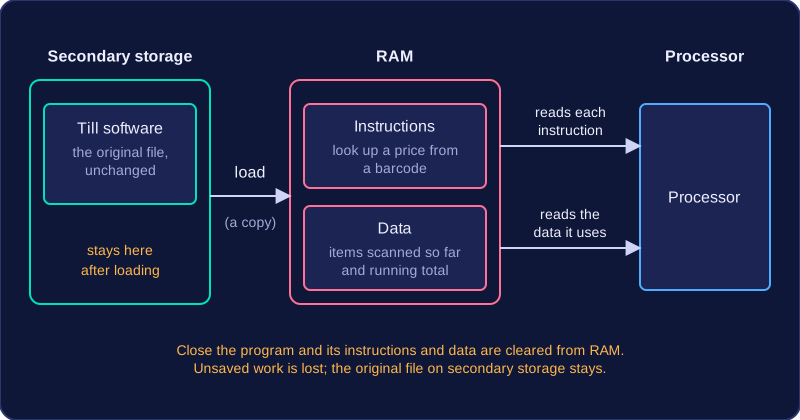
Both parts matter. A chess program needs the instructions that say how a knight is allowed to move, and it also needs data such as the positions of the pieces on the board. The processor reads each instruction from RAM, carries it out, and reads the data the instruction refers to. If only the instructions were loaded, there would be nothing for them to work on.
The instructions and data stay in RAM for as long as the program is in use, because the processor keeps coming back to them. The moment you close the program, they are cleared from RAM, which frees space to load something else next.
Clearing RAM does not save your work, though — a half-finished poster that was never saved to secondary storage is gone once the program is closed.
Practise this
Edexcel GCSE Computer Science · Primary Memory
Edexcel GCSE Computer Science · Memory Management