Networks
Network Performance

Contents
Network performance describes how quickly and reliably a network transfers data. Good performance means files transfer promptly, shared resources open without a pause and connections stay stable. Performance can change as conditions change.
Signs of poor performance
Poor performance appears as slow data transfer, slow loading, buffering, lag or dropped connections. Reliability matters as much as speed, so a quick connection that keeps failing is still performing badly.
What affects performance
Several factors work together, and the weakest one limits the rest:
- Bandwidth — the amount of data the link can carry each second. A wider link moves more data in the same time.
- Number of devices — devices sending and receiving at the same time share the bandwidth. More active devices do not reduce the total bandwidth, but each device gets a smaller share.
- Transmission media — copper, fibre optic and wireless links carry data differently, affecting speed and how easily the signal is disrupted.
- Signal strength, distance and obstacles — a wireless signal weakens with distance from the access point and through walls, floors and solid objects.
- Interference — other radio or electrical signals can corrupt data, so it must be resent.
- Latency — the delay before data arrives. Bandwidth is not latency: bandwidth is how much data can be sent each second; latency is how long data takes to arrive.
- Errors and retransmission — lost or damaged data is resent, wasting time and bandwidth.
- Hardware and servers — an old router, switch or network interface card, or a slow server, caps the speed everything else can reach.
For example, at a climbing centre the check-in tablet slows down on busy afternoons. Two staff phones upload route photos, a backup drive copies CCTV footage over the same connection, and the tablet has an old network adapter. Upgrading the adapter helps, but the tablet still waits while the other transfers use most of the link; the weakest part sets the limit.
Bandwidth is the capacity of a connection: it tells you how much data the link can carry in a set period, normally one second. It works like the width of a pipe carrying water: a wider pipe lets more water through at once, and a connection with more bandwidth moves more data in the same amount of time.
Bandwidth is measured in bits per second. Everyday connections are usually described in megabits per second (Mbps), and fast links such as fibre or a school's main internet line in gigabits per second (Gbps). One Gbps is 1000 Mbps. A bit is a single 1 or 0, so Mbps counts millions of bits each second, not millions of bytes. A line advertised at 200 Mbps can carry at most 200 million bits every second.
Why higher bandwidth helps
More bandwidth means more data can flow each second, so the same job finishes sooner. A family uploading 2 GB of holiday photos to cloud storage is shifting about 16,000 megabits, which takes roughly 16 seconds on a 1000 Mbps connection but around 200 seconds on an 80 Mbps line.
Bandwidth is not the speed at which an individual bit travels along a cable or through the air, since signals move at roughly the same speed whatever the bandwidth. What changes is how many bits can be sent in each second, so a higher bandwidth means a large transfer finishes sooner and network performance generally improves.
Bandwidth is also different from latency: latency is the delay before data reaches the other end, while bandwidth sets how much of it can arrive in each second.
Bandwidth sharing happens because a connection's bandwidth is not given separately to every device. It is a shared amount of data capacity, divided between all the devices using that connection at the same time.
To find one device's share when all of them are busy, divide the total bandwidth by the number of devices active at that moment. For example, an art room has a 240 Mbps connection and 30 tablets downloading images together. Each tablet gets about 240 ÷ 30 = 8 Mbps. If 10 more tablets start downloading, each of the 40 tablets gets about 240 ÷ 40 = 6 Mbps. The total bandwidth has not changed, but every device's share is smaller.
More active devices, more congestion
As more devices send and receive data at once, more traffic is created. This congestion means each device gets a smaller share of the bandwidth, so the network's performance falls and work on the network takes longer to finish. Performance falls most when many devices are busy at the same time; a device that is connected but idle uses very little bandwidth, so it hardly affects the share.
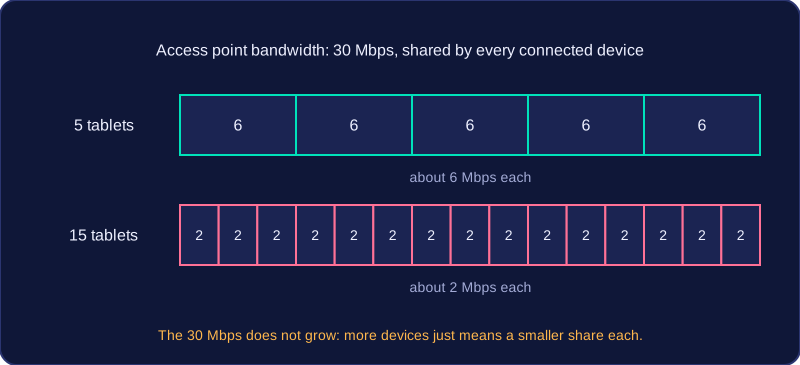
Heavy users take a bigger share
A few users can also slow everyone else. If two students in the music room are uploading long audio recordings to the school's shared drive while the rest of the class is researching online, those heavy transfers take a large slice of the shared bandwidth. The other devices are left with less capacity, so their work slows down even though only a handful of devices are connected.
A signal does not stay at full strength as it travels: wireless signals in the air and electrical signals in copper cable both lose strength, so the further data has to travel, the weaker the signal that arrives.
Wireless signals
The greater the distance between a device and the wireless access point it uses, the weaker the signal that reaches it. Strength drops with distance even in an open room, and drops much faster when the signal has to pass through walls, floors and other solid obstacles, which absorb part of the radio energy.
A weaker signal cannot carry data as quickly without errors, so the bandwidth available to that device falls and the same amount of data takes longer to arrive. If the signal drops below the minimum the device needs, the device cannot join the network, may not list the network as available, or may keep disconnecting.
For example, a referee's tablet at the far touchline of a school playing field, well away from the access point inside the sports hall, may take a few seconds to show the new score, while the same update appears almost instantly on a laptop in the sports hall. The weaker signal supports a lower bandwidth, so the update takes longer to arrive.
Copper and fibre optic cable
Wireless is not the only medium that loses signal. Copper Ethernet cable carries data as electrical signals, and these weaken over long distances, so the signal arriving at the far end of a long cable run is weaker than the one that was sent.
Fibre optic cable carries data as pulses of light and offers very high bandwidth. Light in the fibre weakens very little, so fibre signals travel much further than copper signals before they weaken significantly.
| Medium | Carried as | Effect of distance |
|---|---|---|
| Copper Ethernet cable | Electrical signals | Signals weaken over long distances |
| Fibre optic cable | Pulses of light | Very little weakening, so signals travel much further and bandwidth is very high |
| Wireless | Radio waves | Weaken with distance and through walls, floors and solid obstacles |
Interference is anything that disturbs a signal carrying data, so the data arrives damaged or not at all. Wireless connections are the most exposed: their signals travel through the air as radio waves, sharing that space with every other wireless device nearby.
What causes interference
Other wireless networks are a common cause: on a busy high street, a café's free Wi-Fi, the shop next door's network and the bus stop's Wi-Fi all cover the same patch of pavement, each one adding noise to the others. Individual wireless devices do the same — cordless phones, wireless doorbells and wireless speakers all send out radio waves of their own.
Interference can corrupt data, so the bits that arrive are not the bits that were sent. It also reduces the effective bandwidth — how much useful data actually gets through — and shortens the range the signal covers, because with noise competing for the same airwaves the signal weakens sooner. A fitness tracker that syncs in seconds at home can take far longer in a crowded gym full of the same kind of device.
Cables and interference
Copper cable carries data as an electrical signal, so nearby motors, machinery and power cables can interfere with it. Fibre optic cable carries data as pulses of light, which electrical noise cannot disturb at all. Wireless is affected most of all, so a wired connection is generally less affected by interference than a wireless one.
| Connection | Carries data as | Affected by electrical interference? |
|---|---|---|
| Copper cable | An electrical signal | Yes, from nearby electrical equipment |
| Fibre optic cable | Pulses of light | No |
| Wireless | Radio waves through the air | Yes, from other wireless networks and devices |
Why retransmission slows a network
If data is lost or damaged in transit, it must be retransmitted — sent again. That uses up bandwidth that could have carried new data, and it uses up time, so performance drops even though the connection's own bandwidth has not changed. If one chunk in every ten is damaged, about a tenth of what the link carries ends up as repeats, so the file arrives later than it would over a clean connection.
Latency is the delay between data being sent from its source and arriving at its destination. Every network has some latency because signals take time to travel and each piece of hardware takes time to handle the data.
What makes latency higher
Latency grows as data passes through more switches and routers, because each one has to read the data, work out where to send it and forward it on. It also grows as the distance travelled increases, since the signal is on the move for longer.
This is why latency is usually lower on a LAN than on a WAN. A LAN keeps data within one site and may only pass through a couple of switches, while on a WAN data crosses long distances and goes through far more routers.
Bandwidth is not latency
These two ideas are often confused, but they measure different things.
| Aspect | Bandwidth | Latency |
|---|---|---|
| What it measures | how much data can be sent each second | how long data takes to arrive |
| Typical unit | megabits per second (Mbps) | milliseconds (ms) |
| If it gets bigger | more data moves each second, so a big transfer finishes sooner | data arrives later, so replies feel delayed |
A connection with high bandwidth can still have high latency, so paying for more bandwidth does not automatically make data arrive sooner.
Wired connections usually have lower latency than wireless ones, because a cable carries the signal straight to the device, whereas a wireless signal is broadcast through the air and can weaken with distance, adding delay.
Why high latency matters
High latency causes the biggest problems in real-time uses, where a reply is needed almost straight away. Suppose you steer a robot arm from another classroom over the school network: a half-second delay means the arm carries on moving after you release the control, and this lag makes it awkward to use. Sending a batch of photos to the printer is different, because the short delay at the start is tiny compared with the whole transfer.
Data cannot travel through a network faster than the slowest piece of equipment it meets. Cables, switches, routers and servers all take a turn handling it, and each has a top speed that caps what the rest can manage. To improve performance, find the part holding everything up and either replace it or take some of the load off it.
What holds a network back
An old switch, router or network interface card (NIC) has a low maximum speed, so every device sending data through it is held at that speed. Fitting a fast NIC to a new computer gains you nothing if it plugs into a switch running at a fraction of that rate. A server short of processing power or memory is a bottleneck too: when many clients ask it for files at once, its queue of requests grows and everyone waits, even though the cabling is fine.
Matching the fix to the problem
| Slow part | Improvement | Why it helps |
|---|---|---|
| A slow switch or router | Replace it with a faster model | Traffic no longer queues behind it, so devices work at full speed |
| An old NIC in a desktop | Fit a newer NIC | More data is sent every second |
| A server that cannot keep up | Add memory or upgrade it | It handles many requests at once, so clients stop waiting |
| A low-bandwidth connection | Pay for higher bandwidth | More data moves each second, so pages and files arrive sooner |
Signals and busy times
A device that needs high bandwidth but never moves, such as a media suite desktop, is best on a wired or fibre link rather than relying on Wi-Fi. For the devices that must be wireless, adding an access point or moving an existing one closer gives a stronger signal and a faster connection. Cutting sources of interference, such as a cordless phone base unit left beside an access point, helps in the same way.
Some fixes cost nothing. Spreading out a group's afternoon video exports, or moving a nightly backup to a quieter hour, frees bandwidth for everyone. If the server is still the slowest part after that, upgrading it is the answer.