Networks
IP and MAC Addressing

Contents
IP is short for Internet Protocol. Every device using this protocol on a network needs an IP address, which identifies that device so data reaches the correct one. The network a device joins gives it this address; it is not fixed in the hardware. That is why the same laptop can have one address at home and a different one at school.
The format of an IPv4 address
An IPv4 address is 32 bits long. It is divided into four 8-bit groups, and four groups of 8 bits make the 32 bits. Each group is displayed as a denary value from 0 to 255, and full stops separate the groups. For example, 156.83.210.44 is an IPv4 address.
Why stop at 255? Because each group is 8 bits, so it has 2 to the power 8 = 256 possible values, counting from 0 up to 255. A group of 274 is impossible, and so is a negative group, because neither can be stored in 8 bits.
An address is only a valid IPv4 address if it has exactly four groups separated by full stops, and every group is a whole number from 0 to 255.
Turning an IPv4 group into binary
Each group converts using the place values 128, 64, 32, 16, 8, 4, 2 and 1. Take the group 210: 128 + 64 + 16 + 2 = 210, so the bits for 128, 64, 16 and 2 are set to 1 and the rest to 0, giving 11010010.
If the total needs fewer than eight bits, pad the front with zeros so the group is still 8 bits: the group 12 becomes 00001100. Doing this to all four groups and joining them gives the full 32-bit address, so 156.83.210.44 is 10011100 01010011 11010010 00101100.
Checking whether an address is valid
| Address | Valid? | Reason |
|---|---|---|
| 104.62.8.199 | Yes | Four groups, all between 0 and 255 |
| 47.286.9.2 | No | 286 is above 255 |
| 88.12.7.abc | No | abc is not a whole number |
| 130.14.6.22.5.1 | No | Six groups |
IPv6 is the newer version of the Internet Protocol. It was introduced because IPv4 does not provide enough addresses for all the devices that need to connect to networks.
Why IPv6 is needed
An IPv4 address is 32 bits long, so there are 2 to the power 32 possible IPv4 addresses. That number cannot cover every piece of equipment that now needs a connection, especially as people now connect phones, tablets, games consoles and smart devices as well as computers. An IPv6 address is 128 bits long, so there are 2 to the power 128 possible addresses. This is vastly more than IPv4, giving enough address space for the foreseeable future.
The format of an IPv6 address
An IPv6 address is made of eight groups, with 16 bits in every group. A group is shown as four hexadecimal digits, and colons separate the groups. Hexadecimal uses digits 0 to 9 and letters A to F, and each hexadecimal digit represents 4 bits. So four digits make 16 bits, and eight groups make 128 bits.
For example, a valid IPv6 address is 3f2a:9c41:00b7:5d18:e6a3:1174:8f02:bb59. It has eight groups. Each group has four hexadecimal digits. In total there are 8 × 4 = 32 hexadecimal digits, and 32 × 4 = 128 bits.
Telling IPv4, IPv6 and MAC addresses apart
| Address type | Length | How it is written | Separator | Example |
|---|---|---|---|---|
| IPv4 | 32 bits | Four denary groups, each from 0 to 255 | Full stops | 146.82.19.204 |
| IPv6 | 128 bits | Eight groups of four hexadecimal digits | Colons | 3f2a:9c41:00b7:5d18:e6a3:1174:8f02:bb59 |
| MAC | 48 bits | Six pairs of hexadecimal digits | Colons or hyphens | 7A-2C-9F-04-D1-58 |
A MAC address (Media Access Control address) is a unique identifier built into a device's network hardware, such as the network interface card that lets a computer, phone or printer join a network.
Fixed by the manufacturer
The manufacturer writes the MAC address into the hardware when the device is made, and it stays the same for as long as the device exists. It does not change when you join a different network or move the device somewhere else. Every address is meant to be unique: if two devices on the same network shared one, a frame might be sent to the wrong machine and communication would break down.
48 bits, written in hexadecimal
A MAC address is 48 bits long. A string of 48 ones and zeros is slow to read and easy to mistype, so we write it in hexadecimal instead. Each hexadecimal digit stands for 4 bits, so 48 ÷ 4 gives 12 hexadecimal digits. They are written as six two-digit groups; a colon or hyphen normally goes between neighbouring groups, as in 5A:2F:9C:41:B7:D3. Hexadecimal does not change the number of bits stored, but it is much shorter and easier to read and write than binary, which reduces mistakes.
The address is really two halves. The first six hexadecimal digits identify the manufacturer (5A:2F:9C in the example above), and the second six identify that individual device (41:B7:D3).
Used within a local network
MAC addresses do their work inside a single local network (LAN). When a frame arrives at a switch, the switch looks at the MAC address marked as the destination and forwards the frame only through the port that leads to the matching device. Getting data from one network to another is the job of IP addresses.
A switch connects the devices in a LAN and keeps a MAC address table in its memory. The table records which MAC address has been learned on each port, so the switch knows where each device can be found.
How the table is built
Every time a packet arrives, the switch reads the source MAC address and notes the port it came in on. It stores the pair in the table. Over time the switch learns the address of every device that sends data, without anyone typing the addresses in.
| Port | MAC address learned | Device |
|---|---|---|
| 6 | 5C:2A:8E:47:19:B3 | hall camera |
| 9 | A1:6F:3D:88:02:E7 | staff laptop |
| 12 | 7E:B0:44:9C:D5:1A | office printer |
Using the table to deliver data
When a packet arrives for another device, the switch reads the destination MAC address and searches the table for it. It then sends the packet out of the matching port only. For example, if the staff laptop sends a photo to the printer, the switch finds 7E:B0:44:9C:D5:1A on port 12 and sends the packet out of port 12, so the camera on port 6 never receives it.
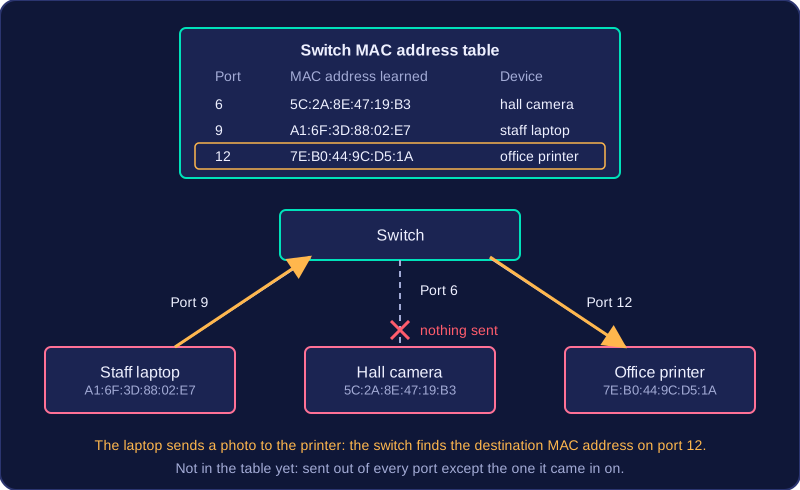
If the destination address is not in the table yet, the switch sends the packet out of every port except the one it arrived on. When the reply comes back, it learns the address and adds it to the table.
Why it matters
MAC addresses are what actually get data to the correct device inside a LAN. By matching each address to a single port, the switch keeps traffic away from the other ports, which makes the network more efficient. The switch uses MAC addresses, not IP addresses, to forward data within the LAN.
When you send data to a device on a different network, such as a friend's phone in another town, the data has to cross several networks to reach it. The data travels as packets, and each packet is addressed in two ways on its journey: with IP addresses between networks and with MAC addresses inside each local network (LAN).
Every packet carries a destination address and a source address. The destination address lets each device know where the packet is going next. The source means the receiving device knows who to reply to, so the reply gets back to the right computer.
Between networks: IP addresses
When data is sent between networks, the packet is addressed with the destination IP address: the IP address of the device it is finally meant for. Routers read this address and forward the packet towards the destination network, network by network, until it arrives at the network the destination device is on.
Inside a LAN: MAC addresses
Inside a LAN, delivery is done with MAC addresses. In the source LAN, the switch uses the MAC address of the router to pass the packet on to the router. At the other end, the router forwards the packet into the destination LAN, and the switch there uses the destination device's MAC address to deliver it to that device only.
For example, a tablet at a vet's surgery in Norwich (IP 80.4.19.133) sends an X-ray image to a server at a specialist centre in Leeds (IP 212.58.244.18). The surgery's switch forwards the packet to its router using the router's MAC address. The router sends it across the internet towards 212.58.244.18. When it reaches the specialist centre's network, a switch there uses the server's MAC address, such as 7C-19-E4-B2-0D-A5, to hand the packet over. The reply carries both addresses too, so it can find its way back.
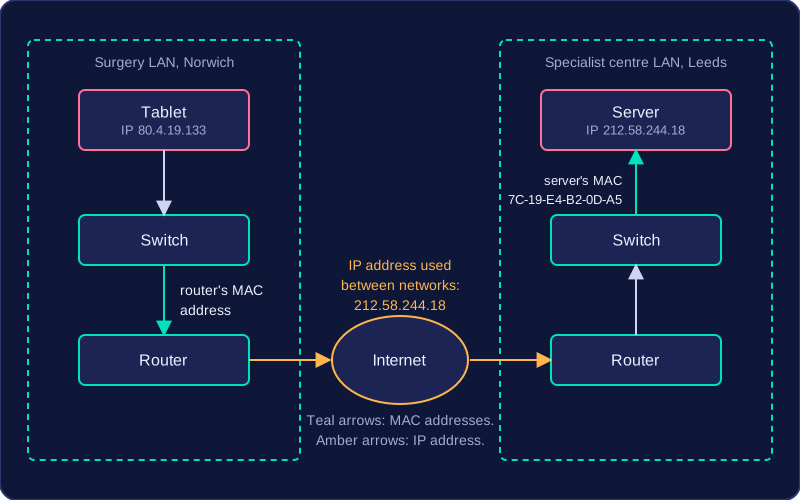
MAC addresses alone cannot do this job: the tablet and the server are not on the same network or connected to the same switch, so a MAC address gives no clue about how to cross the internet. IP addresses carry the packet between networks; MAC addresses deliver it within each LAN.
MAC addresses and IP addresses both identify a device on a network, but they are created and used in very different ways. The table summarises the main differences.
| Feature | MAC address | IP address |
|---|---|---|
| Assigned by | The manufacturer | The network |
| Can it change? | No, it is fixed in the hardware | Yes, when the device joins a different network |
| Format | 48 bits, written as 12 hexadecimal digits in six pairs | IPv4: 32 bits, four denary groups. IPv6: 128 bits, eight groups of four hexadecimal digits |
| Used by | Switches, inside a LAN | Routers, between networks |
Who assigns each address
A MAC address is built into the network hardware by the manufacturer before the device is sold, so it stays the same for the whole life of the device. The first half of the address identifies the manufacturer and the second half identifies that individual device, which is why no two devices should share one.
An IP address is given to a device by the network it joins, usually by the router. Move a laptop from a home network to a school network and its MAC address stays exactly the same, but its IP address is replaced with one that suits the new network.
Formats
A MAC address is written in hexadecimal, for example 3A-7D-91-0C-5E-B2. Colons can be used instead of hyphens. Twelve hexadecimal digits make 48 bits, because each digit stands for 4 bits.
An IPv4 address has four denary groups separated by full stops, such as 86.42.17.205, and every group must be from 0 to 255. An IPv6 address uses eight groups of four hexadecimal digits separated by colons, such as 2f4c:00a1:9b3e:0000:1d7f:6a20:44b8:0e91.
Where each is used
Within a LAN, a switch reads the destination MAC address on each packet and sends it out of the port leading to that device. To travel between networks, a router checks the destination IP address on the packet and sends it on towards the network that address belongs to. That is why MAC addresses are only used within the local network, while IP addresses are used to route data between networks.