IP and MAC Addressing
Switch MAC address tables

A switch connects the devices in a LAN and keeps a MAC address table in its memory. The table records which MAC address has been learned on each port, so the switch knows where each device can be found.
How the table is built
Every time a packet arrives, the switch reads the source MAC address and notes the port it came in on. It stores the pair in the table. Over time the switch learns the address of every device that sends data, without anyone typing the addresses in.
| Port | MAC address learned | Device |
|---|---|---|
| 6 | 5C:2A:8E:47:19:B3 | hall camera |
| 9 | A1:6F:3D:88:02:E7 | staff laptop |
| 12 | 7E:B0:44:9C:D5:1A | office printer |
Using the table to deliver data
When a packet arrives for another device, the switch reads the destination MAC address and searches the table for it. It then sends the packet out of the matching port only. For example, if the staff laptop sends a photo to the printer, the switch finds 7E:B0:44:9C:D5:1A on port 12 and sends the packet out of port 12, so the camera on port 6 never receives it.
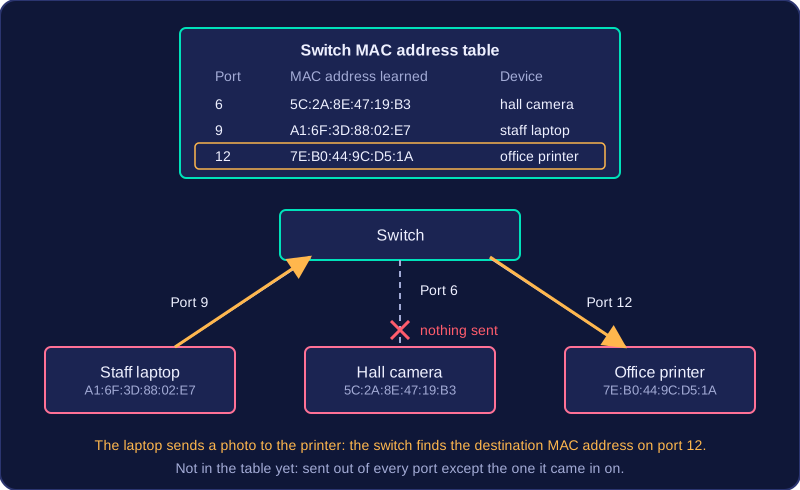
If the destination address is not in the table yet, the switch sends the packet out of every port except the one it arrived on. When the reply comes back, it learns the address and adds it to the table.
Why it matters
MAC addresses are what actually get data to the correct device inside a LAN. By matching each address to a single port, the switch keeps traffic away from the other ports, which makes the network more efficient. The switch uses MAC addresses, not IP addresses, to forward data within the LAN.