Subprograms
Libraries
Contents
A pre-existing subprogram is a subprogram that has already been written, tested and supplied, so you never write it yourself — you simply call it. Some are built in to Python and are always ready to use, such as len(); others belong to a library, such as random or math.
Why they save you work
- Time and effort — a job that would take you many lines is done with one call.
- Already tested — the supplied code has been used and checked by many programmers, so its bugs have been found and fixed. Your own program is more reliable as a result.
- Shorter, more readable programs — one line says clearly what is happening, so anyone reading your code understands it faster.
- Fewer errors to find — every routine you don't write is a routine that cannot go wrong inside your program.
- You can treat it as a black box — you don't need to know how it works inside, only how to call it.
Calling one correctly
Using a pre-existing subprogram takes the same effort however hard its job is, because you only need to know three things: what it does, the arguments it needs and what it returns, if anything. Arguments are the values you place inside the brackets, and you must supply the number the subprogram expects — give it too many or too few and the call stops with an error. The values must also be in the right order and of a sensible type.
Remember that a pre-existing subprogram is only part of a program. You call it from your own code, and you can use it alongside subprograms you devise yourself for the parts that are unique to your solution.
Here len() is called once with the text stored in a variable; the value it returns is stored in characters and then displayed.
# len() is built into Python, so it is ready to call
username = "SpeedyBadger"
characters = len(username)
print(characters)
Output:
12The next program breaks the rule about arguments: len() expects exactly one value, so passing two stops the program.
# len() needs exactly one argument
total = len("SpeedyBadger", "QuickFox")
print(total)
Output:
TypeError: len() takes exactly one argument (2 given) (line 2)A subprogram is a named block of code that you call when you need it. Subprograms come in two kinds, and the difference between them is what the call hands back.
Procedures do a job
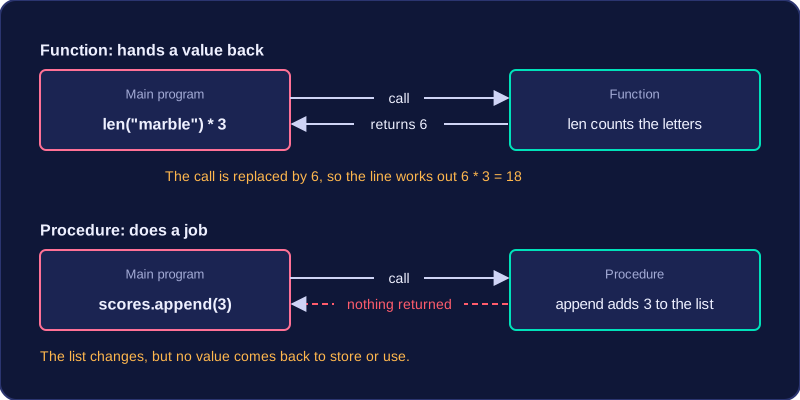
A procedure carries out a task but does not return a value. You call it for what it does, not for what it gives back. A procedure that adds an item to a list shows this clearly — scores.append(3) changes the list, and that is the end of it; nothing is handed back to store or calculate with.
Functions hand a value back
A function is a subprogram that returns a value to the point in the program where it was called. The call is swapped for that value, exactly as if you had typed the value yourself, so the rest of the line carries on with it. len("marble") returns 6, which is why len("marble") * 3 works out 18. round(7.6) returns 8, and str(25) returns the text "25"; returned values like these can be stored or used straight away.
| Call | Procedure or function | What happens |
|---|---|---|
scores.append(3) | Procedure | 3 is added to the list; no value comes back |
len("marble") | Function | 6 comes back to the point of the call |
round(7.6) | Function | 8 comes back |
str(25) | Function | The text "25" comes back |
Using a returned value
A returned value is not shown on screen by itself. If nothing is done with it, it is lost and the program simply moves on. You can store it in a variable, print it, or use it straight away in a calculation.
sport = "tennis racket"
points = len(sport) * 2
points_text = str(points)
print(points_text)
Output:
26Here len(sport) returns 13, and that number is used in the calculation of points. str(points) returns 26 as text, which is stored in points_text. print(points_text) then displays that text as a procedure, returning nothing to the program. A line containing only len(sport) would count the letters and throw the count away.
Built-in subprograms such as print() and len() are part of Python itself, so they are ready to use in every program and do not need to be imported. Library subprograms are stored in a separate library (sometimes called a module) that comes with Python but is not loaded automatically, so you must import the library before you can call them.
Importing a library
An import statement names the library and is usually placed at the top of the program. Importing makes the library's subprograms available; it does not call any of them. The program below imports two libraries, then calls one subprogram from each.
import random
import math

score = random.randint(40, 90)
root = math.sqrt(score)
print(score)
print(root)
Output:
89
9.433981132056603
Dot notation and exact names
After importing, call a library subprogram by writing the library name, a dot, then the subprogram name, for example math.sqrt(). The library name is needed because another library could contain a subprogram with the same name, and it tells Python where to look. Names must be written exactly as defined: math.sqrt() is correct, but math.square_root() and sqrt() are not. A call must also give the right number of arguments in the right order, such as two whole numbers for random.randint(40, 90) and one value for math.sqrt(64); the wrong number of arguments stops the program with an error.
Errors from imports and names
If you forget the import, Python does not recognise the library name, so the program stops with an error. A misspelt library or subprogram name causes an error for the same reason: Python cannot find what you asked for. This program tries to use the math library without importing it.
score = 64
root = math.sqrt(score)
print(root)
Output:
NameError: name 'math' is not defined (line 2)The random library provides subprograms that generate random values. Each call returns a value that you can store in a variable and use in your program.
Random whole numbers
random.randint() takes two arguments: the lowest and highest values. It returns a whole number that can be any value from the lowest to the highest, including both ends. For example, random.randint(4, 9) can return 4, 5, 6, 7, 8 or 9. The first argument is the lowest value and the second is the highest, so the order matters.
This program stores a random bonus between 25 and 75 points and displays it:
import random

bonus = random.randint(25, 75)
print("Bonus points awarded: " + str(bonus))
Output:
Bonus points awarded: 74Random real numbers
random.random() takes no arguments. It returns a real number from 0.0 up to but not including 1.0, so it may return 0.0 but never exactly 1.0. Since the result is less than 1, you can scale it by multiplying. Multiplying by 3.5 gives a real number from 0.0 up to but not including 3.5. The range always starts at 0.0, so the multiplier sets its width: change the multiplier to get the width you need.
This program produces a random length of fabric up to 3.5 metres:
import random

fabric = random.random() * 3.5
print("Fabric length in metres: " + str(fabric))
Output:
Fabric length in metres: 3.3825873749224855| Subprogram | Arguments | Value returned |
|---|---|---|
random.randint() | Two: lowest and highest | A whole number from lowest to highest, including both ends |
random.random() | None | A real number from 0.0 up to but not including 1.0 |
The math library is a collection of ready-made mathematical subprograms and constants, so you do not have to write them yourself. You import it with import math, then write the library name, a dot, and the name of the subprogram or constant you need.
The constant pi
math.pi holds the value of pi, about 3.14159. It is a constant, not a subprogram, so it is used directly as a value: no brackets, no arguments. Writing your own approximation such as 3.14 loses accuracy, so use the supplied constant throughout a calculation. A bike wheel with a diameter of 0.7 m rolls math.pi * 0.7 metres in one full turn, about 2.2 m.
The ceiling function
math.ceil() takes one argument and returns the smallest whole number that is greater than or equal to it, so any decimal part always pushes the result up: math.ceil(4.1) is 5, while math.ceil(4.0) is 4. It never rounds to the nearest value, and casting with int() would chop the decimal part off instead of rounding up.
Rounding up matters when a calculation produces part of an item but only whole items can be supplied. For a school concert, 250 guests sit at tables of 8: 250 / 8 = 31.25, so math.ceil(250 / 8) gives 32 tables. Rounding to the nearest would give 31 and leave 2 guests with nowhere to sit.
Powers
The library also provides a power function, math.pow(), which raises the first argument to the power of the second: math.pow(3, 4) returns 81.0 as a float. The ** operator does the same job, so 3 ** 4 gives 81.
import math

diameter = 0.7
turn_distance = math.pi * diameter
print("One wheel turn covers " + str(round(turn_distance, 2)) + " m")

guests = 250
tables = math.ceil(guests / 8)
print("Tables needed: " + str(tables))
Output:
One wheel turn covers 2.2 m
Tables needed: 32The time library provides subprograms for working with time, so you never have to write timing code yourself. You import the library and then call the subprogram you need, putting the library name in front of it, as in time.sleep().
Pausing a program
time.sleep() pauses a running program for a set length of time. It takes exactly one argument — the length of the pause — and that number is measured in seconds, so time.sleep(2) waits two seconds, not two milliseconds. Decimals are allowed too: time.sleep(0.5) waits half a second.
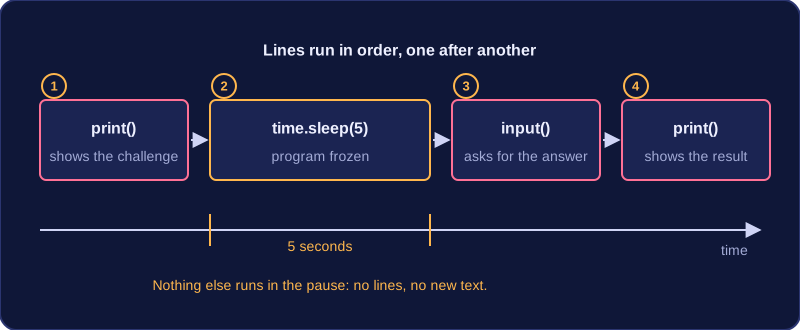
While the pause is happening the program does nothing else: no further lines run and no new text appears on the screen until the wait is over. That makes sleep useful for pacing a program: giving someone a few seconds to read a question or think of an answer before the next line is displayed, or slowing a game down so events do not rush past the player.
import time

print("Mental maths challenge: 17 * 4")
time.sleep(5)
answer = input("Your answer: ")
print("You wrote " + answer + ", the correct answer is " + str(17 * 4) + ".")
Output when the user types 68:
Mental maths challenge: 17 * 4
Your answer: 68
You wrote 68, the correct answer is 68.
The lines run in order. The challenge is printed, then the program freezes for five seconds while the player thinks, then the input prompt appears. The last line only runs once an answer has been typed and Enter is pressed.
Sleep is a procedure
time.sleep() carries out a task but returns nothing — no value is sent back to the program. In Python the call gives back only the special value None, so assigning it, such as wait = time.sleep(3), leaves wait holding None, which is no use in your program; you call sleep on its own line and ignore the result. A subprogram that returns no value is a procedure, so sleep is a procedure, whereas a subprogram such as a random integer function hands a value back and is a function.