Print Function
Print Function
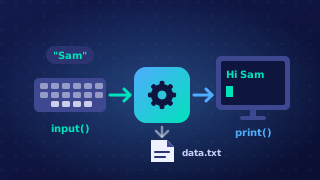
Output is the part of a program that sends data to the screen so the user can read it. Results, pieces of information and messages are all output. Input and output are two of the structural components that make up a program: input brings data in from the user, and output shows what the program has done with it.
Producing output with print
In Python 3, screen output is produced with the print function. Whatever you place inside its brackets is what appears on the screen when that statement runs.
Text must be written inside quotation marks so that Python treats it as text rather than as a variable name. Single or double quotation marks both work, and the marks themselves never appear in the output: print("Well done") displays Well done, with no quotes around it.
A variable name is written in the brackets with no quotation marks. Python then shows the value stored in that variable, not its name. If a variable called score holds the value 18, then print(score) displays 18, while print("score") would display the word score instead — the quotes turn it into text, so the program never looks at the variable at all.
A calculation or other expression can sit directly inside the brackets, so its result is displayed straight away without being stored in a variable first. print(15 * 4) displays 60, because Python works out the multiplication before printing it.
One line at a time
Each print statement starts a new line, which is how several of them build up a neat set of lines down the screen instead of one long line. print() with empty brackets displays nothing at all, so it is a simple way of leaving a blank line to space output out and keep it easy to read.
tickets = 4
price = 7
print("Cinema booking")
print(tickets)
print(tickets * price)
print()
print("Enjoy the film")
Output:
Cinema booking
4
28

Enjoy the film
Practise this
Edexcel GCSE Computer Science · Print Function
Edexcel GCSE Computer Science · Input Function
Edexcel GCSE Computer Science · Libraries