Print Function
Printing Multiple Items
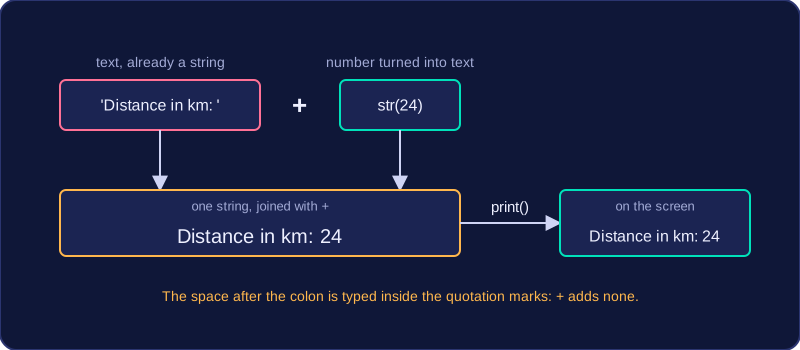
A label explains what a value means. Printing a bare number such as 24 leaves the user guessing, but printing Distance in km: 24 tells them exactly what they are looking at, so the output is fit for purpose.
You give print() one string to display, so the label and the value are built into a single string first. Text in quotation marks is already a string, and the + operator joins it to the rest. A number has to be converted with str() before it can be joined, because + cannot mix text and numbers.
# A cycling app reports the ride so far
distance = 24
average_speed = 18.5

print('Distance in km: ' + str(distance))
print('Average speed in km/h: ' + str(average_speed))
Output:
Distance in km: 24
Average speed in km/h: 18.5
Spaces are not added for you
The + operator joins the pieces exactly as they are written and adds nothing between them, so the space after a colon has to be typed inside the quotation marks. Compare how the same value appears:
| Statement | What appears on screen |
|---|---|
print('Distance: ' + str(24)) | Distance: 24 |
print('Distance:' + str(24)) | Distance:24 |
Why str() is needed
Joining a number to text without converting it first makes Python stop with an error, so the conversion is not optional:
# Joining a number to text without str()
distance = 24
print('Distance in km: ' + distance)
Output:
TypeError: can only concatenate str (not "int") to str (line 3)Practise this
Edexcel GCSE Computer Science · Print Function