Print Function
Input Prompts
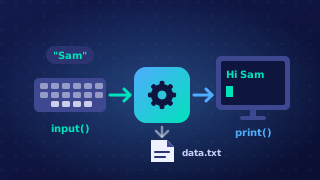
When a program needs information from the user, the input function collects what the user types. The string you place inside the brackets of input() is called the prompt. It is displayed on screen before the user types anything, so it acts as the program's instructions for what to enter.
The prompt is a string, so it is written inside quotation marks, either single or double. It appears exactly as written, but the quotation marks themselves are never shown on screen. Without a prompt the program would just stop and wait, and the user would have no idea what value was expected or what kind of value to type.
Writing a clear prompt
A good prompt states exactly what is wanted, and often the unit or type of value too. Compare these two:
input('?')gives the user nothing to work with.input('Enter your age in years: ')tells the user which value is needed and in what unit.
The prompt does not start a new line, so the user's typing appears straight after it. Finishing the prompt with a space or a colon keeps the typing separate from the prompt text, so the screen stays easy to read.
The prompt is only a message shown to the user. It is not the value the program keeps: whatever the user types in response is what gets stored, never the prompt itself.
book = input('Enter the title of your favourite book: ')
author = input('Enter the name of the author: ')
print(author + ' wrote ' + book + '.')
Output when the user types Holes, Louis Sachar:
Enter the title of your favourite book: Holes
Enter the name of the author: Louis Sachar
Louis Sachar wrote Holes.
In this program the first prompt asks for a book title and the second asks for the author's name, so the user knows which value is expected before they type each one.
Practise this
Edexcel GCSE Computer Science · Print Function
Edexcel GCSE Computer Science · Input Function