Software
Process Management

Contents
A process is a program, or part of a program, that is being run or needs to be run on the CPU. At any moment a computer usually has lots of processes: the one the CPU is working on right now, and the others waiting their turn.
A program is simply a set of instructions stored in a file. On its own it does nothing — it is a list of steps with nobody stepping through them. A process is that program in execution, or waiting to execute. That is the whole difference: the instructions are the same, but a process is those instructions being carried out, or lined up to be carried out.
Program compared with process
| Program | Process | |
|---|---|---|
| What it is | A set of instructions that does a job | A program, or part of one, being run or needing to be run on the CPU |
| Where it sits | In a file on a storage drive | In RAM while it is running or waiting |
| Is anything happening? | No — nothing runs until it is started | Yes — the CPU is working through its instructions, now or shortly |
A worked example
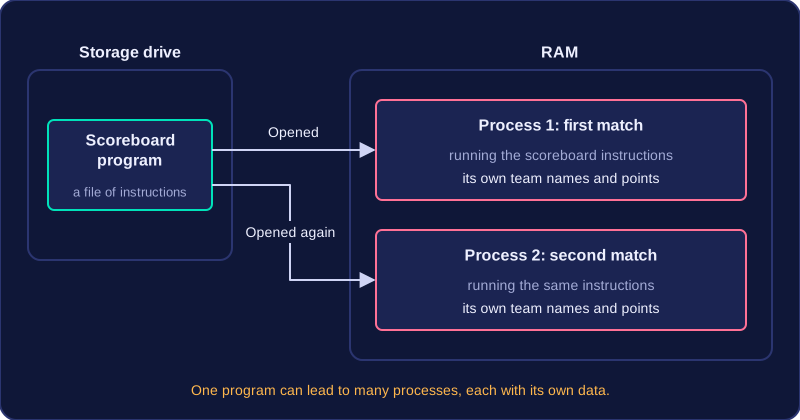
Your school laptop has a scoreboard program saved on its drive. Until someone opens it, it is only a program: a file of instructions doing nothing. When the sports teacher launches it, the operating system loads those instructions into RAM and the CPU begins working through them, filling in the team names and points. It is now a process, because it is being run.
If the teacher opens a second copy of the same scoreboard for another match, there are two processes made from one program. Each has its own team names and points, so each is a separate process with its own data. One program can therefore lead to many processes, which is why a computer with only a handful of programs open can still have dozens of processes to manage.
Process management is one of the functions of an operating system. It is the operating system's job to look after every process on the computer so that each one gets a turn to use the CPU.
A single CPU core can only carry out one process at a time, yet a typical computer has dozens of processes that all want to run — a game, a music player, the small program that keeps the battery icon up to date. The operating system keeps track of all of them and shares the CPU's time between them, so each process makes some progress instead of one of them holding on to the processor and freezing everything else. Sharing the CPU like this is what allows a computer to multi-task.
The operating system is the manager, not the worker: it never executes a process itself. The CPU runs the instructions, while the operating system decides which process should be allowed to use it and keeps everything in order. As part of process management, the operating system also manages interrupts — signals that tell the CPU an event needs attention.
A worked example
A games console is running a racing game when it also begins saving your lap times and checks whether a second controller has been connected. Each of these is a separate process with a claim on the CPU. Process management is what stops the save from stalling the race: the operating system watches over all three and gives each one its share of CPU time, so the game keeps moving, the save finishes and the controller check still happens.
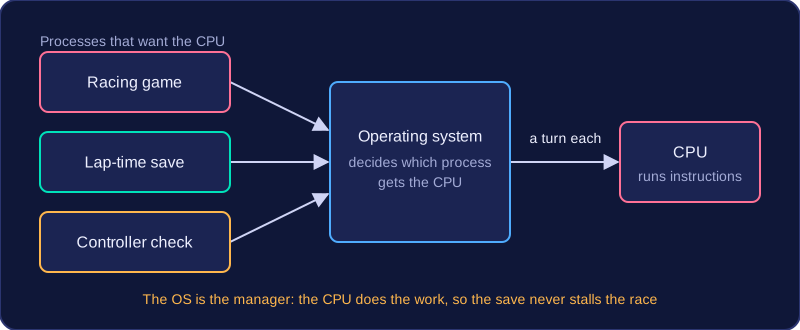
On a single-core CPU only one process can be carried out at any instant, because the core can only work through one instruction at a time. So that every program you are using keeps making progress, the operating system shares the CPU out, letting processes take turns.
Time slices
A time slice is the small amount of CPU time the operating system gives a process before moving on, often just a few milliseconds. When a process's time slice runs out, it is paused and a different process gets a turn.
- A slice that is too long lets one process hog the CPU, so other programs stall and the computer seems to freeze.
- A slice that is too short means the CPU spends much of its time switching between processes instead of doing useful work.
The scheduler
The scheduler is the part of the operating system that decides which process runs next and how long its time slice will be. The rules it follows are called a scheduling algorithm. One algorithm might be fair so every process gets a turn; another might let the process you are using run first, so the computer feels responsive.
The scheduler only makes the decision. The CPU is the hardware that actually carries out the process. This constant switching between processes is what makes multi-tasking possible.
Worked example
Imagine a single-core computer running three processes: the text editor you are typing into, a video editor exporting a clip and a zip program compressing a folder, with each process given a 15 ms time slice.
| Turn | Time on the CPU (ms) | Process running |
|---|---|---|
| 1 | 0 to 15 | Text editor |
| 2 | 15 to 30 | Video export |
| 3 | 30 to 45 | Zip compression |
| 4 | 45 to 60 | Text editor |
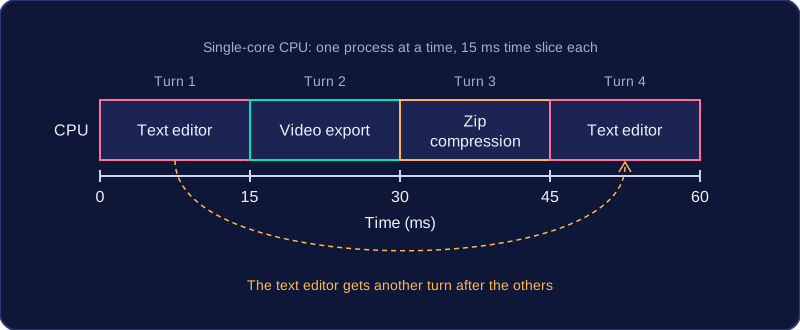
Each process gets a regular turn, and because the switching happens so quickly the letters you type still appear straight away while the export and the compression carry on in the background.
When more processes are ready to run than the CPU can run at once, the operating system keeps the waiting ones in a data structure, usually a first in, first out waiting line. The process that has waited longest sits at the front and gets the CPU next.
Each turn on the CPU is a time slice. If a process finishes within its slice, it is removed and does not return. If it does not finish, the operating system takes the CPU away and returns the process to the back of the waiting line to wait for another turn. This stops one long process from hogging the CPU, so every waiting process makes progress.
Ordering by priority
The waiting line can be ordered by priority, so a process that matters more is placed ahead of lower-priority ones and runs sooner. A low-priority process can be pushed back several times before it gets a turn. For example, in a school results system, the process that works out grades could have a higher priority than a process that tidies up old log files, so the important job is not kept waiting behind the tidy-up. When an unfinished process rejoins a priority-ordered waiting line, it goes in at the position that matches its priority rather than straight to the end.
Keeping waiting processes in a data structure makes this practical: the operating system can quickly add a process, take the next one from the front, and reorder the line by priority.
Worked example
Three processes, P, Q and R, all have the same priority and each gets a time slice of 3 units. P needs 8 units, Q needs 4 and R needs 2.
| Turn | On the CPU | Units used | Units left | Waiting line after the turn |
|---|---|---|---|---|
| 1 | P | 3 | 5 | Q, R, P |
| 2 | Q | 3 | 1 | R, P, Q |
| 3 | R | 2 | 0, finished | P, Q |
| 4 | P | 3 | 2 | Q, P |
| 5 | Q | 1 | 0, finished | P |
| 6 | P | 2 | 0, finished | empty |
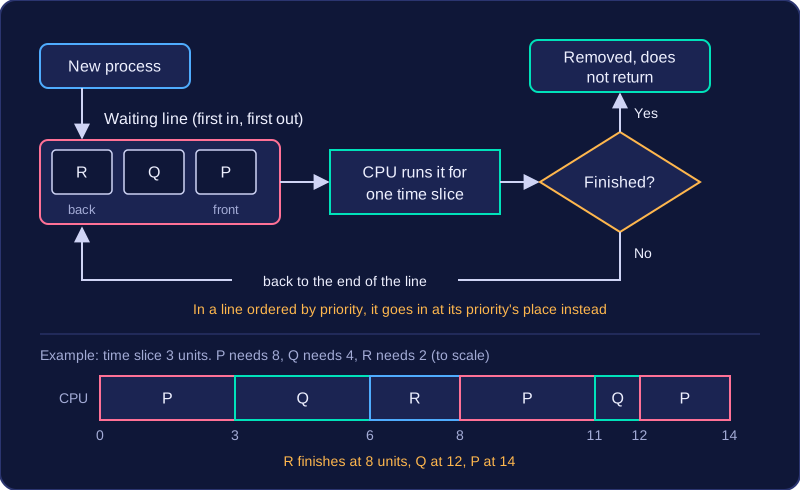
If Q had a higher priority than the others, it would be placed at the front, so it would finish sooner.
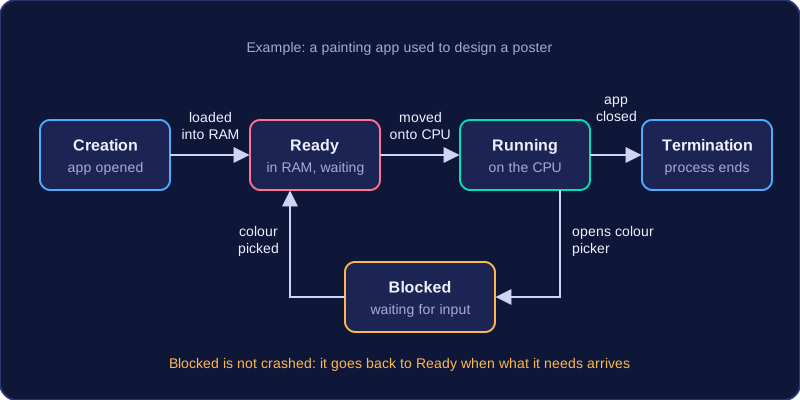
A process life cycle is the set of stages a process passes through from the moment it is created until it ends. The operating system controls each move between the stages.
The five stages
| Stage | What happens |
|---|---|
| Creation | When you open a program, the operating system creates one or more processes for it. |
| Ready | The operating system moves the process instructions into RAM, so the process is ready to run. |
| Running | The operating system moves the process onto the CPU so that its instructions can be executed. |
| Blocked | The process cannot continue because it is waiting for user input or for another resource, such as a file, to become available. |
| Termination | The process ends when it has finished its job or is closed. |
A process in the ready stage is not running yet — it is waiting for its turn. A blocked process has not crashed or finished; it is paused until the thing it needs arrives, and then it goes back to the ready stage.
For example, imagine you open a painting app to design a poster. The operating system creates a process for the app, and its instructions are loaded into RAM, so it is ready. The CPU runs the process while you draw with the brush. When you open the colour picker and the app is waiting for your choice, the process is blocked. Once you pick a colour, it returns to ready and then runs again. When you close the app, the process terminates.
Multi-tasking is when the operating system manages many tasks so that they appear to happen at the same time. A single CPU core can carry out only one process at a time, so the operating system rapidly switches between processes to create that effect.
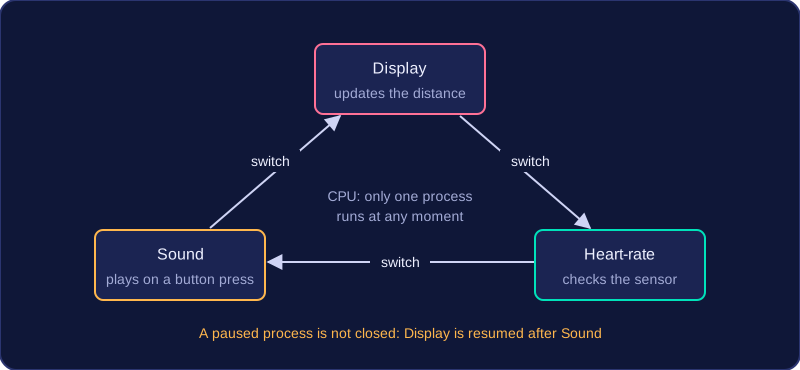
The operating system decides which process runs next and for how long. The CPU carries out the instructions of whichever process is running, while the operating system manages the switching. Each process gets a short turn; when its turn ends, it is paused and another process is allowed to use the CPU. The first process can be resumed later, so being paused is not the same as being closed.
For example, a gym treadmill may update the distance display, check the heart-rate sensor and play a sound when a button is pressed. The operating system might let the display process run, then switch to the heart-rate process, then to the sound process, then back to the display. The changes happen so quickly that the treadmill seems to do all three at once, even though the CPU is only working on one process at any moment.
An interrupt is a signal sent to the CPU to show that an event needs immediate attention. The CPU suspends whatever it is doing, runs the instructions that deal with the event, and then carries on. The set of instructions that handles the event is called the interrupt handler.
Interrupts are needed because a CPU works on one thing at a time. Without them, a key you pressed might not be read until the current process had finished, so typing would feel frozen and a device would seem to be ignored.
Hardware and software interrupts
| Type | Where it comes from | Example |
|---|---|---|
| Hardware interrupt | A hardware device | A mouse button being clicked, or a timer chip signalling that a time slice has ended |
| Software interrupt | A program | A drawing app asking the operating system to load a picture from storage |
Programs do not access hardware devices or storage directly, so they raise a software interrupt to ask the operating system to do it for them. Most software interrupts are ordinary requests like this, not faults.
What happens when one arrives
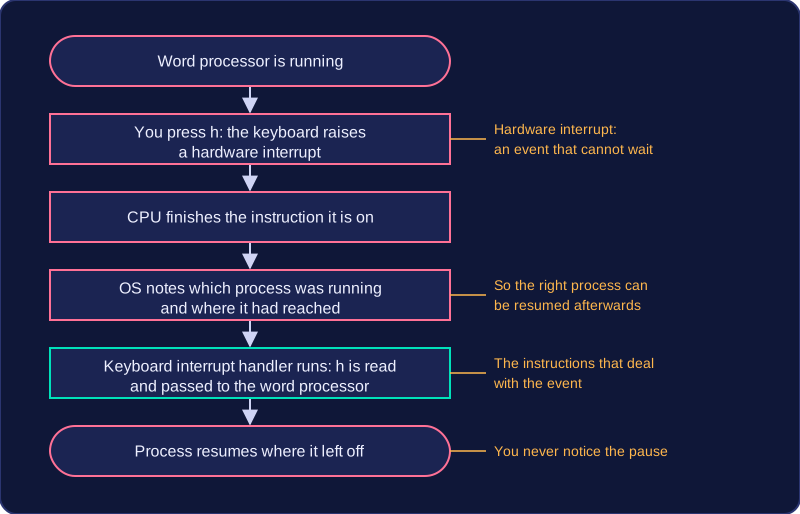
Imagine you are typing a story into a word processor and you press the letter h. Pressing the key is an event that cannot wait, so the keyboard raises a hardware interrupt. The CPU finishes the instruction it is on, the operating system notes which process was running and where it had reached, and the keyboard interrupt handler runs. The key press is read and passed to the word processor, which adds h to the text, and the process then resumes exactly where it left off, so you never notice the pause.
The operating system manages interrupts as part of process management. It decides which interrupt is dealt with first when two arrive together, makes sure the right process is resumed afterwards, and keeps a flood of interrupts from pushing ordinary processes aside for too long.